
When an editor says “Umbraco is slow”, when an upgrade becomes frightening, or when every new feature takes longer than the last one, the visible CMS is an easy target. Sometimes the CMS is the problem. Often it is simply the layer where a deeper architectural decision becomes visible.
A slow page can originate in a synchronous external API. An awkward backoffice can originate in a content model that mirrors a temporary page design. An expensive upgrade can originate in years of package and customization decisions. A huge database can originate in using content as application storage.
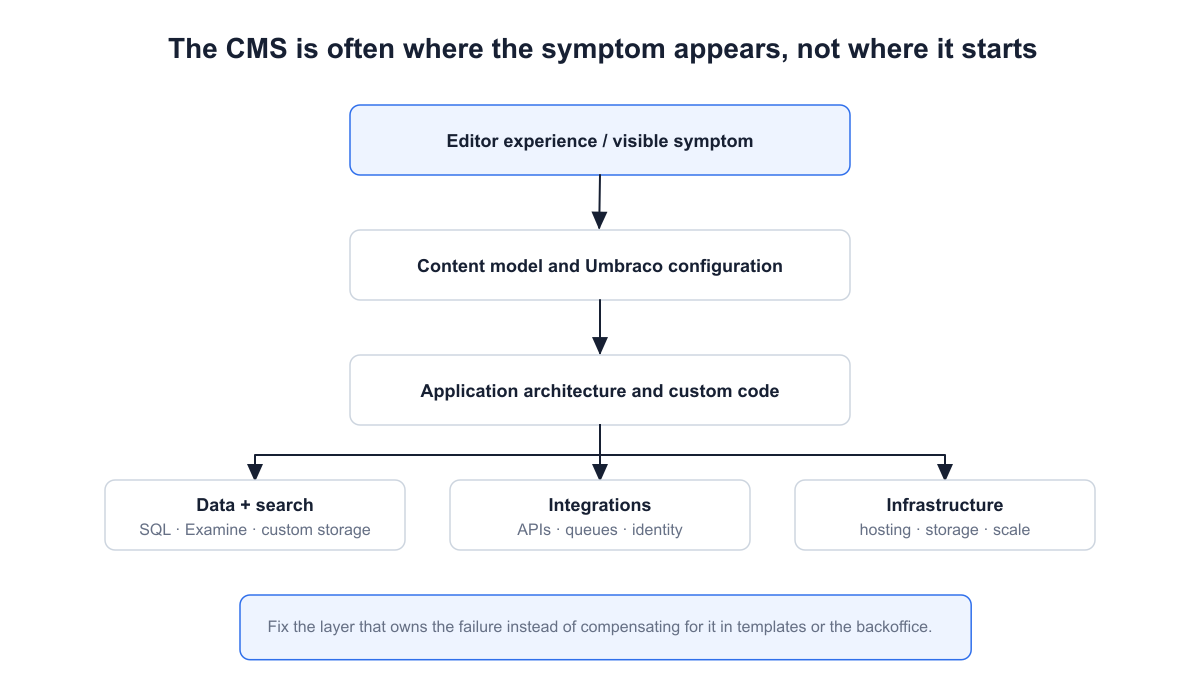
Diagnose the layer that owns the failure instead of compensating for every symptom inside the CMS.
This distinction matters because defensive fixes at the wrong layer accumulate. Another cache, conditional, editor convention, or manual deployment step can hide today's symptom while increasing tomorrow's maintenance cost.
1. The Project Starts Before the Problem Is Understood
Some of the most expensive Umbraco decisions are made before the first Document Type is created. The team knows that a website needs pages, products, articles, markets, or forms, so implementation starts while the underlying concepts are still vague. The CMS then becomes the place where unanswered product questions are resolved implicitly.
This does not mean writing a complete specification before anybody writes code. Requirements will change, and trying to predict every future editor need is usually wasteful. The valuable work is identifying the concepts that are expensive to misunderstand: what the core entities are, who owns them, which relationships matter, what editors are allowed to change, which data comes from external systems, and which behaviors must remain stable across channels.
Start with the domain, then decide what belongs in the CMS
A useful early model might distinguish an editorial Product Page from a commerce Product, or a reusable Person from an Article Author role. Those distinctions sound academic until an integration, search index, or second website needs the same information. If the concepts were collapsed because the first page happened to display them together, later separation requires both code and data migration.
For larger projects, I would document the important assumptions before implementation: domain terminology, content ownership, source-of-truth systems, key relationships, URL rules, localization requirements, integration boundaries, non-functional requirements, and the few architectural decisions that would be expensive to reverse. A short decision record is often more useful than a hundred-page specification that becomes obsolete after the first sprint.
The goal is not perfect upfront design. It is to avoid discovering six months later that two things modeled as the same concept have different lifecycles, permissions, sources of truth, or publishing rules.
2. Content Architecture Stops Matching the Product
Most content models do not become difficult because somebody designed them badly on day one. They become difficult because a sequence of reasonable short-term decisions slowly turns the model into a record of every page design the project has ever had.
A campaign needs a different hero, so another property is added. A new landing page needs cards with slightly different fields, so another block type appears. An old template cannot be migrated yet, so both versions remain. Six months later, developers are asking which field is authoritative, and editors are learning rules that exist only in Slack messages and people's memory.
This matters because an Umbraco content model is not merely an editor form. It becomes a contract consumed by rendering code, search indexes, imports, APIs, migrations, and sometimes external systems. Once several consumers depend on an accidental shape, changing that shape is no longer a back-office cleanup task.
The expensive part appears later
Suppose two document types represent essentially the same article but were created for different website generations. Keeping both avoids a migration today. From that point forward, however, every feature that touches articles may need to understand both. Search mapping, structured data, related-content queries, previews and migrations all inherit the distinction.
The same effect appears inside Block Grid. Blocks are useful precisely because they let editors compose pages, but a block that mixes content meaning, layout, styling, campaign rules and integration configuration can become a miniature application contract. Reusing it then becomes harder rather than easier.
Why changing a content model can be expensive
Changing a property in the back office is easy. Changing the meaning of a model that already contains production content is where the cost appears. A typical change can require several coordinated steps:
Define the new model and decide how old data maps to it.
Update generated models, mapping code, views, controllers, or APIs that consume the old shape.
Migrate existing content, including nulls, defaults and historical edge cases that were valid under the old model.
Update Examine indexing and queries if searchable fields or structure changed.
Review imports, exports, and external integrations that read or write the affected properties.
Check URLs, canonical behavior, and structured data if the change affects routing or page semantics.
Regression-test both migrated content and newly created content before removing compatibility code.
Deploy in an order that does not leave code and persisted content temporarily incompatible.
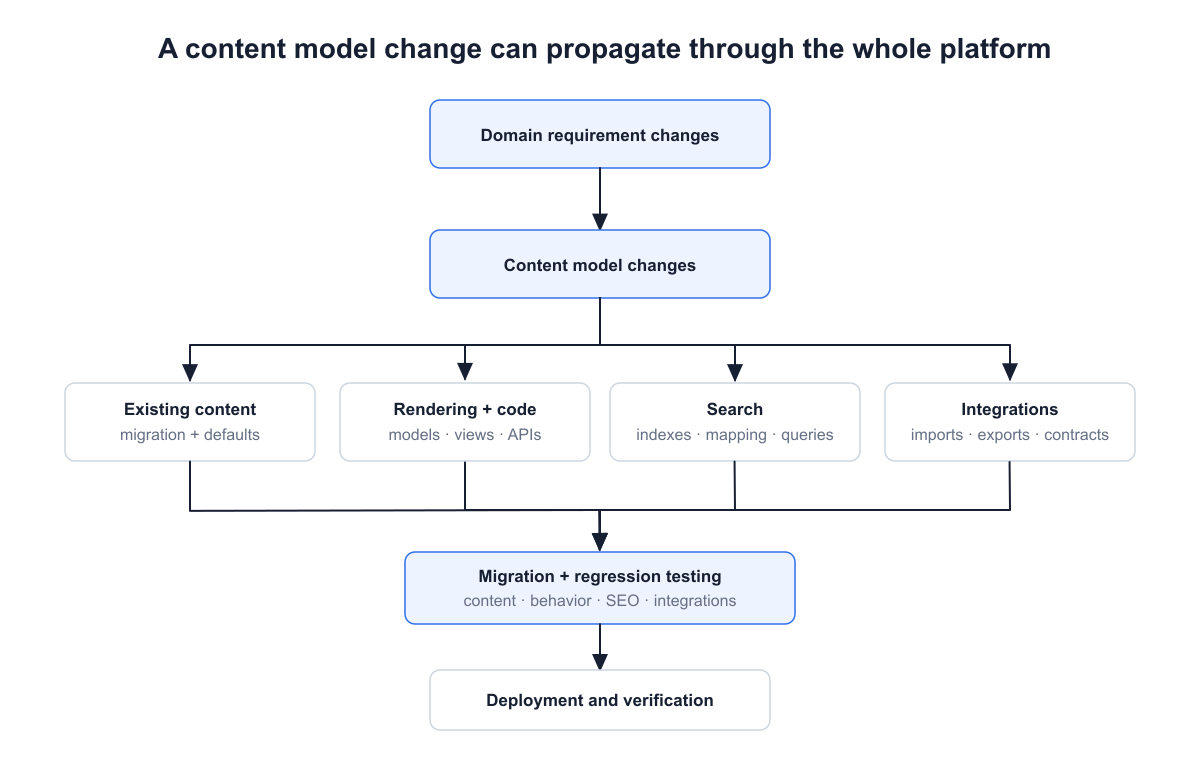
The cost of a model change comes from its consumers and existing data, not from changing the Document Type itself.
This blast radius is why early domain work and later documentation reinforce each other. The domain model explains what the concepts mean; architecture decisions explain why important boundaries exist; migration notes explain how those concepts changed over time. Without that context, developers can preserve accidental legacy behavior simply because nobody knows whether it is still required.
A practical test: if a developer has to ask “which one of these fields should I use?” or an editor needs unwritten rules to avoid invalid combinations, the model is already communicating uncertainty downstream.
The healthier direction is not maximal abstraction. A brochure site does not need a domain-modeling exercise. The goal is a content model whose concepts remain understandable when the current page design changes. Model what the content is; let rendering decide more of how it looks.
3. Customization Has No Architectural Boundary
Umbraco makes customization easy enough that architectural boundaries can disappear without anybody consciously removing them.
A feature begins in a controller. Later, an editor notification needs the same behavior, so part of it is copied into a notification handler. A Razor view needs one additional value and calls an integration directly. A scheduled import needs another variant of the rule. Every individual change is small, yet the application gradually stops having a clear place where its business behavior lives.
This is where “the Umbraco project is hard to maintain” can actually mean “the application architecture is hard to maintain”. Umbraco is simply the host in which the coupling is visible.
Why this changes the cost of ordinary work
Imagine that product availability comes from an external service. If the HTTP call is hidden in rendering code, page rendering now owns network latency and failure behavior. If a second implementation exists in an import job and a third in an API controller, changing the provider is no longer an integration change. It is a search across the whole solution.
Clear boundaries do not require an elaborate clean-architecture template. A focused application service that owns the use case, an integration client that owns the remote contract, and CMS adapters that translate Umbraco concepts at the edge are often enough. The important property is that a developer can answer: where does this rule belong?
That boundary also pays during upgrades. Code that depends deeply on CMS-specific APIs has a larger migration surface than code whose core behavior is expressed in ordinary .NET types behind a small Umbraco-facing layer.
4. The Wrong Data Is Forced Into the Content Tree
One of the most tempting shortcuts in a CMS project is to treat every piece of data as content. Umbraco already provides persistence, permissions, an editor UI, and search, so creating nodes may seem cheaper than designing another storage path.
Consider an integration that imports tens of thousands of product or reference records. As content nodes, the first version can be remarkably quick to build. The cost becomes visible when those records behave like application data rather than editorial content: they are rewritten in bulk, rarely edited by humans, queried in patterns unrelated to navigation, and rebuilt into indexes even though publishing semantics add little value.
Now the original convenience touches publishing, cache behavior, Examine, backups, migrations, and backoffice usability. The architecture has made several subsystems participate in a workload they were not chosen for.
Content, published content, and operational data are different concerns
For request-time rendering, the distinction also matters at API level. Management-oriented services such as IContentService are not a substitute for the read-optimized published-content model. Reaching for management APIs because they are familiar can turn database work into frontend request work.
Moving data to custom tables is not automatically better. You then own schema migrations, access code, validation, and any administration UI. External storage introduces another operational dependency. The useful question is therefore not “should this be a node?” but “does this data actually need the lifecycle and editorial behavior of Umbraco content?”
Typical smell: a background process constantly creates or updates large parts of the content tree while editors almost never touch those records.
5. Performance Problems Are Hidden Instead of Removed
Performance work often starts too late, after the team already has a preferred explanation: “Umbraco is slow”, “SQL is slow”, or “we need more Azure resources”. Mature systems are usually less convenient. A page becomes slow because its request path has accumulated work.
For a broader production baseline, see How to Improve Umbraco Performance: A Production Guide. When the problem is already visible in production, the companion methodology How I Diagnose Slow Umbraco Sites in Production focuses on isolating the expensive path before choosing a fix.
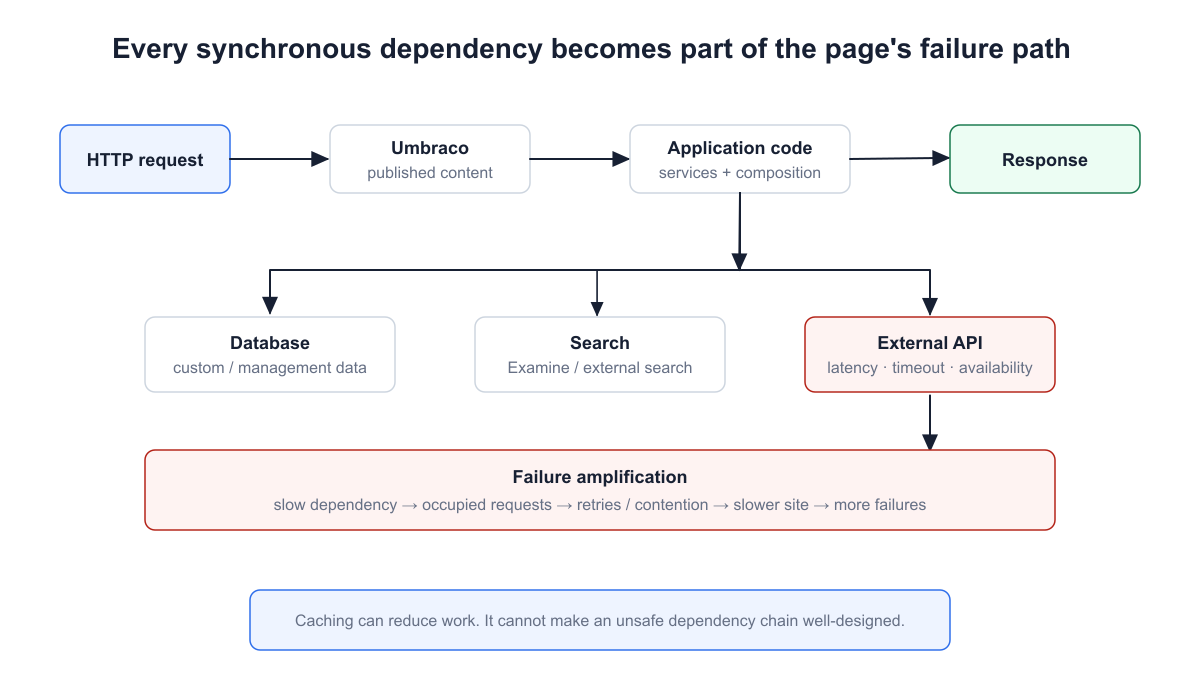
Every synchronous dependency contributes to latency and availability risk.
A request may read published content, execute custom queries, search Examine, resolve images, call an external API, and render several independently developed components. If one remote dependency occasionally takes 4 seconds, those 4 seconds are now part of the page's latency unless the architecture explicitly decouples it.
Caching can make this architecture look healthy. That does not make caching wrong; good caching is one of the most useful tools in a content platform. The danger is using it to avoid understanding the uncached path. A cache clear, deployment, or cold start then reveals the true cost all at once.
Measure the path, not the reputation of the component
Before adding instances or another cache layer, identify the expensive operations and their frequency. Is rendering repeatedly traversing the same content? Is custom data fetched once per component? Does an external call belong synchronously in the request? Is search doing work that could be prepared earlier?
Umbraco 17's published-content caches are lazy-loaded, and cache seeding is available for scenarios where selected content should be available at startup. Those mechanisms are useful operational tools, but they do not remove the need to understand why a page is expensive.
The uncomfortable test: if the application is acceptably fast only after every important cache is warm, test the cold path deliberately. It often reveals the architecture more clearly than an average response-time chart.
6. Search Is Treated as a Black Box
Search tends to be invisible while it works. That makes it easy for a project to accumulate indexing decisions without ever developing a search architecture.
Umbraco uses Examine on top of Lucene.Net. For many CMS workloads, that is exactly the right tool. But an index still has a schema, storage, rebuild process, and query model. Block-based content can create many fields, custom value sets can expand what is indexed, and a rebuild that is trivial with five thousand items can become operationally significant at a very different scale.
The warning is not “Examine does not scale”. That would be too simplistic. The warning is that teams often do not know what their indexes contain until a rebuild, migration, or relevance problem forces them to investigate.
Know when search becomes its own subsystem
Simple site search, lookup by known fields, and many filtering scenarios fit naturally into Examine. Requirements such as sophisticated relevance tuning, large external datasets, specialized linguistic analysis, cross-system search, or independent scaling may justify a dedicated search boundary. The decision should come from requirements, not fashion.
A useful operational question is: if every index disappeared now, would we know how it would be rebuilt, how long that would take, and what the site would do in the meantime? If the answer is unclear, search is already more important to the platform than its documentation suggests.
7. Infrastructure Does Not Match the Workload
Cloud hosting makes it dangerously easy to confuse infrastructure changes with architecture improvements. Increasing an App Service plan or adding another instance can be the correct fix, but only after the bottleneck and state model are understood.
A single-instance editorial website can rely on assumptions that no longer hold when the application scales out. Files written locally may not be shared. A background job may run on every instance. Session-dependent behavior can move between servers. Real-time backoffice features introduce their own state and connectivity considerations.
Umbraco 17 supports load balancing of the back office, but the official setup still requires deliberate choices regarding session behavior and SignalR. That is a good example of the general rule: scale-out changes the system's topology.
Architecture before capacity
If CPU is low but requests wait on a database or an external service, doubling the number of application instances may increase pressure on the actual bottleneck. If background work is duplicated, more instances can make the problem worse. If media storage assumes a local disk, horizontal scaling exposes a consistency problem rather than solving a performance problem.
A mature project should be able to draw its production topology and explain which components are stateful, which operations can run concurrently, where durable files are stored, and what happens when an instance disappears.
8. Deployment Is Treated as File Copying
“Deploy the website” sounds like a single operation, but an Umbraco release can move several fundamentally different kinds of state: application binaries, configuration, database migrations, Document Types, templates, media, and content.
Treating all of that as a file-copy problem works until environments drift. A developer changes a schema manually in production. A configuration value exists only in one App Service. A template is deployed, but its corresponding model change is not. Months later, the next release has to preserve differences nobody intended to create.
Umbraco Deploy makes the distinction explicit by handling schema/metadata deployment separately from content and media transfer. Even projects that do not use Deploy benefit from the same mental model: decide which state is versioned, which state is environment-specific, and which state is editorial.
A deployment should be reproducible without institutional memory
If production can only be reconstructed by asking the developer who has maintained it for six years, the release process contains undocumented state. The same is true when rollback means “restore whatever we remember changing”.
Runtime configuration belongs here too. Production runtime behavior should be intentional; Umbraco's production runtime mode validates production-oriented settings rather than silently accepting development assumptions.
Good release question: if this deployment fails after the database or schema has changed, what exactly can we roll back, and what must move forward?
9. SEO Failures Are Created Below the Content Layer
Technical teams sometimes reduce SEO to fields editors can fill in: title, description, heading, and perhaps an Open Graph image. Those fields matter, but some of the most damaging SEO failures stem from platform behavior that editors cannot control.
Routes change during a migration and old URLs are not redirected. Multiple hostnames remain indexable. A deleted page returns a friendly template with HTTP 200. Canonical URLs are generated from the wrong host. Pagination or query parameters create duplicate crawl paths. Structured data says something different from what's visible on the page.
None of those problems is solved by better copy.
SEO becomes architecture during change
This is especially visible during CMS upgrades and redesigns. A new content model may produce cleaner routes while simultaneously discarding years of accumulated URL equity. A technically successful migration can therefore be a search failure.
The platform should make URL ownership, redirects, canonicals, sitemap generation, robots directives, and status-code behavior testable. Non-production environments also deserve explicit indexability rules; relying on everyone to remember a checkbox is not a strategy.
Umbraco makes this distinction concrete because several routing mechanisms can produce very different HTTP and indexing behavior. A URL name, an alias, a 302 redirect, an internal redirect, and historical redirect tracking are not interchangeable. See Umbraco routing properties: URL names, aliases, redirects, and internal redirects for the request-level differences.
Useful review habit: inspect what a crawler receives over HTTP, not only what the page looks like in a browser.
10. Packages and Integrations Quietly Become Architecture
A package rarely becomes a problem on the day it is installed. On that day, it usually does exactly what the team wants: removes custom work and delivers a feature faster.
The interesting moment comes two or three years later when the project needs a major Umbraco upgrade, and the package has no compatible release. The team now has four choices: wait, replace it, fork it, or rebuild the capability internally. If the package owns something central such as forms, search, redirects, commerce, or an editor workflow, what originally saved several days can become one of the largest unknowns in the upgrade estimate.
That does not mean “avoid packages”. Reimplementing mature functionality without a reason is often the more expensive decision. It means dependency selection is an architectural decision whenever the dependency sits on a critical path.
Integrations have the same lifecycle problem
A CRM API, identity provider, DAM, or commerce service can outlive the developer who introduced it. Contracts change. Authentication methods are deprecated. Credentials rotate. Rate limits and failure behavior change. If the integration boundary is scattered through the CMS, external change becomes internal churn.
A better question before adoption: what happens to this project if this package or API is no longer maintained in its current form during the next major upgrade?
Keep an inventory of critical dependencies and know why each exists. For major Umbraco upgrades, package compatibility should be checked early enough that replacement work is a planned engineering decision rather than a release blocker.
11. Upgrade Debt Compounds Quietly
There is nothing inherently irresponsible about staying on a supported version instead of upgrading immediately. Constantly chasing versions can create work without business value. Upgrade debt appears when the project stops maintaining a credible path forward.
Upgrade cost is often determined years before the upgrade starts. Umbraco Upgrade Readiness: What Makes an Upgrade Expensive turns this failure pattern into a practical decision framework for assessing the migration surface before a major-version project begins.
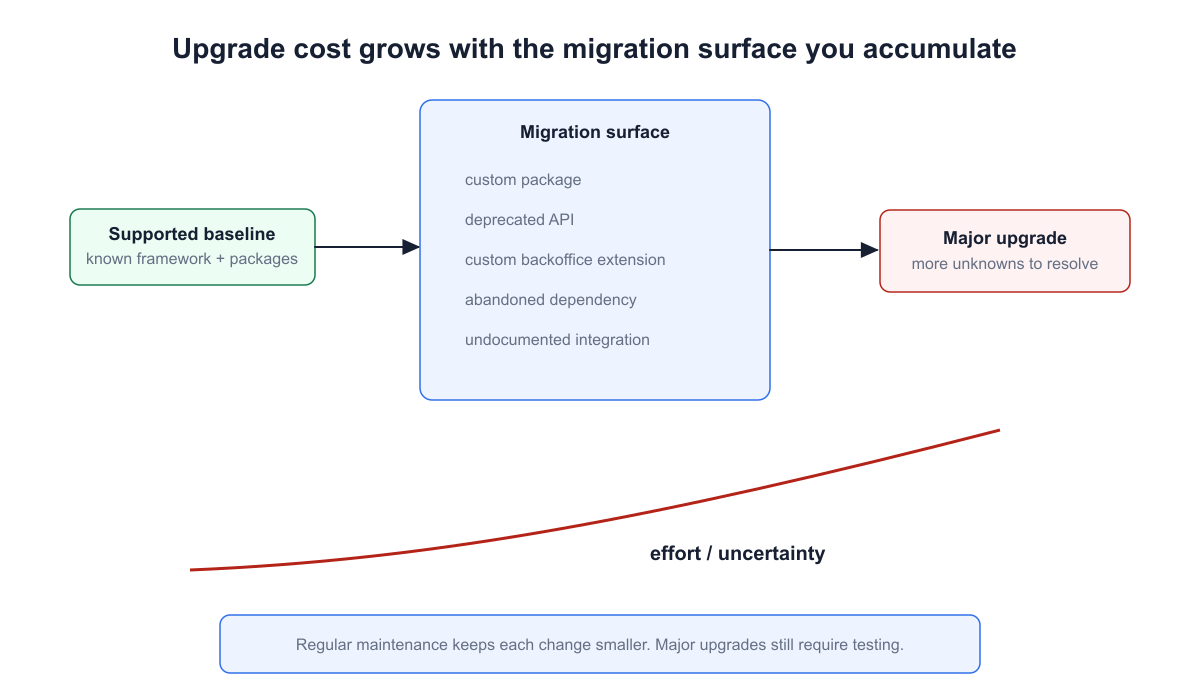
Time is not the debt by itself. The migration surface accumulated between supported baselines is what makes later upgrades uncertain.
While the baseline remains fixed, the application keeps changing. New packages arrive. Custom back-office extensions grow. APIs become deprecated. Integrations gain assumptions. Eventually, a major upgrade has to resolve not one version difference but the entire migration surface accumulated around it.
This is why “we will upgrade when we need to” can be surprisingly expensive. The team postpones not only implementation work but also discovery. Nobody knows which package is incompatible, which customization depends on an old API, or which environment assumption no longer exists in the target version.
Lifecycle is a planning constraint
As of August 2026, Umbraco 17 is the current LTS with end of life on November 27, 2028, while Umbraco 13 reaches end of life on December 14, 2026. Umbraco aligns LTS releases with Microsoft's .NET LTS cadence; .NET 10 is supported until November 14, 2028.
Those dates will age; the principle should not. A supported-version policy, periodic dependency review, and removal of deprecated code keep future options open. The goal is not zero upgrade cost. It is avoiding an upgrade whose scope is unknown until the deadline is already close.
12. The System Is Observable Only After It Fails
A production system can produce gigabytes of logs and still be almost impossible to diagnose.
Imagine an editor reports that imported content stopped appearing yesterday afternoon. The application log contains errors, but there is no correlation among the scheduled job, the remote API call, and the affected records. Nobody knows whether the job stopped, the dependency timed out, authentication expired, indexing failed, or the import succeeded, and publishing did not.
That is a visibility problem, not merely a logging problem.
Umbraco Health Checks are useful for platform and configuration conditions, but custom integrations, queues, background processes, and business-critical workflows need signals that describe their own health. A successful HTTP response from the website does not prove that yesterday's synchronization completed.
Observability should answer operational questions
For important workflows, decide what success looks like and record enough context to identify failures without reproducing them. Dependency timings, correlation identifiers, job outcomes, queue depth, index state, and domain-specific counters can be more useful than another generic exception log.
Simple test: ask “How would we know this integration had been failing for the last six hours if no editor reported it?” The answer quickly exposes the monitoring gap.
13. Security and Permissions Are Added After the Architecture
Security debt often looks harmless because the system continues to function. A user gets administrator access because configuring a narrower role takes longer. A secret remains in configuration “temporarily”. A custom dashboard hides an action in the UI, and everybody assumes that means the action is protected.
Years later, the platform contains more users, integrations, and environments, but the original shortcuts have become the access model.
Umbraco uses ASP.NET Core Identity for back-office users and members and supports external login providers, but custom application behavior still requires authorization at the operation and resource boundaries. Hiding a button or navigation item improves UX; it does not replace server-side authorization.
Support lifecycle is part of security architecture
Running an unsupported CMS or framework is also an architectural risk decision, especially for an internet-facing platform. The right response depends on exposure and compensating controls, but “the site still works” is not a security assessment.
The expensive outcome is not limited to a breach. Emergency credential rotation, rushed upgrades, permission cleanup, and forensic work all cost more when ownership and access boundaries have been allowed to drift for years.
14. Nobody Owns the Technical Direction
This final pattern is different because it can create all the others without producing a single obviously bad change.
One developer installs a useful package. Another adds a special-case block to meet a deadline. A third creates a manual deployment step because automating it is not worth the effort this sprint. An upgrade is postponed because the current version remains supported. Each decision can be rational in isolation.
Four years later, the project has a package that nobody wants to remove, several overlapping content models, environmental drift, and an upgrade that nobody can estimate confidently. There was no moment when the architecture “went bad”. It simply had no owner responsible for the direction of travel.
Technical ownership is not an architecture committee
For many projects, it can be lightweight: record the few decisions that shape the platform, review dependencies periodically, know the support path, define how the schema moves between environments, and make temporary compromises explicit enough that someone can revisit them.
The most useful artifact may be a short decision record explaining why a non-obvious choice exists and what would cause it to change. That is far more valuable than a diagram nobody updates.
Documentation should follow the same rule: record information that changes future decisions. Useful examples include the source of truth for important data, why a custom table exists rather than content nodes, why a package was selected, how environments differ, how an integration fails, and what must be checked before a major upgrade. Generated API documentation and a README can help, but they do not replace the reasoning behind the architecture.
Requirements documentation matters for the same reason. When a rule such as “an article has exactly one primary topic” or “product data is mastered outside Umbraco” affects models, indexes, and integrations, writing it down prevents a later implementation from accidentally contradicting the original constraint.
The strongest warning sign: the platform keeps getting more expensive to change, but the team cannot point to the decisions responsible for that increase.
How to read this guide.
This is not a scorecard where every project should eliminate every warning sign. A brochure site and a multi-market platform should not carry the same architecture. The useful question is whether a compromise is deliberate, owned, observable, and reversible at a reasonable cost.
Group findings by ownership: content architecture, application architecture, data/search, operations, and lifecycle. That framing is more durable than a list of “best practices” because it tells you which layer should own the correction.
Frequently Asked Questions
Is Umbraco expensive to maintain?
It does not have to be. Maintenance cost is driven less by the CMS label than by the architecture around it: customization depth, content-model complexity, package dependencies, integrations, hosting topology, deployment discipline and how long the project postpones lifecycle work. A small, intentionally designed Umbraco site can be inexpensive to operate; a heavily coupled platform can be expensive even when traffic is modest.
How much should be designed before an Umbraco project starts?
Enough to understand the expensive-to-reverse decisions, but not enough to pretend requirements will never change. Define the important domain concepts, content ownership, source-of-truth systems, relationships, localization and URL requirements, integration boundaries, security assumptions, and major non-functional requirements. Then evolve the details iteratively. The objective is informed flexibility, not a complete waterfall specification.
Why can changing an Umbraco content model become expensive?
Because a mature content model has consumers. Existing content must often be migrated; generated models and rendering code change; indexes and queries may change; integrations can depend on property aliases or structure; and routing or semantics can affect SEO. The Document Type edit itself is usually the smallest part of the work.
When should data be stored outside the Umbraco content tree?
Consider another storage model when the data is primarily operational or transactional, changes in bulk, is rarely edited by humans, has query patterns unlike content, or does not benefit from publishing semantics. Custom tables and external systems introduce their own ownership costs, so this is a workload decision rather than a universal rule.
Are Umbraco packages a technical risk?
Any dependency can become a risk when it owns critical behavior. Packages are often the right way to avoid rebuilding solved problems, but evaluate maintenance activity, supported Umbraco versions, upgrade history, and the difficulty of replacing the feature. The more central the package is, the more its lifecycle becomes part of your architecture.
How often should an Umbraco project be upgraded?
There is no useful universal interval. The project should remain on an intentionally supported path and review upcoming major versions, the .NET lifecycle, and package compatibility early enough to estimate work before support deadlines become urgent. Regular maintenance also reduces the amount of deprecated code and dependency drift accumulated between major upgrades.
When does an Umbraco project need load balancing?
Not simply because it is “enterprise”. Scale out when measured workload, availability requirements, or operational constraints justify multiple instances. Before doing so, identify stateful behavior, background jobs, shared storage, session requirements, SignalR, and the actual bottleneck. Adding instances without understanding those concerns can move or amplify the problem.
What documentation is worth maintaining in a long-lived Umbraco project?
Prioritize documentation that preserves decisions: domain terminology, content ownership, integration contracts, environment topology, deployment and recovery procedures, strategic dependencies, security boundaries, source-of-truth rules, lifecycle policy, and short architecture decision records for non-obvious choices. Documentation that nobody uses or updates is less valuable than a small set of accurate documents that explain why the platform works the way it does.
Conclusion
Umbraco's flexibility is not the reason projects become expensive. Flexibility exposes architectural choices. A well-owned platform can use that flexibility to evolve for years. A poorly owned one can turn the same flexibility into coupling, operational uncertainty, and upgrade debt.
The strongest warning sign is a system in which costs keep increasing, but nobody can explain which architectural decisions are causing them. Make those decisions visible early, keep boundaries intentional, and treat lifecycle and operations as architecture rather than afterthoughts.
A useful next question is not whether the platform contains technical debt, but which debt changes risk or delivery economics. See Umbraco Technical Debt: What I Fix, What I Investigate, and What I Leave Alone. For the broader review methodology, continue with How I Audit an Umbraco Project.


