
Before Umbraco 9: the .NET Framework era
For many years, Umbraco was built on the classic .NET Framework and ASP.NET stack. That was a natural foundation for a mature Microsoft-focused CMS, but it also tied the application closely to Windows.
An Umbraco 7 or Umbraco 8 project was therefore not simply an application that happened to be hosted on Windows. Its runtime and much of its hosting model came from a Windows-only framework. Linux hosting was not a supported alternative for the CMS itself.
This mattered increasingly as the wider .NET ecosystem moved toward ASP.NET Core, containers, cross-platform development and cloud-native deployment models.
Umbraco 9 was the turning point
On September 28, 2021, Umbraco 9 was released on .NET 5 and ASP.NET Core. The migration was the result of a multi-year effort known as Unicore.
This was not an incremental framework update. Umbraco’s codebase had to move from the old ASP.NET and .NET Framework world to the modern ASP.NET Core hosting and application model.
Historical detail: Umbraco 9 targeted .NET 5. The important architectural change was the move to modern .NET and ASP.NET Core. Later Umbraco releases continued moving to newer .NET versions.
Umbraco 8 and earlier
.NET Framework and the classic ASP.NET ecosystem.
Umbraco 9, 2021
.NET 5 and ASP.NET Core. The cross-platform transition becomes production-ready.
Subsequent major versions
Umbraco follows the modern .NET release cadence instead of remaining on .NET Framework.
Umbraco 17 LTS
.NET 10 LTS and a supported modern ASP.NET Core foundation.
What ASP.NET Core actually changed for Umbraco
The obvious benefit was Linux support, but the change was much broader.
1. The operating system stopped defining the CMS
ASP.NET Core is cross-platform. An Umbraco application can run wherever its supported .NET runtime and the rest of its infrastructure requirements are available. Windows is an option rather than an architectural requirement inherited from .NET Framework.
2. Umbraco became part of the modern .NET application model
Configuration, dependency injection, application startup, middleware, logging and hosting are based on the same ASP.NET Core concepts used by other modern .NET applications.
3. Development tooling became less Windows-centric
Teams are no longer forced into a Windows-only development environment by the CMS runtime. Visual Studio, Visual Studio Code, JetBrains Rider, and the dotnet CLI can participate in a normal modern .NET workflow.
4. Containers became a natural deployment option
Cross-platform .NET makes Linux containers a realistic option for Umbraco. That can simplify repeatable builds and deployments, but it does not mean every Umbraco installation should automatically be moved to Docker or Kubernetes.
Cross-platform hosting became real
"Cross-platform" is sometimes reduced to "Umbraco runs on Linux", but the architectural benefit is choice. The application is no longer fundamentally coupled to IIS and the full .NET Framework.
Depending on the project, modern Umbraco can fit into environments such as:
Windows servers and IIS-based infrastructure
Linux servers
Azure App Service
Linux containers
container orchestration platforms when the application genuinely needs them
local development on supported Windows, macOS or Linux environments
Cross-platform does not mean infrastructure-independent. Your database, media storage, packages, native dependencies, image processing, file-system assumptions, and deployment architecture must still support the target environment.
The development model changed too
The move is especially important for developers because modern Umbraco extensions live inside the ASP.NET Core ecosystem rather than beside it.
Built-in dependency injection
ASP.NET Core provides dependency injection as a first-class application concept. Modern Umbraco builds its extensibility model around services and composition instead of relying on patterns associated with older ASP.NET applications.
ASP.NET Core configuration
Application configuration follows the modern .NET configuration model. JSON configuration, environment-specific settings, environment variables, and external configuration providers can be combined using familiar ASP.NET Core patterns.
Middleware and the request pipeline
Developers can reason about an Umbraco application using the ASP.NET Core request pipeline. Authentication, response compression, redirects, headers and custom request processing can integrate with standard middleware patterns where appropriate.
The .NET CLI and SDK-style projects
Project creation, restoration, building, and publishing use standard .NET tooling. That makes Umbraco easier to integrate into CI/CD pipelines that already understand modern .NET applications.
What about performance?
Performance was one of the benefits discussed when Umbraco moved to ASP.NET Core, and the framework itself has a strong performance story. However, framework benchmarks need to be interpreted carefully.
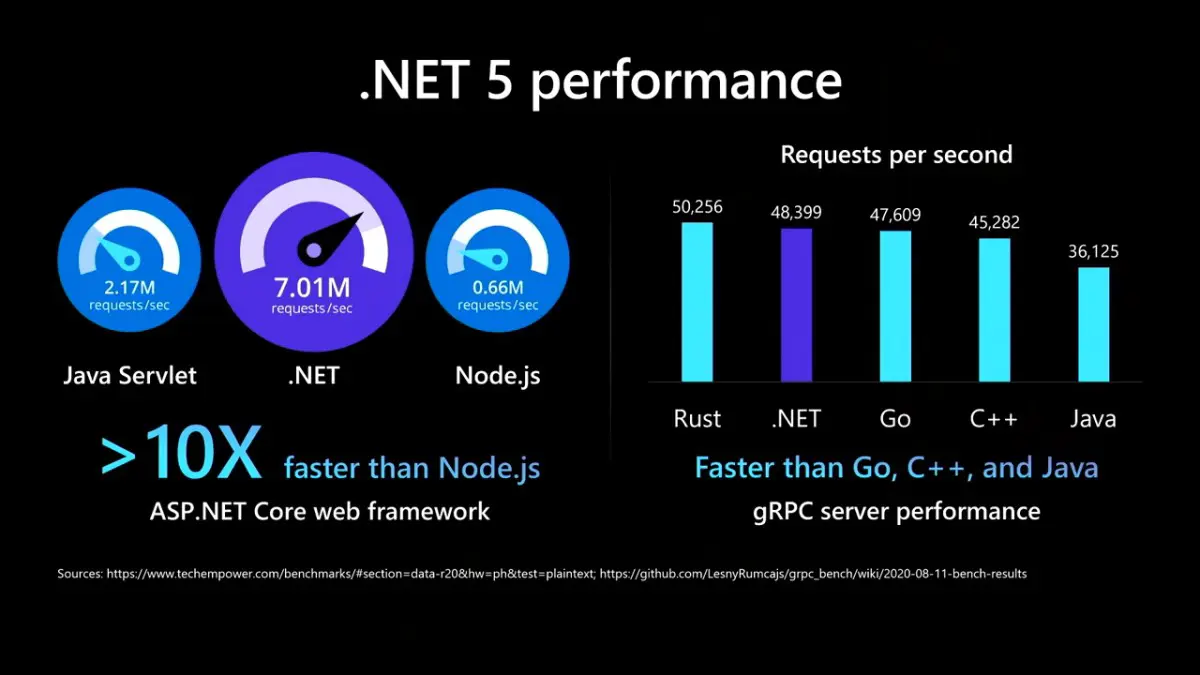
Historical ASP.NET Core 5 benchmark overview. Image Source: https://dusted.codes/how-fast-is-really-aspnet-core
The figure above is useful historical context for the ASP.NET Core 5 era, but it should not be read as an Umbraco benchmark. A raw ASP.NET Core benchmark measures a different workload from a CMS rendering content through templates, caches, database access, packages, and application-specific code.
Umbraco itself reported substantial performance improvements around the Umbraco 9 transition, including improvements to project and Cloud workflows. Still, the performance of a real site depends on far more than its runtime version.
For production systems, measure the application you actually operate: response times, cache behavior, database workload, memory, startup characteristics, media delivery, and external dependencies.
The bigger change: Umbraco could stay aligned with .NET
In hindsight, this may be more important than Linux support.
Moving away from .NET Framework gave Umbraco a path to adopt subsequent versions of modern .NET. The Umbraco release strategy could align major CMS versions with Microsoft's .NET lifecycle, including Long Term Support releases.
That changes architectural planning. The runtime is no longer a technology generation that remains effectively fixed underneath the CMS for many years. Runtime lifecycle, CMS lifecycle, and upgrade planning now belong in the same conversation.
Where this leaves Umbraco today
Umbraco 17 is an LTS release built on .NET 10 LTS. The official Umbraco requirements for current development specify .NET 10 or later on supported .NET 10 operating systems.
Microsoft currently supports .NET 10 LTS until November 14, 2028, while Umbraco lists support for Umbraco 17 until November 27, 2028.
That is a very different platform from the Windows-bound CMS of the .NET Framework era. The transition that became visible with Umbraco 9 established the foundation on which current Umbraco versions run.
Does Windows still make sense for Umbraco?
Absolutely. Cross-platform support is about removing a restriction, not declaring Windows obsolete.
Existing operational expertise, hosting standards, deployment tooling, package dependencies and infrastructure can make Windows the simplest and most economical choice for a project.
Linux or containers become valuable when they solve a concrete infrastructure or delivery problem. Moving platforms only because the runtime technically permits it can add complexity without improving the product.
What this means for legacy Umbraco projects
The architectural break also explains why upgrading an old Umbraco application is not comparable to installing a normal patch.
A legacy solution can contain assumptions about ASP.NET, configuration, dependency injection, application startup, packages, APIs, authentication, file systems, and hosting that do not map directly to modern Umbraco.
This is why a serious upgrade assessment should inventory custom code and dependencies before estimating the migration. The destination is not simply a newer CMS binary. It is a newer application platform.
Was the move worth it?
Yes. The move to ASP.NET Core removed one of Umbraco's most significant technical constraints and, more importantly, gave the CMS a sustainable foundation in the modern .NET ecosystem.
Linux support was the visible headline. The long-term benefits are broader: standard .NET tooling, modern hosting, dependency injection, configuration, middleware, CI/CD integration, and a release model that can continue following the .NET platform.
Frequently Asked Questions
When did Umbraco move to ASP.NET Core?
Umbraco 9 was released on September 28, 2021, and ran on .NET 5 and ASP.NET Core.
Was Umbraco 8 based on ASP.NET Core?
No. Umbraco 8 belonged to the classic .NET Framework and ASP.NET generation
Can modern Umbraco run on Linux?
Yes, modern Umbraco runs on cross-platform .NET. The complete application stack and its dependencies must remain compatible with the chosen environment.
Does Umbraco require IIS?
Modern Umbraco is no longer architecturally tied to IIS in the way .NET Framework versions were. IIS can still be part of a perfectly valid Windows hosting architecture.
Does moving an Umbraco site from Windows to Linux automatically make it faster?
No. Operating system choice is only one part of the stack. Measure the actual application before making infrastructure changes for performance reasons.
What .NET version does Umbraco 17 use?
Umbraco 17 LTS runs on .NET 10 LTS.
References
Conclusion
Umbraco 9 is easy to remember as the release that brought Umbraco to Linux. That description is correct, but incomplete.
Its real significance was moving Umbraco onto ASP.NET Core and the modern .NET lifecycle. That decision changed how Umbraco applications are developed, hosted, deployed, and upgraded, and it created the technical path from the .NET 5-based Umbraco 9 of 2021 to the .NET 10-based Umbraco 17 LTS generation.


