
Four properties, four different routing decisions
Umbraco has reserved property aliases that participate directly in its standard routing pipeline. They look similar in the backoffice, but they solve different problems. The most important distinction is whether you want to change the canonical path, accept another path, send an HTTP redirect, or reuse another node's content while keeping the requested URL.
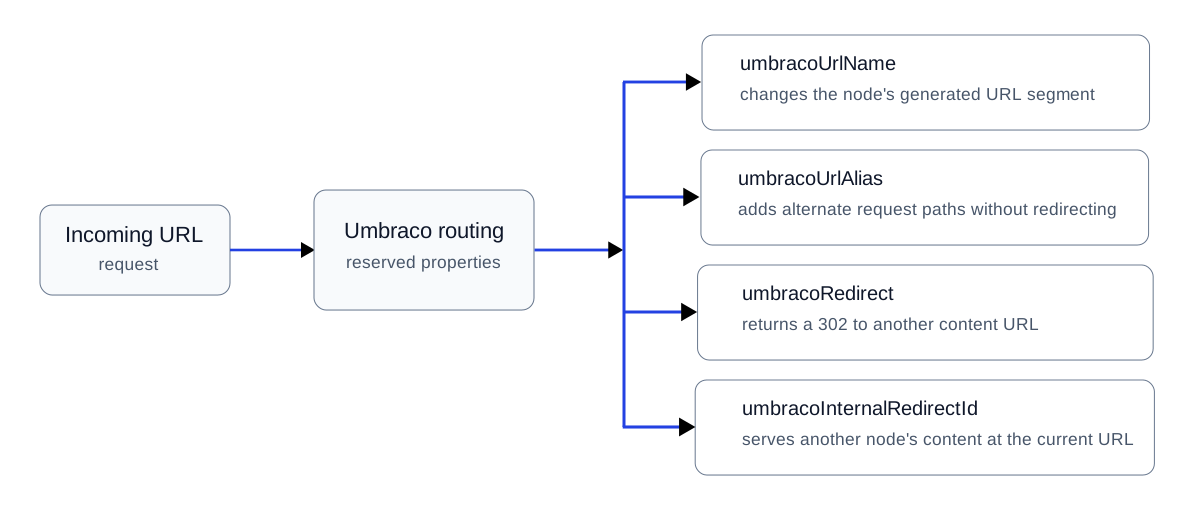
Choose the routing property according to whether you need a different URL segment, an additional route, an HTTP 302 redirect, or internal content routing.
Requirement | Property | HTTP result | Browser URL | Main SEO concern |
|---|---|---|---|---|
Use a different generated slug |
| 200 on the generated URL | Uses the configured segment | If an existing URL changes, verify redirect tracking and update internal links. |
Accept another path for the same node |
| 200 | Alias stays visible | Multiple crawlable URLs can expose the same content, so canonicalization must be deliberate. |
Temporarily send the request elsewhere |
| 302 | Changes to destination | A temporary redirect is not the normal choice for a permanent URL migration. |
Render another node while retaining this URL |
| 200 | Source URL stays visible | Multiple URLs may expose effectively the same content, so indexing and canonicalization need an explicit decision. |
1. Change the generated URL with umbracoUrlName
Use umbracoUrlName when the editor-facing node name and the public URL segment should differ. This is a URL-generation decision, not an alternate URL and not a redirect rule.
2. Accept alternative paths with umbracoUrlAlias
umbracoUrlAlias lets a published node resolve from alternate paths. The alias stays in the address bar, so this isn't equivalent to a 301 or 302. If aliases expose substantially the same page under multiple crawlable URLs, choose a preferred URL and keep canonical signals consistent. An alias is therefore a routing tool, not a substitute for a permanent migration redirect.
Production note for Umbraco 17: a performance problem in ContentFinderByUrlAlias was reported against 17.1.0 on a roughly 25,000-node installation and targeted for 17.2.0. Treat alias-heavy routing as something to load-test on large content trees, not merely as an editor convenience.
3. Send a temporary redirect with umbracoRedirect
umbracoRedirect uses a Content Picker and sends a 302 Temporary Redirect to the selected content item. Use it when the move is genuinely temporary. For a permanent URL move or site migration, Google recommends server-side permanent redirects such as 301 or 308 when possible, so do not use this property merely because it is the easiest redirect available in the backoffice.
4. Reuse content without changing the URL
umbracoInternalRedirectId resolves another content item internally. The browser remains on the requested URL and receives the rendered response without a 3xx redirect. If another public URL renders substantially the same content, decide which URL you want search engines to treat as representative and make the canonical, sitemap and internal-link signals agree.
Do not confuse routing properties with redirect tracking
Umbraco's historical redirect tracking is a different mechanism. When an existing content URL changes, Umbraco can retain the old path and redirect it to the current content URL. For migration scenarios where you already know a large set of legacy URLs, see how to add Umbraco redirect URLs directly in SQL Server.
Which property should you choose?
Need a different generated URL segment?
Use umbracoUrlName.
Need another path to resolve to the same node without redirecting?
Consider umbracoUrlAlias.
Need an explicit temporary redirect?
Use umbracoRedirect.
Need the current URL to render another node's content?
Use umbracoInternalRedirectId.
The mechanism is simple. The architectural decision is not. On production platforms, check HTTP behavior, canonical URLs, multilingual routing, redirect tracking, and the size of the content tree before treating these properties as interchangeable shortcuts.