
Quick answer: check the NuCache serializer timestamp
Record the time before starting the rebuild. Then run this read-only query against the Umbraco database:
SELECT [key]
      ,[value]
      ,[updated] -- This column contains the timestamp of the operation's completion
FROM [dbo].[umbracoKeyValue]
WHERE [key] = 'Umbraco.Web.PublishedCache.NuCache.Serializer';
Compare the updated value with the time at which you started the rebuild. If the timestamp has advanced to a time after the rebuild began, it provides a practical confirmation that Umbraco updated the NuCache serializer state.
Capture a baseline first. Query the table before starting the rebuild whenever possible. This prevents an older timestamp from being mistaken for the result of the current operation.
Do not update or delete this row manually. The query is intended only for verification.
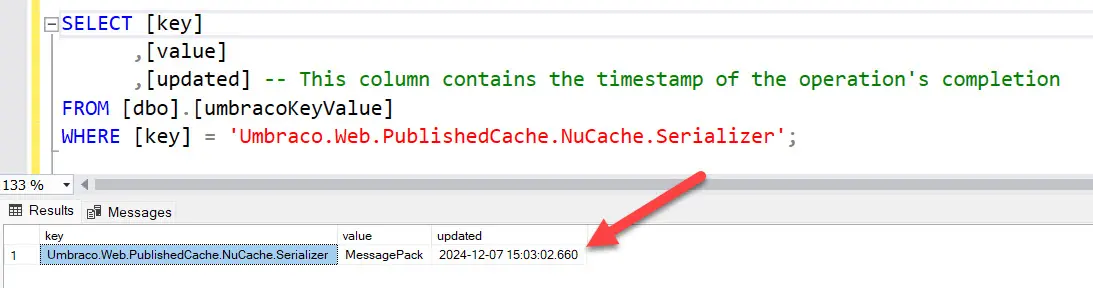
The updated value provides a database-side signal for the latest NuCache serializer update.
Why the backoffice response is not enough
In Umbraco 13, you can start the operation from Settings under Published Status by selecting Rebuild for the Database Cache.
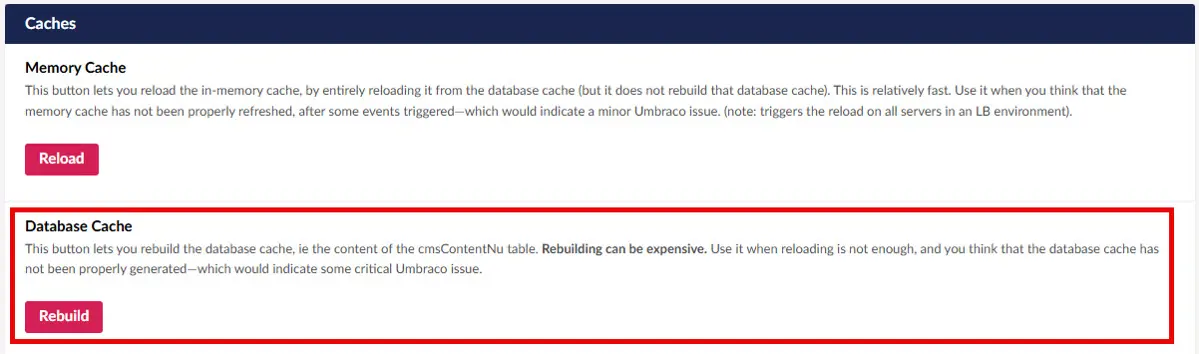
Database Cache rebuild action in the Umbraco 13 Published Status view.
Umbraco warns that rebuilding the database cache is expensive. The operation rebuilds persisted NuCache data and can be substantial on a large database.
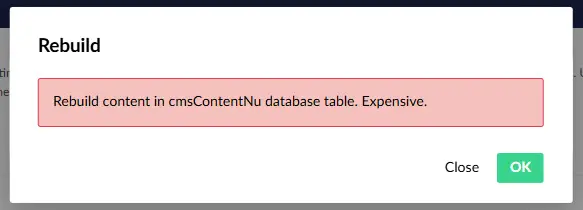
Umbraco warns that rebuilding cmsContentNu is an expensive operation.
The difficult part is not starting the rebuild. It is knowing when it has finished. On a large installation, the request can take long enough for the backoffice to appear unresponsive or display an error. The absence of a clear completion message does not give you enough information to determine the final state of the database operation.
Instead of repeatedly clicking Rebuild, verify the serializer timestamp first. Starting another expensive rebuild can add load while the first operation is still being investigated.
What the Database Cache rebuild changes
The Database Cache action rebuilds the persisted NuCache content stored in cmsContentNu. This table can contain a large number of rows because NuCache persists data for content, media and members.
This is different from simply reloading the in-memory cache. A database rebuild performs more work and should be treated as an operational action rather than a routine troubleshooting button.
If you want to inspect the implementation, see the Umbraco 13 NuCacheContentRepository source.
A production example with 600,000 rows
In one large Umbraco 13 environment, cmsContentNu contained approximately 600,000 records. Rebuilding the Database Cache took up to about 1.5 hours.
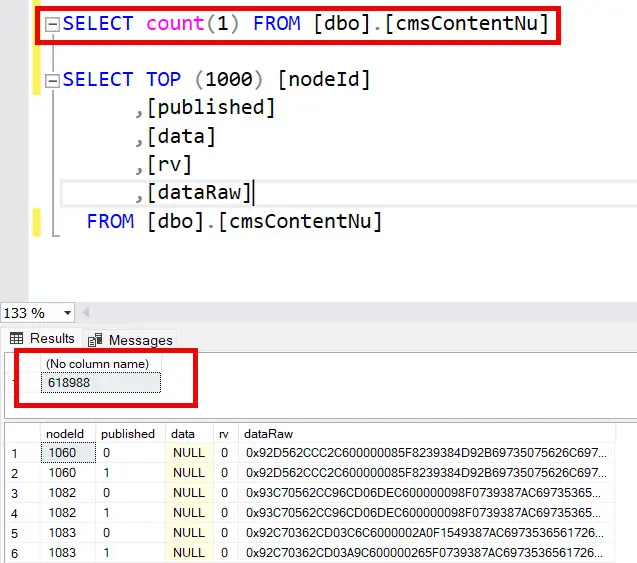
The production database contained approximately 600,000 cmsContentNu records.
This is an observation from one environment, not a universal benchmark. Duration depends on the number and size of records, SQL Server performance, CPU, memory, I/O, application topology and concurrent load.
For a large production database, schedule the operation deliberately and monitor the application and database while it runs. The broader Umbraco production performance guide explains how to approach this kind of diagnosis without reducing it to a single cache action.
A safer verification workflow
This workflow follows the same evidence-first approach used in my practical Umbraco project audit framework.
Confirm that a database rebuild is actually required.
Make sure normal backup, rollback and maintenance procedures are in place.
Record the current UTC time and capture the existing
updatedvalue.Start the Database Cache rebuild once from the Umbraco 13 backoffice.
Monitor application health and database load without restarting the operation.
Query
umbracoKeyValueagain.Confirm that
updatedmoved forward and is later than the rebuild start time.Validate representative content, media and member-dependent functionality.
The timestamp is a strong operational signal, but it should not replace functional checks. A successful cache rebuild does not prove that the original publishing, data integrity or performance problem has been resolved.
What if the timestamp does not change?
Do not immediately launch another rebuild. Check the application and infrastructure logs, SQL Server activity and blocking, resource pressure, the selected database and environment, and whether the original issue genuinely requires a Database Cache rebuild.
On a load-balanced installation, verify which instance handles backoffice and scheduling responsibilities. Umbraco documents the SchedulingPublisher and Subscriber roles in its Umbraco 13 load-balancing guidance.
The key lesson
The backoffice alone may not give you a dependable visual indication that a large Umbraco 13 Database Cache rebuild has completed. Capture a baseline and use the NuCache serializer row in umbracoKeyValue as a database-side verification signal.
Frequently asked questions
How do I know when an Umbraco 13 Database Cache rebuild has finished?
Check the updated column for the Umbraco.Web.PublishedCache.NuCache.Serializer row in dbo.umbracoKeyValue. Compare it with a baseline captured before the rebuild and the operation start time.
What does the Umbraco Database Cache rebuild do?
It rebuilds persisted NuCache data stored in cmsContentNu. It is more expensive than reloading an in-memory cache and should be used only when the persisted cache genuinely needs regeneration.
How long does an Umbraco Database Cache rebuild take?
There is no universal duration. In one production case, rebuilding approximately 600,000 cmsContentNu records took up to about 1.5 hours.
Should I click Rebuild again if there is no completion message?
Not before checking the database-side timestamp and investigating application and SQL Server health. Repeating an expensive operation can create additional load.
Does a successful rebuild fix slow publishing?
Not necessarily. See the investigation of slow publishing in Umbraco 13 at 325,000 nodes for other areas that may require diagnosis.


