
The Production Problem
The problem appeared after upgrading a large Umbraco installation from 11.5.0 to 13.4.1. Basic editorial operations that had been fast enough for normal use became painfully slow. Publishing and unpublishing content could take an excessive amount of time, and database lock errors occurred frequently.
Scale mattered: the installation contained approximately 325,000 documents. At that size, the regression made the CMS effectively unusable for editors.
The upgrade itself was another signal that something was wrong. It took unusually long, the installation screen did not redirect normally after completion, and the application required a restart before it returned to normal operation.
What We Ruled Out First
The symptoms did not immediately point to one component. Before treating this as an Umbraco Core regression, we ruled out likely application-level causes one by one.
Disabled the NuCache local database.
Forced database and memory cache rebuilds.
Disabled custom publishing, unpublishing, and saving notification handlers.
Rebuilt database indexes.
Disabled Delivery API and Webhooks.
Disabled the Content Cleanup Hosted Service to reduce background activity.
None of these changes resolved the publishing problem. That was important evidence: the bottleneck was deeper than our custom handlers or optional background features.
Tracing the Regression into Umbraco Core
We investigated the issue together with Wojciech Tengler and traced it to a regression in Umbraco's paged query logic. I documented the production symptoms and reproduction path in GitHub issue #16803. Wojciech then prepared PR #16837 with the fix.
The regression had been introduced by the earlier PR #14806. The critical detail was a missing WHERE clause in SQL count queries used by the paged NuCache query path. The data query could target a small filtered subset while its count query described a vastly larger set.
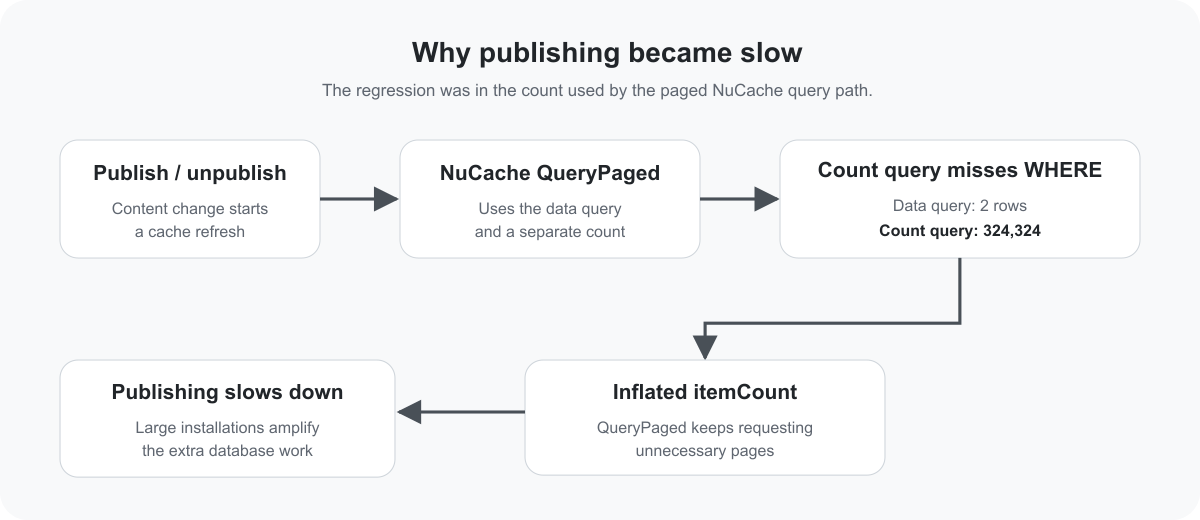
Root-cause flow: the filtered data query needed two rows, but the count query reported 324,324, causing QueryPaged to continue requesting pages far beyond the intended result set.
The SQL Count Mismatch: 324,324 Instead of 2
The most revealing evidence was the difference between the result set and the count used for pagination. In our captured query, the actual data query returned two rows, while the associated count returned 324,324.

The production investigation exposed the mismatch directly: two data rows, but a count of 324,324.
This was not a minor discrepancy. The count controls the paging loop. When it describes almost the entire content table rather than the filtered result, the caller behaves as if hundreds of thousands of items still need to be paged through.
DECLARE @var0 BIT = 1;
DECLARE @var1 BIT = 1;
DECLARE @var2 BIT = 0;
DECLARE @var3 BIT = 1;
DECLARE @var4 UNIQUEIDENTIFIER  = 'c66ba18e-eaf3-4cff-8a22-41b16d66a972';
DECLARE @var5 BIT = 0;
DECLARE @var6 INT = 398650;

SELECT [umbracoNode].[id] AS [Id], [umbracoNode].[uniqueId] AS [Key], [umbracoNode].[level] AS [Level], [umbracoNode].[path] AS [Path], [umbracoNode].[sortOrder] AS [SortOrder], [umbracoNode].[parentId] AS [ParentId], [umbracoNode].[createDate] AS [CreateDate], [umbracoNode].[nodeUser] AS [CreatorId]
, [umbracoContent].[contentTypeId] AS [ContentTypeId]
, [umbracoDocument].[published] AS [Published], [umbracoDocument].[edited] AS [Edited]
, [umbracoContentVersion].[id] AS [VersionId], [umbracoContentVersion].[text] AS [EditName], [umbracoContentVersion].[versionDate] AS [EditVersionDate], [umbracoContentVersion].[userId] AS [EditWriterId]
, [umbracoDocumentVersion].[templateId] AS [EditTemplateId]
, [pcver].[id] AS [PublishedVersionId], [pcver].[text] AS [PubName], [pcver].[versionDate] AS [PubVersionDate], [pcver].[userId] AS [PubWriterId]
, [pdver].[templateId] AS [PubTemplateId]
, [nuEdit].[data] AS [EditData]
, [nuPub].[data] AS [PubData]
, [nuEdit].[dataRaw] AS [EditDataRaw]
, [nuPub].[dataRaw] AS [PubDataRaw]
FROM [umbracoNode]
INNER JOIN [umbracoNode] [x]
ON (([umbracoNode].[id] = [x].[id]) OR ([umbracoNode].[path] LIKE concat([x].[path],',%')))
INNER JOIN [umbracoContent]
ON ([umbracoNode].[id] = [umbracoContent].[nodeId])
INNER JOIN [umbracoDocument]
ON ([umbracoNode].[id] = [umbracoDocument].[nodeId])
INNER JOIN [umbracoContentVersion]
ON (([umbracoNode].[id] = [umbracoContentVersion].[nodeId]) AND [umbracoContentVersion].[current] = @var0)
INNER JOIN [umbracoDocumentVersion]
ON ([umbracoContentVersion].[id] = [umbracoDocumentVersion].[id])
LEFT JOIN [umbracoContentVersion] [pcver]
INNER JOIN [umbracoDocumentVersion] [pdver]
ON (([pcver].[id] = [pdver].[id]) AND ([pdver].[published] = @var1))
ON ([umbracoNode].[id] = [pcver].[nodeId])
LEFT JOIN [cmsContentNu] [nuEdit]
ON (([umbracoNode].[id] = [nuEdit].[nodeId]) AND [nuEdit].[published] = @var2)
LEFT JOIN [cmsContentNu] [nuPub]
ON (([umbracoNode].[id] = [nuPub].[nodeId]) AND ([nuPub].[published] = @var3))
WHERE ((([umbracoNode].[nodeObjectType] = @var4) AND ([umbracoNode].[trashed] = @var5)))
AND (([x].[id] = @var6))
ORDER BY [umbracoNode].[level], [umbracoNode].[parentId], [umbracoNode].[sortOrder]

-- This query returns 324324 records instead of 2
SELECT COUNT(*) FROM (
SELECT [umbracoNode].[id] AS [Id]
FROM [umbracoNode]
INNER JOIN [umbracoContent]
ON ([umbracoNode].[id] = [umbracoContent].[nodeId])
INNER JOIN [umbracoDocument]
ON ([umbracoNode].[id] = [umbracoDocument].[nodeId])
INNER JOIN [umbracoContentVersion]
ON (([umbracoNode].[id] = [umbracoContentVersion].[nodeId]) AND [umbracoContentVersion].[current] = 1)
INNER JOIN [umbracoDocumentVersion]
ON ([umbracoContentVersion].[id] = [umbracoDocumentVersion].[id])
LEFT JOIN [umbracoContentVersion] [pcver]
INNER JOIN [umbracoDocumentVersion] [pdver]
ON (([pcver].[id] = [pdver].[id]) AND [pdver].[published] = 1)
ON ([umbracoNode].[id] = [pcver].[nodeId])
WHERE ((([umbracoNode].[nodeObjectType] = 'c66ba18e-eaf3-4cff-8a22-41b16d66a972') AND ([umbracoNode].[trashed] = 0)))
) npoco_tbl
Why QueryPaged Became So Expensive
The behavior becomes clear in NPocoDatabaseExtensions.QueryPaged. The method obtains the item count once, reads successive pages, yields the rows from each page, and continues while the current page position remains below itemCount.
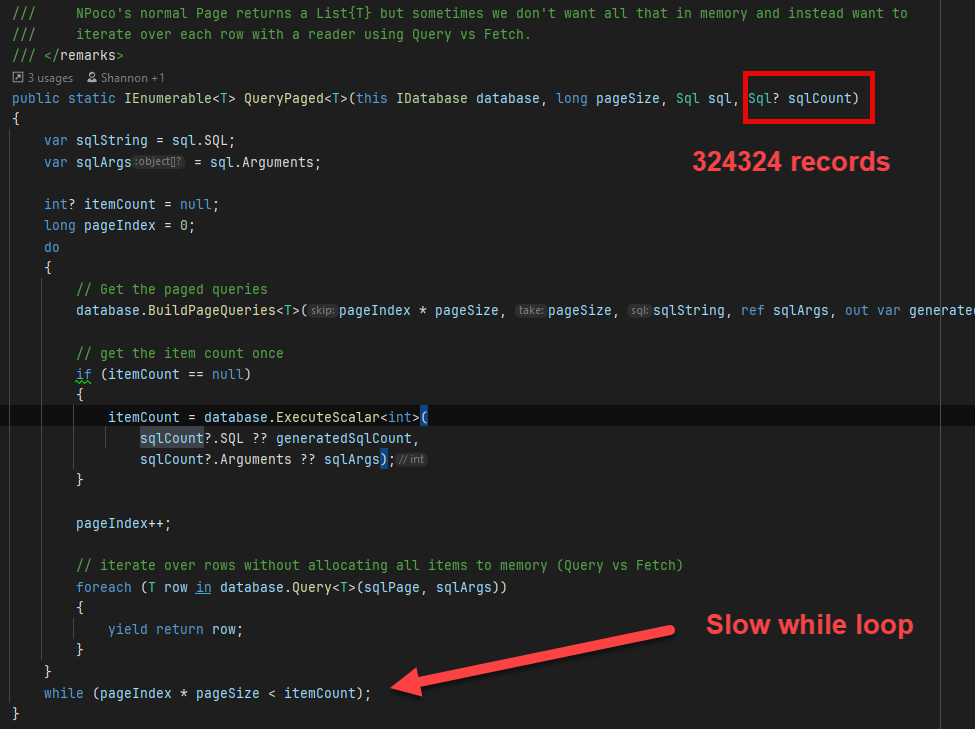
The captured QueryPaged path. With an inflated sqlCount, the loop continues as though 324,324 records were part of the filtered operation.
The important lesson is that the main query does not need to return hundreds of thousands of rows for pagination to become extremely expensive. An incorrect count is enough to drive excessive paging work. On a 325K-document installation, that cost became impossible to ignore during cache refresh operations associated with publishing and unpublishing.
The Fix and Affected Versions
PR #16837 restored the missing filtering in the count-query path while retaining the paged-query approach introduced earlier. The pull request was merged on August 2, 2024, and was tagged for Umbraco 13.5.0 and 14.2.0. The change was also explicitly cherry-picked for the v13 branch.
About Umbraco 10: the regression also affected the v10 line. However, Umbraco HQ declined to ship this non-security fix to v10 once that version was in its security-only phase and instead recommended upgrading to v13.
This article documents the regression we reproduced on Umbraco 13.4.1. I found no evidence in the regression history that the same bug persists in Umbraco 17. If a current installation has slow publishing, diagnose it independently rather than assuming this historical count-query regression is the cause.
What This Investigation Taught Us
Test performance with production-scale data
A query-path regression can remain almost invisible on a small development database. At 325,000 documents, the difference between a correctly filtered count and a table-scale count became operationally critical.
Rule out custom code, but do not stop there
Disabling notification handlers, caches, indexes, and background features was useful because it removed plausible explanations. When the symptoms remained, we had stronger evidence to investigate the core query path.
Inspect generated SQL when application symptoms stop making sense
The mismatch between 2 and 324,324 transformed a vague performance problem into a concrete database-level defect that could be traced through the calling code.
A wrong count can be as damaging as a wrong data query
Pagination logic depends on count accuracy. The data query may be correctly scoped, but an inflated count can still force the application through unnecessary page iterations and turn a routine operation into a severe bottleneck.
This case is one example of the wider diagnostic method I use for slow Umbraco systems: reproduce the symptom, preserve production-scale evidence, isolate the expensive path, inspect the generated work, form a hypothesis, and verify it before optimizing. The full process is described in How I Diagnose Slow Umbraco Sites in Production.
Conclusion
This case started as a difficult upgrade problem: slow publishing, lock errors, and an editor experience that had become unusable. The decisive clue was not another cache setting or database index. It was a mismatch between the rows the operation actually needed and the count driving Umbraco's paging loop.
On large CMS installations, that distinction matters. When performance collapses after an upgrade, preserve the production-scale evidence, methodically eliminate application-specific causes, inspect the generated SQL, and follow the execution path until the numbers make sense.


