
Umbraco does not make a website GDPR-compliant
Important: this is technical guidance for Umbraco developers and architects, not legal advice. GDPR compliance depends on the organization, purposes of processing, legal basis, contracts, jurisdictions, and actual data flows.
Umbraco is a CMS and application platform. Whether an Umbraco website processes personal data depends on what you build around it: Members, forms, custom database tables, analytics, marketing integrations, uploaded files, logs, APIs and other services.
A useful GDPR review is therefore not a search for one "GDPR setting". It is an inventory of where personal data enters the system, where it is stored, who can access it, where it leaves the system, and when it is deleted.
Start with a personal-data inventory
Map the real data flow before changing code or installing a consent package. For every collection point, record the purpose, fields, destination, retention period, access path, and downstream integrations.
Contact, support, registration and newsletter forms
Umbraco Members and custom Member properties
Backoffice Users
Custom application tables
Media uploads and generated documents
Application, web-server and infrastructure logs
Analytics, session replay and advertising tools
CRM, email marketing, payment and support platforms
Search indexes, caches and queues
Database, file and infrastructure backups
This supports two core engineering goals: collect only what is needed and avoid retaining data indefinitely without a defined purpose.
Search for personal data in the Umbraco database
Personal data is not necessarily limited to obvious identity tables. It can appear in Member properties, form submissions, custom tables, imported content, or integration data.
A practical discovery technique is to search text columns for a known test value, such as a test email address or surname, and inspect the matches. I use the approach described in Search for Text Across All SQL Server Tables.
DECLARE @TargetString NVARCHAR(255) = N'bach';

-- Use a reviewed database-wide search script.
-- Prefer a restored copy or non-production environment for broad scans.
-- Inspect every match in context before classifying the data.
(28 rows affected)
Executed search for "bach" in schema [dbo], table [umbracoPropertyData], column [textValue].
(2 rows affected)
Executed search for "bach" in schema [dbo], table [umbracoUser], column [userName].
(1 row affected)
Executed search for "bach" in schema [dbo], table [umbracoUser], column [userLogin].
(1 row affected)
Executed search for "bach" in schema [dbo], table [umbracoUser], column [userEmail].
(18 rows affected)
Executed search for "bach" in schema [dbo], table [cmsContentNu], column [data].
(25 rows affected)
Executed search for "bach" in schema [dbo], table [umbracoAudit], column [performingDetails].
(804 rows affected)
Executed search for "bach" in schema [dbo], table [umbracoAudit], column [affectedDetails].
(203 rows affected)
Executed search for "bach" in schema [dbo], table [umbracoAudit], column [eventDetails].The search is a discovery tool, not proof of compliance. One matching value does not prove a column contains personal data, and one unsuccessful search does not prove that the database contains none.
Production caution: database-wide searches can be expensive. Understand the query first and avoid an unbounded exploratory scan during peak production traffic.
Review Members and Backoffice Users
Umbraco Members are intended to register and authenticate frontend users. Member data can include username, email, and custom Member Type properties. Audit both built-in identity fields and every project-specific profile property.
Backoffice User accounts also deserve review. Check disabled accounts, permissions, password and lockout configuration, and whether former users should still exist in the environment.
Search files, media and exports
SQL is only one storage location. Personal data can appear in local files, temporary exports, CSV files, generated PDFs, import directories, diagnostic dumps, or uploaded media.
Include external storage in the audit. If Umbraco media is stored in Azure Blob Storage or another provider, searching only the web application's local directory is incomplete.
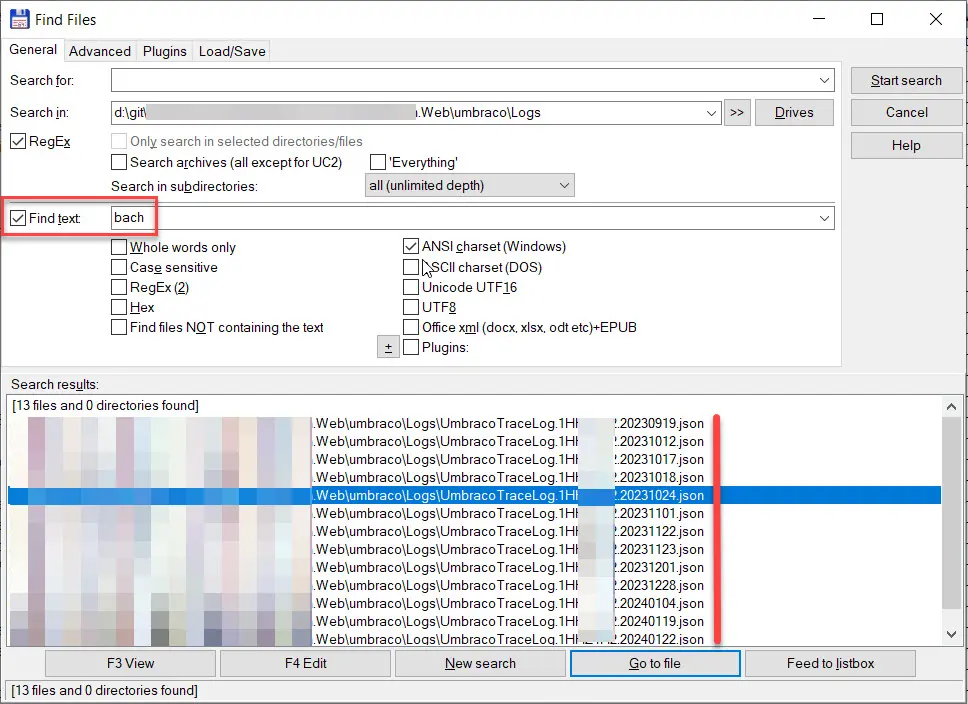
Looking for personal data in Umbraco's local file system
Audit logs and telemetry
Logs can contain IP addresses, email addresses, usernames, identifiers, URLs, exception data, or payload fragments. Review your own logging, hosting, reverse proxy, monitoring, and third-party telemetry configuration.
Avoid logging complete request bodies, authorization values, or form submissions unless there is a specific, justified need. Define retention instead of keeping detailed diagnostic logs forever.
Audit cookies, analytics and consent separately
Do not treat every cookie as advertising and do not treat consent as the universal legal basis for every processing operation. Classify what the site sets and why.
Umbraco documents cookies used for Backoffice and preview functionality, including session and antiforgery-related cookies. Your frontend can add authentication, preference, analytics, and marketing cookies.
For optional tracking, test behavior rather than trusting the banner. Open a clean browser session, reject optional tracking, and inspect cookies, browser storage, and network requests before and after the choice. Repeat after changing preferences.
Define retention and deletion as application behavior
Knowing where data is stored is only half the job. Define what removes old form submissions, temporary exports, diagnostic logs, abandoned accounts and related records.
Automate retention where it is safe and deterministic. Where deletion requires business or legal review, document the workflow instead of leaving data indefinitely.
Protect Azure SQL data at rest
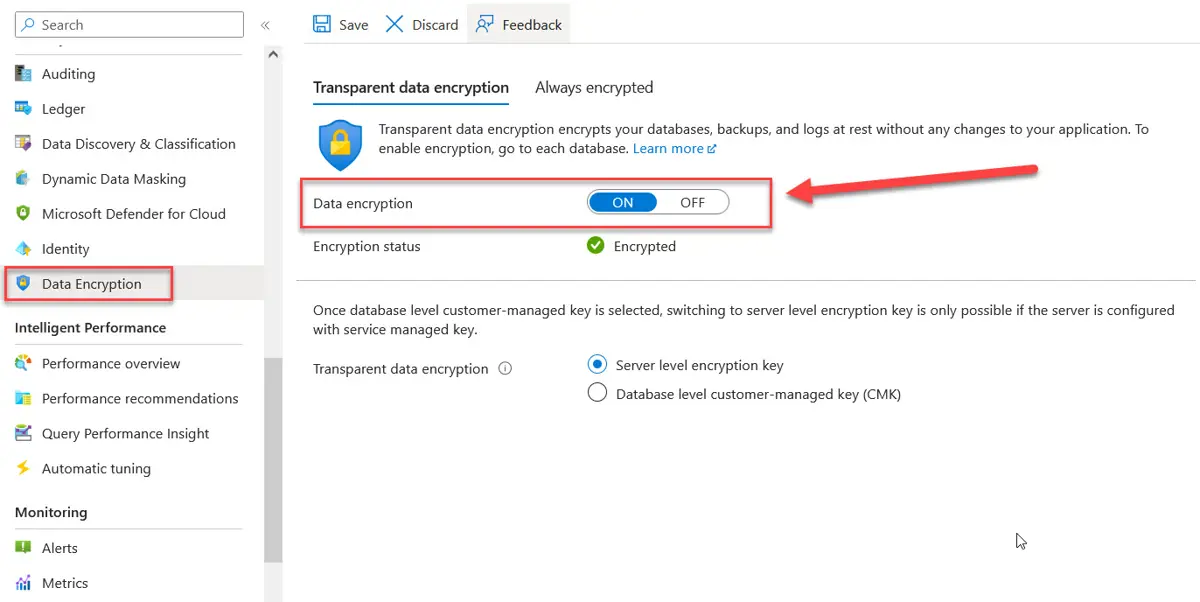
Azure transparent data encryption for SQL database is enabled. SQL DB > Security > Data Encryption
Encryption is an important security control, but it is not a complete GDPR strategy and does not by itself resolve lawful-processing or international-transfer questions.
Azure SQL Transparent Data Encryption protects database files, transaction logs, and associated backups at rest. TDE is enabled by default for newly created Azure SQL databases. Verify older or unusual environments rather than assuming their configuration.
Customer-managed TDE keys in Azure Key Vault or Managed HSM can provide additional key control where security or compliance requirements justify the extra operational complexity.
Know what TDE protects: TDE primarily protects data at rest against offline access to database files and backups. It does not stop an authorized database connection or compromised application from reading plaintext data. For especially sensitive fields, evaluate controls such as Always Encrypted where appropriate.
Do not forget backups
Deleting a record from the live database does not rewrite every historical backup. Retention and privacy-request procedures therefore need to account for the backup lifecycle and restoration process.
Azure SQL backups are encrypted when the source database uses TDE. Document what happens after restoring an older backup, because data deleted from production after that backup was created can reappear in the restored environment.
Map third-party data flows
An Umbraco database audit is incomplete when the website sends data elsewhere. Newsletter forms, CRM integrations, analytics, support platforms and payment services can all create additional copies.
For every integration, record which fields leave the application, where they go, why they are sent, how long they are retained and how correction or deletion requests propagate. Review packages too, because extensions can introduce cookies, telemetry, APIs or storage.
Design for access, correction and deletion requests
A developer does not decide the legal outcome of a data-subject request, but the application should make approved requests technically feasible.
Know how to locate records associated with an identifier, correct them consistently, and delete or anonymize them where the organization's process requires it. Include databases, Members, files, logs, external systems, and restored environments.
Important: deletion does not always mean deleting everything immediately. Legal obligations and other applicable requirements can affect retention. Technical behavior should follow the organization's reviewed policy.
Umbraco GDPR developer checklist
Map every place where the website collects personal data.
Review Members, Backoffice Users, and custom identity properties.
Search the database for known test identifiers.
Inspect files, media storage, exports, and temporary directories.
Review application, infrastructure and telemetry logs.
Inventory cookies, browser storage and third-party network requests.
Verify optional tracking follows the site's consent implementation.
Use HTTPS for production traffic and Backoffice access.
Verify encryption at rest for databases and storage.
Define retention for forms, logs, accounts, exports and backups.
Map processors and external integrations.
Test how approved access, correction and deletion requests are executed.
Repeat the audit after major changes to features, packages, or integrations.
Frequently Asked Questions
Is Umbraco GDPR-compliant out of the box?
There is no single CMS switch that makes a website GDPR-compliant. Compliance depends on how the complete solution processes personal data.
Does Umbraco store personal data?
It can. Backoffice Users contain identifying information, Members can contain frontend identity and custom profile fields, and applications can store additional data through forms, custom tables, and integrations.
Should I search the database for names and email addresses?
Yes, as a discovery technique, especially for an inherited project. It is not a complete inventory because data can exist outside SQL, and not every record will match your test values.
Does Azure SQL TDE make an Umbraco site GDPR-compliant?
No. TDE is an encryption-at-rest control. It does not address the purpose, legal basis, minimization, retention, access, data subject rights, or third-party processing.
Do all cookies require consent?
Do not apply one rule blindly to every cookie and jurisdiction. Classify the cookie and purpose, distinguish necessary functionality from optional tracking, and implement the requirements applicable to the site.
References
Conclusion
A useful Umbraco GDPR review is fundamentally a data-flow audit. Start with what the website collects, then follow the data through Members, SQL, files, logs, cookies, integrations and backups.
The technical goal is to make the system understandable and controllable: collect less, expose less, retain data deliberately, secure it appropriately and know how to find it when an approved privacy request arrives.


