
Introduction
Sometimes you know the value you are looking for but not where it is stored. This occurs in unfamiliar databases, legacy systems, migrations, incident investigations, and CMS databases, where a value may appear in multiple tables or columns.
Searching every text column manually is slow and error-prone. The script in this article discovers character columns from SQL Server catalog views, searches them dynamically, and returns a compact summary showing where the value was found.
When this search is useful
finding a customer name, email address, identifier, URL, or other text when the table is unknown;
investigating legacy or undocumented databases;
checking where an old domain, configuration value, or label is still stored;
auditing a migration before changing or removing data;
troubleshooting CMS or application databases without manually inspecting every table.
Note
Use this as a diagnostic tool. The script only reads data and returns matching locations. It does not update or delete anything.
Ready-to-use T-SQL search script
Change the search text at the top of the script. Leave the schema variable empty to search all user schemas, or set it to a specific schema such as dbo to reduce the scope.
SET NOCOUNT ON;

DECLARE @SearchText nvarchar(4000) = N'Piotr Bach';
DECLARE @SchemaName sysname = NULL; -- NULL = all user schemas

IF NULLIF(@SearchText, N'') IS NULL
    THROW 50000, 'Search text cannot be empty.', 1;

DECLARE @LikePattern nvarchar(max) = @SearchText;

SET @LikePattern = REPLACE(@LikePattern, N'~', N'~~');
SET @LikePattern = REPLACE(@LikePattern, N'%', N'~%');
SET @LikePattern = REPLACE(@LikePattern, N'_', N'~_');
SET @LikePattern = REPLACE(@LikePattern, N'[', N'~[');
SET @LikePattern = N'%' + @LikePattern + N'%';

DROP TABLE IF EXISTS #SearchResults;

CREATE TABLE #SearchResults
(
    SchemaName sysname NOT NULL,
    TableName sysname NOT NULL,
    ColumnName sysname NOT NULL,
    MatchCount bigint NOT NULL
);

DECLARE @CurrentSchemaName sysname;
DECLARE @CurrentTableName sysname;
DECLARE @CurrentColumnName sysname;
DECLARE @Sql nvarchar(max);

DECLARE ColumnCursor CURSOR LOCAL FAST_FORWARD FOR
SELECT
    s.name,
    t.name,
    c.name
FROM sys.tables AS t
INNER JOIN sys.schemas AS s
    ON s.schema_id = t.schema_id
INNER JOIN sys.columns AS c
    ON c.object_id = t.object_id
INNER JOIN sys.types AS ty
    ON ty.user_type_id = c.user_type_id
WHERE t.is_ms_shipped = 0
    AND c.is_hidden = 0
    AND c.encryption_type IS NULL
    AND ty.name IN
    (
        N'char',
        N'varchar',
        N'nchar',
        N'nvarchar',
        N'text',
        N'ntext'
    )
    AND (@SchemaName IS NULL OR s.name = @SchemaName)
ORDER BY
    s.name,
    t.name,
    c.column_id;

OPEN ColumnCursor;

FETCH NEXT FROM ColumnCursor
INTO @CurrentSchemaName, @CurrentTableName, @CurrentColumnName;

WHILE @@FETCH_STATUS = 0
BEGIN
    SET @Sql = N'
        DECLARE @Matches bigint;

        SELECT @Matches = COUNT_BIG(*)
        FROM ' + QUOTENAME(@CurrentSchemaName) + N'.' + QUOTENAME(@CurrentTableName) + N'
        WHERE TRY_CONVERT(nvarchar(max), ' + QUOTENAME(@CurrentColumnName) + N')
            LIKE @Pattern ESCAPE N''~'';

        IF @Matches > 0
        BEGIN
            INSERT INTO #SearchResults
            (
                SchemaName,
                TableName,
                ColumnName,
                MatchCount
            )
            VALUES
            (
                @Schema,
                @Table,
                @Column,
                @Matches
            );
        END;';

    EXEC sys.sp_executesql
        @Sql,
        N'@Pattern nvarchar(max), @Schema sysname, @Table sysname, @Column sysname',
        @Pattern = @LikePattern,
        @Schema = @CurrentSchemaName,
        @Table = @CurrentTableName,
        @Column = @CurrentColumnName;

    FETCH NEXT FROM ColumnCursor
    INTO @CurrentSchemaName, @CurrentTableName, @CurrentColumnName;
END;

CLOSE ColumnCursor;
DEALLOCATE ColumnCursor;

SELECT
    SchemaName,
    TableName,
    ColumnName,
    MatchCount
FROM #SearchResults
ORDER BY
    MatchCount DESC,
    SchemaName,
    TableName,
    ColumnName;
The result contains the schema, table, column, and number of matching rows. Returning a summary instead of every matching row keeps the initial search manageable and avoids accidentally dumping large or sensitive result sets to the client.
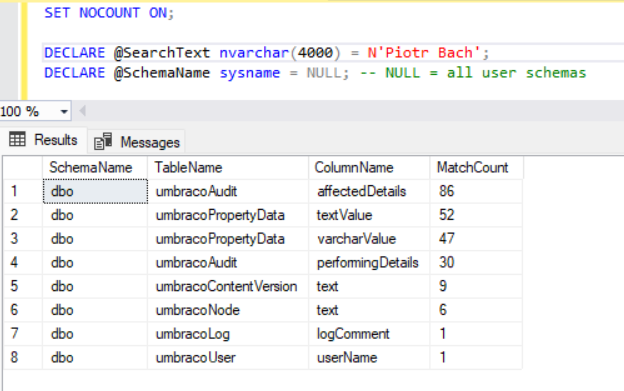
Example search output showing where a search text was found in a SQL Server database.
How the script works
1. Discover character columns
The script reads SQL Server catalog views to find user tables and character-based columns. System tables, hidden columns, and encrypted columns are excluded.
2. Quote identifiers safely
Schema, table, and column names are database identifiers. The script quotes them before constructing dynamic SQL, so names containing spaces or reserved words are handled correctly.
3. Parameterize the search value
The value being searched is passed separately to the dynamic statement rather than concatenated into the SQL text. This is safer and avoids quoting problems when the search term contains apostrophes.
4. Return only useful matches
A result row is stored only when at least one match exists. That produces a concise map of where to investigate next.
Literal text and LIKE wildcards
A normal LIKE search treats percent, underscore, and opening square bracket as pattern characters. That can produce surprising results when you are looking for a literal value such as a URL, code, or configuration string.
The script escapes those characters before building the search pattern. Searching for a value containing a percent sign therefore searches for the actual percent sign instead of treating it as a wildcard.
The search remains subject to SQL Server collation. Whether matching is case-sensitive or accent-sensitive depends on the relevant collation rather than on this script alone.
Supported text data types
The script searches char, varchar, nchar, and nvarchar columns. It also supports existing text and ntext columns by converting their values during the search.
Microsoft has deprecated text and ntext for new development and recommends varchar(max) and nvarchar(max) instead. They are included here because diagnostic scripts are often used against older databases where those legacy types still exist.
Data | Included? | Notes |
|---|---|---|
Character columns | Yes | The primary target of this script. |
Legacy text columns | Yes | Supported for existing databases, but deprecated for new development. |
JSON stored as text | Yes | JSON stored in a character column is searched like other text. |
XML | No | Search separately when XML data is part of the investigation. |
Binary data | No | Not treated as text. |
Encrypted columns | No | Excluded from the generic search. |
Performance and production impact
Searching an entire database this way can be expensive. The script may scan many large columns, and a leading wildcard search usually cannot use a normal B-tree index to seek directly to the matching value.
The cost grows with the number of tables, text columns, row counts, and value sizes. Converting legacy large-value columns can add more work.
Warning
Read-only does not mean low-cost. On a large or busy production database, narrow the search first and run broad scans during an appropriate maintenance or diagnostic window.
Reduce the search scope when possible
limit the search to one schema;
search known tables directly once you have narrowed the investigation;
exclude large audit or log tables if they are irrelevant;
avoid repeatedly running a database-wide search for the same value;
consider full-text search or application-specific indexing for recurring search requirements.
This script is a troubleshooting utility, not a replacement for a proper search architecture.
Inspect the matching rows
Once the summary identifies the table and column, switch to a targeted query. This is easier to review and gives you control over how much data is returned.
DECLARE @SearchText nvarchar(4000) = N'Piotr Bach';

SELECT TOP (100) *
FROM dbo.YourTable
WHERE TRY_CONVERT(nvarchar(max), YourColumn)
    LIKE N'%' + @SearchText + N'%';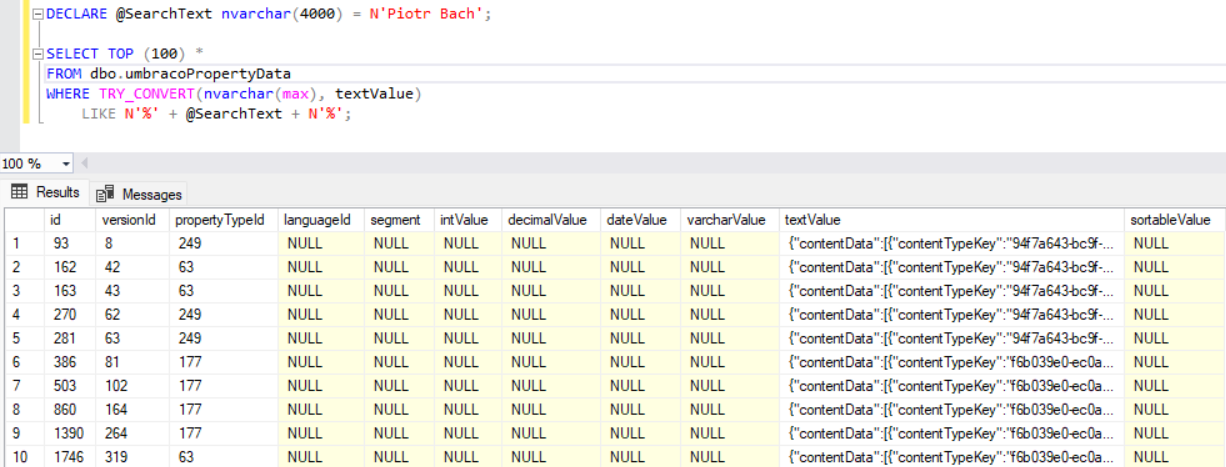
Adapt the table name, column name, and result limit to the match you want to investigate.
Frequently Asked Questions
Can this search every table in the database?
Yes. Leave the schema filter empty, and the script inspects character columns in all user tables visible to the current login.
Can I restrict the search to dbo?
Yes. Set the schema variable to dbo before running the script.
Is the search case-sensitive?
That depends on SQL Server collation. A case-insensitive collation produces case-insensitive matching, while a case-sensitive collation distinguishes letter case.
What happens if my search text contains a percent sign or underscore?
The script escapes SQL LIKE pattern characters, so those characters are treated literally.
Why does the script return counts instead of all matching rows?
The first goal is to locate the data. Returning only the location and match count keeps the diagnostic result small. After finding the relevant column, run a targeted query to inspect the actual rows.
Can this be slow in production?
Yes. A broad text search can scan a large amount of data. Narrow the scope whenever possible and avoid running it repeatedly during peak workload.
Should I use this for application search functionality?
No. For recurring user-facing search, design an appropriate search solution such as full-text search, a dedicated index, or another application-specific search architecture.
References
Key takeaways
Use a database-wide search when you know the value but not its location.
Parameterize the search value and quote database identifiers.
Escape LIKE pattern characters when the goal is a literal text search.
Return a compact location summary first, then inspect matching rows with a targeted query.
Expect broad searches to be expensive on large databases.
Keep legacy text types in diagnostic coverage, but do not use them for new development.


