
Introduction
Knowing how many rows are stored in each SQL Server table is useful during database audits, migrations, cleanup work, capacity investigations, and troubleshooting. The important part is choosing the right way to obtain that number.
For most exploratory work, you do not need to execute a full count against every table. SQL Server already maintains partition-level row-count information that can provide a fast overview. When the number must be exact, you can execute a real count for each table instead.
Quick answer
Start with the metadata-based query when you want to identify the largest tables or understand the shape of a database. Use the exact-count script when the result will be used for reconciliation, migration validation, auditing, or another task where every row matters.
Note
Recommended workflow: run the fast query first. Use exact counts only in tables or scenarios where exactness is required.
Approximate vs exact row counts
Need | Recommended method | Trade-off |
|---|---|---|
Find the largest tables | Partition metadata | Fast and normally sufficient for ranking tables. |
Initial database assessment | Partition metadata | Avoids scanning every table solely for inventory. |
Operational diagnostics | Partition metadata | Lower overhead than repeatedly counting every row. |
Migration reconciliation | Exact count | More work, but appropriate when source and target counts must match. |
Audit or acceptance criterion | Exact count | Use when the precise number is part of the requirement. |
Microsoft describes the partition-statistics row count as approximate. That makes it ideal for inventory and diagnostics, but not for requirements that explicitly demand an exact value. A real COUNT_BIG query returns the number of rows processed by that statement and uses the bigint return type.
Fast method: row counts from partition metadata
This is the query I would run first on an unfamiliar database. It returns one result per user table, works with partitioned tables, and can optionally be limited to a single schema.
DECLARE @SchemaName sysname = NULL; -- NULL = all schemas, N'dbo' = dbo only

SELECT
    s.name AS SchemaName,
    t.name AS TableName,
    SUM(ps.row_count) AS ApproximateRows
FROM sys.tables AS t
INNER JOIN sys.schemas AS s
    ON s.schema_id = t.schema_id
INNER JOIN sys.dm_db_partition_stats AS ps
    ON ps.object_id = t.object_id
WHERE ps.index_id IN (0, 1)
    AND t.is_ms_shipped = 0
    AND (@SchemaName IS NULL OR s.name = @SchemaName)
GROUP BY
    s.name,
    t.name
ORDER BY
    ApproximateRows DESC,
    SchemaName,
    TableName;
Leave the schema variable as NULL to inspect all user schemas. Set it to N'dbo' when you only want tables in the dbo schema.
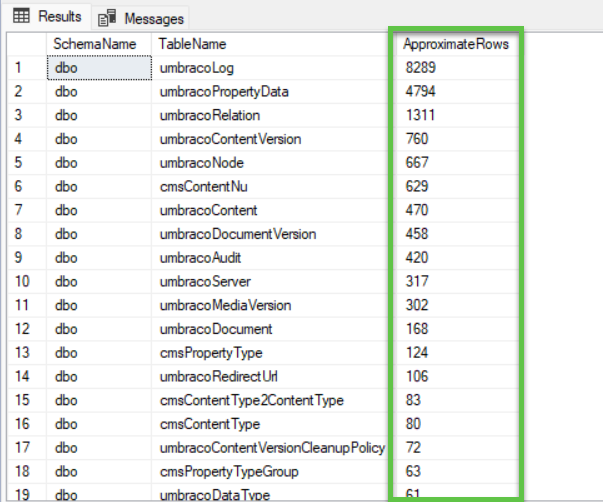
Why the query filters index IDs 0 and 1
Partition statistics contain information for both table indexes and table data. A heap uses index ID 0, while a clustered index uses index ID 1. Restricting the query to those two cases prevents nonclustered indexes from being counted as additional copies of the table rows.
Why the query uses SUM
A partitioned table can have multiple partitions. SQL Server exposes row information for each partition separately, so the query sums those values to produce a single table-level result.
Permissions
The required permissions depend on the SQL Server version. SQL Server 2022 and later require VIEW DATABASE PERFORMANCE STATE and VIEW SECURITY DEFINITION for this DMV. Earlier supported versions use VIEW DATABASE STATE and VIEW DEFINITION.
Note
Important: the result is intentionally named ApproximateRows. Use it for sizing, ranking, diagnostics, and investigation. Do not present it as an exact audit count.
Exact method: count every table
When approximate metadata is not enough, the following script executes an exact count for each selected user table. It supports either all schemas or a single selected schema, and it safely quotes schema and table names before executing dynamic SQL.
DECLARE @SchemaName sysname = NULL; -- NULL = all schemas, N'dbo' = dbo only
DECLARE @CurrentSchemaName sysname;
DECLARE @CurrentTableName sysname;
DECLARE @Sql nvarchar(max);

DROP TABLE IF EXISTS #TableCounts;

CREATE TABLE #TableCounts
(
    SchemaName sysname NOT NULL,
    TableName sysname NOT NULL,
    ExactRows bigint NOT NULL
);

DECLARE TableCursor CURSOR LOCAL FAST_FORWARD FOR
SELECT
    s.name,
    t.name
FROM sys.tables AS t
INNER JOIN sys.schemas AS s
    ON s.schema_id = t.schema_id
WHERE t.is_ms_shipped = 0
    AND (@SchemaName IS NULL OR s.name = @SchemaName)
ORDER BY
    s.name,
    t.name;

OPEN TableCursor;

FETCH NEXT FROM TableCursor
INTO @CurrentSchemaName, @CurrentTableName;

WHILE @@FETCH_STATUS = 0
BEGIN
    SET @Sql = N'
        INSERT INTO #TableCounts (SchemaName, TableName, ExactRows)
        SELECT @Schema, @Table, COUNT_BIG(*)
        FROM ' + QUOTENAME(@CurrentSchemaName) + N'.' + QUOTENAME(@CurrentTableName) + N';';

    EXEC sys.sp_executesql
        @Sql,
        N'@Schema sysname, @Table sysname',
        @Schema = @CurrentSchemaName,
        @Table = @CurrentTableName;

    FETCH NEXT FROM TableCursor
    INTO @CurrentSchemaName, @CurrentTableName;
END;

CLOSE TableCursor;
DEALLOCATE TableCursor;

SELECT
    SchemaName,
    TableName,
    ExactRows
FROM #TableCounts
ORDER BY
    ExactRows DESC,
    SchemaName,
    TableName;
The script uses COUNT_BIG rather than COUNT because COUNT_BIG returns bigint. This makes the script suitable for tables whose row count could exceed the range of an int.
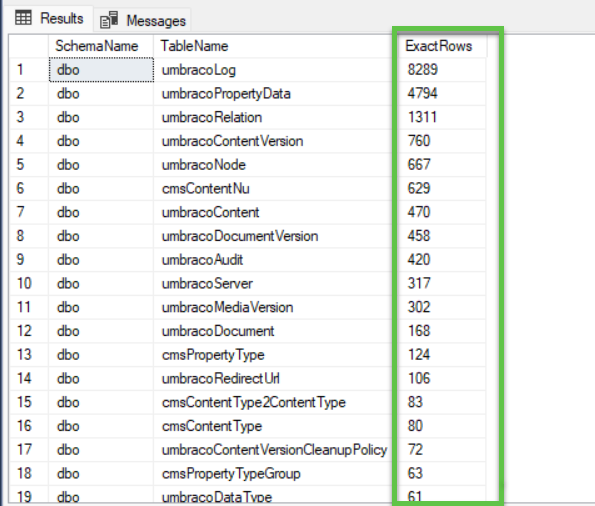
Why not use RowCount as the result column?
ROWCOUNT is a reserved Transact-SQL keyword. Using it as an unquoted column name causes the syntax error shown during testing. The scripts above deliberately use ApproximateRows and ExactRows instead.
Count one table only
If you only need to verify one table, do not iterate through the entire database:
SELECT COUNT_BIG(*) AS ExactRows
FROM dbo.YourTable;
Performance and production impact
The two approaches have very different operational costs. The metadata query reads information maintained by SQL Server. The exact script executes a count against every selected table.
On a large production database, exact counts can consume I/O, CPU, memory, and execution time while competing with normal application traffic. The actual cost depends on table size, indexes, cached pages, storage performance, isolation level, and concurrent workload.
Warning
Read-only does not mean free. Avoid database-wide exact counts during peak traffic when the metadata query already answers the question.
Exact counts make sense for migration reconciliation, import verification, data audits, and controlled cleanup validation. For routine diagnostics and finding large tables, the metadata query is usually the better starting point.
Exact counts and changing data
There is another distinction that matters on active systems. Each individual exact count is accurate for that statement, but the all-table script processes tables one after another.
If the application continues inserting or deleting rows while the script runs, the final result can contain counts observed at different moments. That is normally acceptable for diagnostics. It may not be acceptable for migration reconciliation or audit-grade validation.
If you need a transactionally consistent view across many tables, treat that as a separate requirement. Choose an isolation strategy appropriate for the database and test its locking, version-store, and runtime impact before using it in production.
Frequently Asked Questions
What is the fastest way to get row counts for all SQL Server tables?
Use partition statistics and aggregate the heap or clustered-index row counts. This avoids deliberately executing a full count against every table.
Are partition-statistics row counts exact?
No. Microsoft documents them as approximate. They are generally the right choice for database inventory, sizing, and diagnostics.
Why use COUNT_BIG instead of COUNT?
COUNT_BIG returns bigint, while COUNT returns int. The larger return type is safer for a reusable script that may be run against very large tables.
Can I limit the scripts to the dbo schema?
Yes. Set the schema variable to N'dbo'. Leave it as NULL to include all user schemas.
Do the scripts work with partitioned tables?
Yes. The fast query adds the relevant partition counts together. The exact query counts the table normally, regardless of how its rows are partitioned.
Should I use exact counts for production monitoring?
Usually not. For recurring inventory or monitoring, the metadata approach is typically more appropriate. Use exact counts when the business or technical requirement genuinely needs exact values.
References
Source code
The earlier utility for counting records by schema is available in the Piotr Bach code-examples repository on GitHub.
Key takeaways
Use partition metadata for a fast overview of table sizes.
Use exact counts when the precise number is a real requirement.
Filter partition statistics to heaps and clustered indexes to avoid counting nonclustered indexes.
Use
COUNT_BIGin reusable scripts that may operate on potentially very large tables.Avoid the reserved keyword
ROWCOUNTas an unquoted identifier.Remember that database-wide exact counting can affect production workload.
In an active database, sequential exact counts do not automatically represent a single point in time.


