
TL;DR
Do not rebuild every index because a fragmentation percentage looks high. A 50% fragmented index containing two pages is very different from a 50% fragmented index containing millions of pages. Microsoft recommends making maintenance decisions in the context of the workload rather than from fixed fragmentation or page-density thresholds alone.
Tip
Use this workflow: inventory all relevant indexes, identify meaningful candidates, review the generated commands, run maintenance in a controlled window, monitor application impact, and use Query Store to verify whether performance actually improved.
What Index Maintenance Actually Solves
Rowstore indexes are B-trees. Inserts, updates, and deletes can reduce page density and make the logical order of pages differ from their physical order. These effects can increase the number of pages SQL Server must read, particularly for workloads that perform larger scans.
Fragmentation by itself is not a performance problem in every workload. If an index is tiny, or queries mostly use selective seeks, removing fragmentation may provide no measurable benefit. Maintenance also has a cost, so the goal is not to make every percentage look perfect. The goal is to improve the workload.
Measure First: Fragmentation, Page Density, and Size
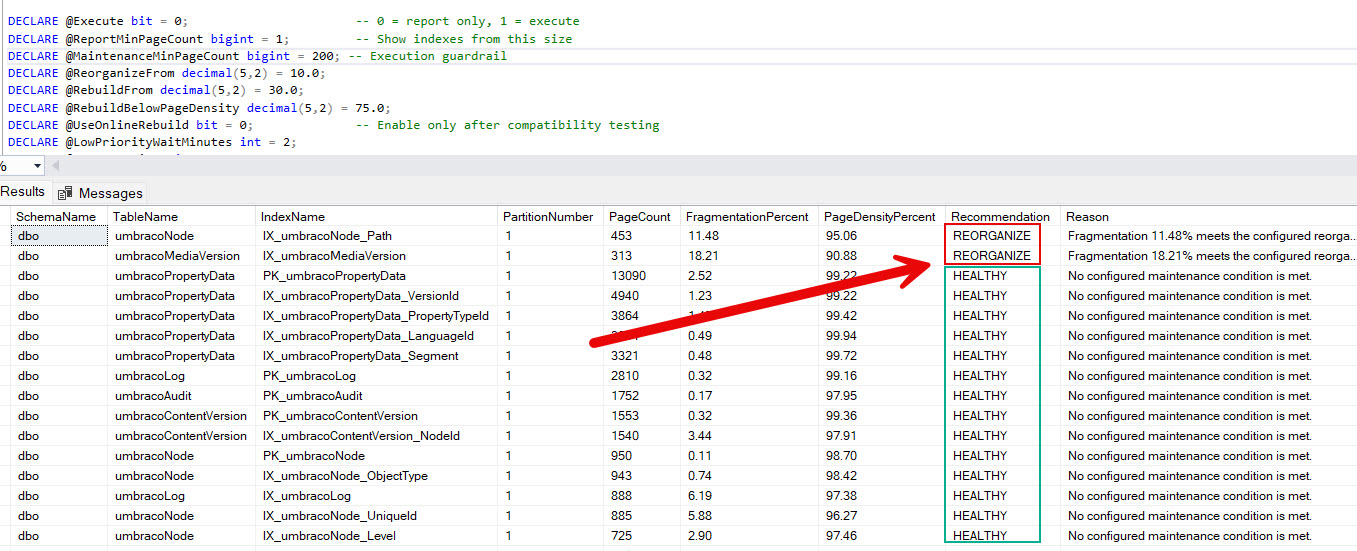
SQL Server index health report
The final script uses sys.dm_db_index_physical_stats in SAMPLED mode. This matters because LIMITED is excellent for a lightweight fragmentation check, but it does not provide the page-density information this report needs. SAMPLED estimates statistics from a sample. For indexes with fewer than 10,000 pages, SQL Server uses DETAILED instead.
The report deliberately separates what you can see from what the script is allowed to maintain. By default it reports indexes from one page upward, but requires at least 1,000 pages before an index becomes an automatic maintenance candidate.
This prevents a common mistake. A tiny index can show 33% or 50% fragmentation simply because it contains only a handful of pages. Rebuilding it just to reduce that percentage is usually wasted work.
Reorganize vs Rebuild
Microsoft currently recommends REORGANIZE as the preferred index maintenance method unless there is a specific reason to rebuild. It is less resource-intensive and is always online.
Operation | What it does | When it fits |
|---|---|---|
| Incrementally defragments the leaf level and compacts pages. It does not rebuild the complete B-tree. | When maintenance is justified, but you want a lower-resource, online operation. |
| Creates a new copy of the index, removes fragmentation more thoroughly, can improve page density, and refreshes that index's statistics. | When the expected benefit justifies the additional CPU, I/O, log, storage, and locking cost. |
| Refreshes the data-distribution information used by the optimizer without rebuilding the index. | When stale or low-quality statistics are the actual reason query plans improved after previous rebuilds. |
The script contains configurable thresholds because an executable maintenance policy needs explicit rules. Treat them as candidate filters, not universal SQL Server rules. Adjust them using evidence from your own workload.
Impact on a Running Application
Index maintenance competes with the application for resources. A large rebuild can generate substantial transaction log activity, consume CPU and storage I/O, require additional free space, and increase query latency even when requests are not directly blocked.
Reorganize
REORGANIZE is online and less resource intensive. Queries and updates can continue, but the operation still consumes resources and can affect throughput.
Offline rebuild
An offline rebuild can block access to the affected data. On a busy web application, this can turn into slow requests, queued connections, command timeouts, and failed requests. Run large offline rebuilds inside an appropriate maintenance window.
Online rebuild
Online rebuild keeps data available for most of the operation, but it is not lock-free. SQL Server still needs short-lived locks during phases of the operation. A blocked schema lock can materially increase workload latency.
Where supported, WAIT_AT_LOW_PRIORITY lets the online rebuild wait without immediately competing at normal lock priority. The provided script uses ABORT_AFTER_WAIT = SELF, so maintenance abandons the blocked rebuild rather than terminating application sessions.
Ready-to-Use SQL Server Index Maintenance Script
Copy this script into SSMS and run it unchanged first. @Execute = 0 guarantees report-only mode. The inventory is returned even when no index qualifies for maintenance, so a result of 0 candidates is still meaningful rather than appearing to be a failed run.
/*
    SQL Server Rowstore Index Maintenance
    Version: 2026

    Start with @Execute = 0.

    Candidate thresholds are operational defaults, not universal Microsoft rules.
    Validate them against Query Store, workload behavior, index size,
    page density, maintenance cost, and your maintenance window.
*/
SET NOCOUNT ON;
SET XACT_ABORT ON;

DECLARE @Execute bit = 0;                       -- 0 = report only, 1 = execute
DECLARE @ReportMinPageCount bigint = 1;         -- Show indexes from this size
DECLARE @MaintenanceMinPageCount bigint = 1000; -- Execution guardrail
DECLARE @ReorganizeFrom decimal(5,2) = 10.0;
DECLARE @RebuildFrom decimal(5,2) = 30.0;
DECLARE @RebuildBelowPageDensity decimal(5,2) = 75.0;
DECLARE @UseOnlineRebuild bit = 0;              -- Enable only after compatibility testing
DECLARE @LowPriorityWaitMinutes int = 2;
DECLARE @MaxOperations int = 25;

DROP TABLE IF EXISTS #IndexInventory;

CREATE TABLE #IndexInventory
(
    RowId int IDENTITY(1, 1) NOT NULL PRIMARY KEY,
    SchemaName sysname NOT NULL,
    TableName sysname NOT NULL,
    IndexName sysname NOT NULL,
    ObjectId int NOT NULL,
    IndexId int NOT NULL,
    PartitionNumber int NOT NULL,
    PageCount bigint NOT NULL,
    FragmentationPercent decimal(9,2) NOT NULL,
    PageDensityPercent decimal(9,2) NULL,
    Recommendation varchar(12) NOT NULL,
    Reason nvarchar(300) NOT NULL,
    CommandText nvarchar(max) NULL,
    Status varchar(20) NOT NULL DEFAULT ('Not executed'),
    ErrorMessage nvarchar(4000) NULL
);

;WITH PhysicalStats AS
(
    SELECT
        ips.object_id,
        ips.index_id,
        ips.partition_number,
        ips.page_count,
        CONVERT(decimal(9,2), ips.avg_fragmentation_in_percent) AS FragmentationPercent,
        CONVERT(decimal(9,2), ips.avg_page_space_used_in_percent) AS PageDensityPercent
    FROM sys.dm_db_index_physical_stats(DB_ID(), NULL, NULL, NULL, 'SAMPLED') AS ips
    WHERE ips.index_id > 0
        AND ips.alloc_unit_type_desc = 'IN_ROW_DATA'
        AND ips.page_count >= @ReportMinPageCount
)
INSERT INTO #IndexInventory
(
    SchemaName, TableName, IndexName, ObjectId, IndexId, PartitionNumber,
    PageCount, FragmentationPercent, PageDensityPercent, Recommendation, Reason
)
SELECT
    s.name,
    o.name,
    i.name,
    ps.object_id,
    ps.index_id,
    ps.partition_number,
    ps.page_count,
    ps.FragmentationPercent,
    ps.PageDensityPercent,
    CASE
        WHEN ps.page_count < @MaintenanceMinPageCount THEN 'TOO_SMALL'
        WHEN ps.FragmentationPercent >= @RebuildFrom
            OR (ps.PageDensityPercent IS NOT NULL
                AND ps.PageDensityPercent < @RebuildBelowPageDensity) THEN 'REBUILD'
        WHEN ps.FragmentationPercent >= @ReorganizeFrom THEN 'REORGANIZE'
        ELSE 'HEALTHY'
    END,
    CASE
        WHEN ps.page_count < @MaintenanceMinPageCount
            THEN CONCAT('Only ', ps.page_count, ' pages. Below maintenance minimum of ',
                        @MaintenanceMinPageCount, '.')
        WHEN ps.FragmentationPercent >= @RebuildFrom
            THEN CONCAT('Fragmentation ', ps.FragmentationPercent,
                        '% meets the configured rebuild candidate threshold.')
        WHEN ps.PageDensityPercent IS NOT NULL
            AND ps.PageDensityPercent < @RebuildBelowPageDensity
            THEN CONCAT('Page density ', ps.PageDensityPercent,
                        '% is below the configured review threshold.')
        WHEN ps.FragmentationPercent >= @ReorganizeFrom
            THEN CONCAT('Fragmentation ', ps.FragmentationPercent,
                        '% meets the configured reorganize candidate threshold.')
        ELSE 'No configured maintenance condition is met.'
    END
FROM PhysicalStats AS ps
INNER JOIN sys.indexes AS i
    ON i.object_id = ps.object_id AND i.index_id = ps.index_id
INNER JOIN sys.objects AS o
    ON o.object_id = ps.object_id
INNER JOIN sys.schemas AS s
    ON s.schema_id = o.schema_id
WHERE o.type = 'U'
    AND o.is_ms_shipped = 0
    AND i.is_disabled = 0
    AND i.is_hypothetical = 0
    AND i.type IN (1, 2);

UPDATE inventory
SET CommandText =
    CASE inventory.Recommendation
        WHEN 'REORGANIZE' THEN
            N'ALTER INDEX ' + QUOTENAME(inventory.IndexName) +
            N' ON ' + QUOTENAME(inventory.SchemaName) + N'.' + QUOTENAME(inventory.TableName) +
            N' REORGANIZE PARTITION = ' + CONVERT(nvarchar(12), inventory.PartitionNumber) + N';'
        WHEN 'REBUILD' THEN
            N'ALTER INDEX ' + QUOTENAME(inventory.IndexName) +
            N' ON ' + QUOTENAME(inventory.SchemaName) + N'.' + QUOTENAME(inventory.TableName) +
            N' REBUILD PARTITION = ' + CONVERT(nvarchar(12), inventory.PartitionNumber) +
            CASE
                WHEN @UseOnlineRebuild = 1 THEN
                    N' WITH (ONLINE = ON (WAIT_AT_LOW_PRIORITY (MAX_DURATION = ' +
                    CONVERT(nvarchar(12), @LowPriorityWaitMinutes) +
                    N' MINUTES, ABORT_AFTER_WAIT = SELF)));'
                ELSE N';'
            END
        ELSE NULL
    END
FROM #IndexInventory AS inventory;

SELECT
    SchemaName,
    TableName,
    IndexName,
    PartitionNumber,
    PageCount,
    FragmentationPercent,
    PageDensityPercent,
    Recommendation,
    Reason,
    CommandText
FROM #IndexInventory
ORDER BY
    CASE Recommendation
        WHEN 'REBUILD' THEN 1
        WHEN 'REORGANIZE' THEN 2
        WHEN 'HEALTHY' THEN 3
        ELSE 4
    END,
    PageCount DESC,
    FragmentationPercent DESC;

DECLARE @IndexesAnalyzed int = (SELECT COUNT(*) FROM #IndexInventory);
DECLARE @Candidates int = (
    SELECT COUNT(*) FROM #IndexInventory
    WHERE Recommendation IN ('REORGANIZE', 'REBUILD')
);
DECLARE @ReorganizeCount int = (
    SELECT COUNT(*) FROM #IndexInventory WHERE Recommendation = 'REORGANIZE'
);
DECLARE @RebuildCount int = (
    SELECT COUNT(*) FROM #IndexInventory WHERE Recommendation = 'REBUILD'
);
DECLARE @TooSmallCount int = (
    SELECT COUNT(*) FROM #IndexInventory WHERE Recommendation = 'TOO_SMALL'
);
DECLARE @HealthyCount int = (
    SELECT COUNT(*) FROM #IndexInventory WHERE Recommendation = 'HEALTHY'
);

PRINT '';
PRINT 'INDEX MAINTENANCE REPORT';
PRINT '----------------------------------------';
PRINT CONCAT('Database: ', DB_NAME());
PRINT CONCAT('Indexes analyzed: ', @IndexesAnalyzed);
PRINT CONCAT('Healthy: ', @HealthyCount);
PRINT CONCAT('Too small for automatic maintenance: ', @TooSmallCount);
PRINT CONCAT('Maintenance candidates: ', @Candidates);
PRINT CONCAT('REORGANIZE: ', @ReorganizeCount);
PRINT CONCAT('REBUILD: ', @RebuildCount);
PRINT '----------------------------------------';

IF @Candidates = 0
BEGIN
    PRINT 'No indexes currently meet the configured maintenance criteria.';
    PRINT 'No changes were made.';
    RETURN;
END;

IF @Execute = 0
BEGIN
    PRINT 'REPORT ONLY MODE';
    PRINT 'No indexes were changed.';
    PRINT 'Review Recommendation, Reason and CommandText before setting @Execute = 1.';
    RETURN;
END;

DROP TABLE IF EXISTS #MaintenanceQueue;

CREATE TABLE #MaintenanceQueue
(
    QueueId int IDENTITY(1, 1) NOT NULL PRIMARY KEY,
    InventoryRowId int NOT NULL,
    CommandText nvarchar(max) NOT NULL
);

INSERT INTO #MaintenanceQueue (InventoryRowId, CommandText)
SELECT TOP (@MaxOperations)
    inventory.RowId,
    inventory.CommandText
FROM #IndexInventory AS inventory
WHERE inventory.Recommendation IN ('REORGANIZE', 'REBUILD')
ORDER BY
    CASE inventory.Recommendation WHEN 'REBUILD' THEN 1 ELSE 2 END,
    inventory.PageCount DESC;

SELECT
    queue.QueueId,
    inventory.SchemaName,
    inventory.TableName,
    inventory.IndexName,
    inventory.PartitionNumber,
    inventory.PageCount,
    inventory.FragmentationPercent,
    inventory.PageDensityPercent,
    inventory.Recommendation,
    queue.CommandText
FROM #MaintenanceQueue AS queue
INNER JOIN #IndexInventory AS inventory
    ON inventory.RowId = queue.InventoryRowId
ORDER BY queue.QueueId;

DECLARE @QueueId int = 1;
DECLARE @QueueCount int = (SELECT COUNT(*) FROM #MaintenanceQueue);
DECLARE @InventoryRowId int;
DECLARE @CommandText nvarchar(max);

PRINT '';
PRINT CONCAT('Starting maintenance operations: ', @QueueCount);

WHILE @QueueId <= @QueueCount
BEGIN
    SELECT
        @InventoryRowId = InventoryRowId,
        @CommandText = CommandText
    FROM #MaintenanceQueue
    WHERE QueueId = @QueueId;

    BEGIN TRY
        PRINT CONCAT('[', @QueueId, '/', @QueueCount, '] Executing: ', @CommandText);

        EXEC sys.sp_executesql @CommandText;

        UPDATE #IndexInventory
        SET Status = 'Completed', ErrorMessage = NULL
        WHERE RowId = @InventoryRowId;

        PRINT CONCAT('[', @QueueId, '/', @QueueCount, '] Completed.');
    END TRY
    BEGIN CATCH
        UPDATE #IndexInventory
        SET Status = 'Failed', ErrorMessage = ERROR_MESSAGE()
        WHERE RowId = @InventoryRowId;

        PRINT CONCAT('[', @QueueId, '/', @QueueCount, '] Failed: ', ERROR_MESSAGE());
    END CATCH;

    SET @QueueId += 1;
END;

PRINT '';
PRINT 'MAINTENANCE EXECUTION FINISHED';
PRINT '----------------------------------------';

SELECT
    SchemaName,
    TableName,
    IndexName,
    PartitionNumber,
    PageCount,
    FragmentationPercent,
    PageDensityPercent,
    Recommendation,
    Status,
    ErrorMessage
FROM #IndexInventory
WHERE Recommendation IN ('REORGANIZE', 'REBUILD')
ORDER BY RowId;

DECLARE @Completed int = (
    SELECT COUNT(*) FROM #IndexInventory WHERE Status = 'Completed'
);
DECLARE @Failed int = (
    SELECT COUNT(*) FROM #IndexInventory WHERE Status = 'Failed'
);

PRINT CONCAT('Completed: ', @Completed);
PRINT CONCAT('Failed: ', @Failed);
PRINT '----------------------------------------';
How to run it
Run with
@Execute = 0.Review the inventory, especially
PageCount,FragmentationPercent,PageDensityPercent,Recommendation, andReason.Review every generated
CommandText.Use Query Store and application monitoring to identify whether the candidate indexes matter to real queries.
Adjust the policy variables if necessary.
Choose a maintenance window and set
@Execute = 1.Keep
@MaxOperationsconservative until you understand the resource cost in your environment.
The script does not depend on index names such as IX_ or PK_. It is schema-aware, partition-aware, quotes identifiers with QUOTENAME, limits the number of operations per execution, and records individual failures without wrapping the whole maintenance run in one large explicit transaction.
Monitor Maintenance While It Runs
Run this query in a second SSMS window. Monitor blocking and resource usage alongside application telemetry. A maintenance job completing successfully is not useful if it causes unacceptable application latency.
SELECT
    r.session_id,
    r.command,
    r.status,
    r.percent_complete,
    r.wait_type,
    r.wait_time,
    r.blocking_session_id,
    r.cpu_time,
    r.reads,
    r.writes,
    r.logical_reads,
    r.total_elapsed_time,
    r.estimated_completion_time,
    DatabaseName = DB_NAME(r.database_id),
    RunningSql = SUBSTRING
    (
        t.text,
        (r.statement_start_offset / 2) + 1,
        (
            (
                CASE r.statement_end_offset
                    WHEN -1 THEN DATALENGTH(t.text)
                    ELSE r.statement_end_offset
                END - r.statement_start_offset
            ) / 2
        ) + 1
    )
FROM sys.dm_exec_requests AS r
CROSS APPLY sys.dm_exec_sql_text(r.sql_handle) AS t
WHERE
    r.session_id <> @@SPID
    AND
    (
        r.command LIKE '%INDEX%'
        OR r.blocking_session_id <> 0
    )
ORDER BY
    r.blocking_session_id DESC,
    r.session_id;
Statistics After Reorganize and Rebuild
This is easy to misunderstand because index maintenance and statistics maintenance solve different problems, even though a rebuild performs both jobs to some extent.
First: what are SQL Server statistics?
Statistics describe the distribution of values in one or more columns. The Query Optimizer uses them to estimate how many rows a query is likely to return. Those row-count estimates strongly influence choices such as index seek vs scan, join order, join algorithm, and memory grants.
An index and its statistics are therefore related but not the same thing. The index is the physical access structure. Statistics are information that the optimizer uses when choosing an execution plan.
What REORGANIZE changes
ALTER INDEX ... REORGANIZE changes the physical organization of the index. It incrementally defragments leaf pages and compacts them. It does not update the index statistics.
That means an index can be neatly reorganized while the optimizer is still using statistics that are stale or were created from an inadequate sample. If query-plan quality is the problem, reorganizing alone may not help.
What REBUILD changes
ALTER INDEX ... REBUILD recreates the index. As a side effect, SQL Server also refreshes the statistics associated with that index.
For a normal nonpartitioned rowstore index, rebuilding updates the index statistics by scanning all rows, which is equivalent to a FULLSCAN. There are important exceptions. A partitioned index rebuild and a resumable index rebuild use sampling rather than automatically scanning every row.
Another important limitation is that rebuild refreshes the statistics belonging to the rebuilt index only. It does not update every statistic on the table. Separate column statistics, including automatically created statistics, are not refreshed just because another index was rebuilt.
Why a rebuild can appear to fix a query
Imagine that a query suddenly becomes slow. You rebuild an index, and the query becomes fast again. It is tempting to conclude that fragmentation caused the problem.
That conclusion can be wrong. The rebuild also refreshed the index statistics. Better statistics can produce better cardinality estimates, which can trigger compilation of a better execution plan. The performance improvement may therefore come from the statistics update rather than from physically rebuilding the index.
This distinction matters because updating statistics is usually much cheaper than rebuilding a large index. Microsoft specifically recommends testing whether a statistics update provides the same improvement before adopting frequent rebuilds.
Should you update statistics after REORGANIZE?
Not automatically. REORGANIZE itself does not update statistics, but reorganizing also does not change the distribution of data. If statistics are already sufficiently current, there is no reason to update them merely because you reorganized the index.
Update statistics when the statistics themselves need attention, for example after substantial data changes or when Query Store and execution plans indicate inaccurate cardinality estimates.
Should you update statistics after REBUILD?
Usually not for the statistics attached to the index you just rebuilt. SQL Server has already refreshed those statistics as part of the rebuild.
However, other statistics on the same table are a separate question. Suppose a table has:
an index
IX_Orders_CustomerIdwith its index statistics;an automatically created statistic on
Status;a manually created multicolumn statistic on
Country, Created.
Rebuilding IX_Orders_CustomerId refreshes the statistics for that index. It does not automatically refresh the independent statistics on Status or Country, Created.
Where does EXEC sys.sp_updatestats fit?
sys.sp_updatestats is a database-wide statistics maintenance command. It runs UPDATE STATISTICS against statistics on user-defined and internal tables in the current database. For disk-based tables, SQL Server uses the statistics modification counter and updates statistics where at least one row has changed. Without RESAMPLE, normal sampling behavior is used.
EXEC sys.sp_updatestats;It can be useful when you intentionally want a broad statistics refresh, for example after a large import, migration, major data cleanup, or when troubleshooting a database where many statistics may be stale and query-plan quality has degraded.
Do not append it automatically to every index-maintenance job. An index REBUILD has already refreshed the statistics belonging to that rebuilt index. sp_updatestats can also update other eligible statistics across the database, consume additional CPU and I/O, extend the maintenance window, and cause dependent query plans to recompile.
After REORGANIZE, the answer is also not simply "run sp_updatestats". Reorganize does not update statistics, but it does not change the underlying data distribution either. Update statistics because the statistics need attention, not merely because pages were reorganized.
Tip
Practical rule: normally keep AUTO_UPDATE_STATISTICS enabled. Prefer targeted UPDATE STATISTICS when you know which table or statistic needs attention. Use EXEC sys.sp_updatestats when a database-wide refresh is intentional and justified. Do not treat it as a mandatory final step after every REORGANIZE or REBUILD.
Targeted update vs sp_updatestats
For one known problem statistic, a targeted update is easier to reason about and measure:
UPDATE STATISTICS dbo.Orders IX_Orders_CustomerId;If you have evidence that the default sample is insufficient and can afford the scan cost, test a full scan:
UPDATE STATISTICS dbo.Orders IX_Orders_CustomerId
WITH FULLSCAN;
FULLSCAN can be substantially more expensive on large tables. Use it deliberately rather than applying it indiscriminately across the database.
Practical decision table
What you did | Index statistics | Other table statistics | What to do next |
|---|---|---|---|
REORGANIZE | Not updated | Not updated | Update statistics only if there is an independent reason to do so. |
REBUILD nonpartitioned rowstore index | Updated, normally using all rows | Not updated | Do not immediately refresh the same index statistics again. |
REBUILD partitioned or resumable index | Updated using sampling rules | Not updated | Evaluate statistics quality if the workload requires more accurate sampling. |
UPDATE STATISTICS | Only the targeted statistics are updated | Only if explicitly targeted | Use when optimizer estimates, rather than index structure, are the problem. |
Tip
The key distinction: rebuild an index when you need to rebuild the physical index and can justify the cost. Update statistics when you need better optimizer information. Do not use an expensive index rebuild merely as a statistics-update mechanism.
A simple troubleshooting example
If an important query becomes slow, inspect its execution plan and Query Store history. If estimates differ significantly from actual row counts and the relevant statistics are stale, try updating those statistics first. If query performance returns without rebuilding the index, you have learned something important: the physical index structure was probably not the main cause.
Production Checklist
Capture a Query Store baseline.
Run report-only mode first.
Review index size, fragmentation, page density, and actual workload usage together.
Do not rebuild tiny indexes because their fragmentation percentage looks high.
Check the transaction log, data file, and temporary space capacity.
Understand whether the operation will be offline or online.
Test online-index compatibility before enabling it in the script.
Keep the per-run operation limit conservative.
Monitor waits, blocking, CPU, I/O, log growth, and application latency.
Remember that REORGANIZE does not refresh statistics.
Remember that REBUILD refreshes only the rebuilt index's statistics, not every statistic on the table.
Use Query Store after maintenance to confirm a measurable benefit.
Remove maintenance work that produces no measurable benefit.
Frequently Asked Questions
Should I rebuild every index above 30% fragmentation?
No. Treat fixed thresholds as candidate filters, not universal rules. Consider index size, page density, query patterns, maintenance cost, and measured workload impact.
Should I run EXEC sys.sp_updatestats after rebuilding indexes?
Not automatically. A rowstore index rebuild already refreshes the statistics associated with that index. Run sp_updatestats when you intentionally need a broader database-wide statistics refresh.
Should I run sp_updatestats after REORGANIZE?
Only when statistics need updating for an independent reason. REORGANIZE does not refresh statistics, but reorganizing pages does not itself change the data distribution.
Can updating statistics change query plans?
Yes. Statistics updates can cause dependent plans to recompile. Measure important workloads with Query Store and application telemetry before and after maintenance.
Is sp_updatestats the same as UPDATE STATISTICS ... WITH FULLSCAN?
No. By default, sp_updatestats uses normal sampling behavior for eligible statistics. Use a targeted FULLSCAN only when the additional scan cost is justified.
Does an online index rebuild mean zero blocking?
No. Online rebuilds keep data available for most of the operation, but locks are still required at certain points in the process.
Why did the script report zero maintenance candidates?
That can be the correct result. If larger indexes are healthy and highly fragmented indexes are too small to justify maintenance, doing nothing is preferable to unnecessary work.
References
Conclusion
Good index maintenance is a measured production process, not a command that rebuilds everything. Inventory first, ignore misleading percentages on tiny indexes, choose the least expensive operation that addresses the real problem, and monitor the application while maintenance runs.
Keep statistics conceptually separate from physical index maintenance. A rebuild refreshes the rebuilt index's statistics, which can make a query faster even when fragmentation was not the real problem. That is why Query Store, execution plans, and targeted statistics updates belong in the same troubleshooting workflow.


