
Introduction
SQL Server IDENTITY columns generate numeric values automatically. Deleting rows does not mean SQL Server should reuse their identity values, and gaps in an identity sequence are not inherently a problem.
There are legitimate cases where you need to inspect or deliberately reset the current identity value, such as repeatable test data, staging-table cleanup, controlled migrations, or correcting an identity counter.
Quick answer
Inspect without changing:
DBCC CHECKIDENT ('dbo.bachLogs', NORESEED);After emptying an IDENTITY(1, 1) table with DELETE, make the next value 1:
DELETE FROM dbo.bachLogs;
DBCC CHECKIDENT ('dbo.bachLogs', RESEED, 0);
If TRUNCATE is appropriate, it resets the identity counter to the column seed automatically:
TRUNCATE TABLE dbo.bachLogs;Warning
Do not reseed a populated table below existing identity values without understanding the consequences. Future inserts can collide with existing values and fail under PRIMARY KEY or UNIQUE constraints.
What DBCC CHECKIDENT does
DBCC CHECKIDENT checks the current identity value for a table and can change that value. It does not renumber existing rows and does not change the original IDENTITY(seed, increment) definition.
Reseeding changes the value SQL Server uses when generating subsequent identities. It is not a tool for making existing IDs gap-free.
When should you reseed?
Good use cases include disposable development or integration-test data, staging tables, controlled migrations, and correcting an accidentally changed identity state. Do not reseed merely because rows were deleted from the middle of a table or the sequence contains gaps. Identity values are identifiers, not row numbers.
Syntax and options
DBCC CHECKIDENT
(
    'table_name'
    [, { NORESEED | { RESEED [, new_reseed_value] } }]
)
[ WITH NO_INFOMSGS ];
Option | Purpose |
|---|---|
| Reports identity information without correcting it. |
| Allows correction of the current identity value in supported cases. |
| Sets the current identity value explicitly. |
Complete working example
1. Create the table
DROP TABLE IF EXISTS dbo.bachLogs;

CREATE TABLE dbo.bachLogs
(
    LogId INT IDENTITY(1, 1) NOT NULL CONSTRAINT PK_bachLogs PRIMARY KEY,
    [Text] VARCHAR(200) NULL,
    Severity VARCHAR(10) NULL,
    Created DATETIME2(0) NOT NULL CONSTRAINT DF_bachLogs_Created DEFAULT SYSUTCDATETIME()
);
2. Insert sample rows
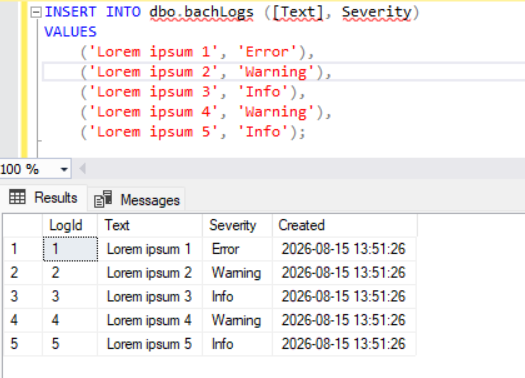
INSERT INTO dbo.bachLogs ([Text], Severity)
VALUES
    ('Lorem ipsum 1', 'Error'),
    ('Lorem ipsum 2', 'Warning'),
    ('Lorem ipsum 3', 'Info'),
    ('Lorem ipsum 4', 'Warning'),
    ('Lorem ipsum 5', 'Info');

SELECT LogId, [Text], Severity, Created
FROM dbo.bachLogs
ORDER BY LogId;
3. Inspect the identity
DBCC CHECKIDENT ('dbo.bachLogs', NORESEED);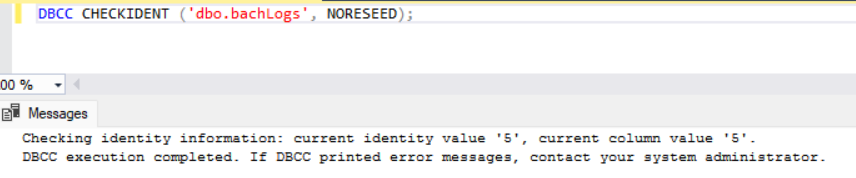
4. Delete all rows and reseed
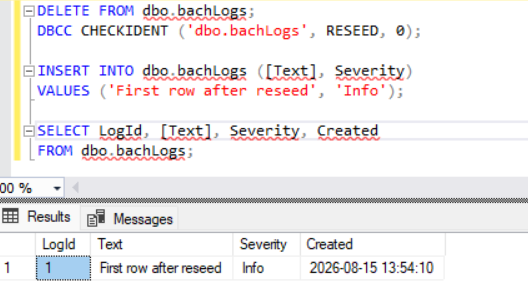
DELETE FROM dbo.bachLogs;
DBCC CHECKIDENT ('dbo.bachLogs', RESEED, 0);

INSERT INTO dbo.bachLogs ([Text], Severity)
VALUES ('First row after reseed', 'Info');

SELECT LogId, [Text], Severity, Created
FROM dbo.bachLogs;
Why 0 instead of 1?
After rows have existed in a table, including when all rows were removed with DELETE, the next generated identity is the current reseed value plus the increment. For IDENTITY(1, 1), reseeding to 0 makes the next value 1.
DELETE vs TRUNCATE TABLE
Operation | Rows | Identity |
|---|---|---|
| Selected or all rows | Counter normally preserved |
| All rows, or supported partitions | Full truncate resets counter to the defined seed |
TRUNCATE TABLE dbo.bachLogs;

INSERT INTO dbo.bachLogs ([Text], Severity)
VALUES ('First row after truncate', 'Info');
For IDENTITY(1, 1), the first row after a full truncate receives 1. No extra reseed is needed simply to restore the original seed.
Note
TRUNCATE is not interchangeable with DELETE. It has different logging, locking, permissions, trigger behavior, and restrictions, including foreign key constraints.
Production considerations
Before reseeding a production table, inspect the data and current identity state, verify keys and relationships, and account for concurrent application inserts.
SELECT
    COUNT_BIG(*) AS [RowCount],
    MIN(LogId) AS MinLogId,
    MAX(LogId) AS MaxLogId
FROM dbo.bachLogs;

DBCC CHECKIDENT ('dbo.bachLogs', NORESEED);
If the application can insert while you delete and reseed, coordinate a maintenance window or otherwise prevent concurrent writes. Keep transactions short because large deletes can generate substantial transaction-log activity and hold locks.
Can this be transactional?
Yes. SQL Server can roll back TRUNCATE TABLE when it is executed inside a transaction. A controlled DELETE plus reseed can also be grouped in a transaction when the locking and availability impact is acceptable.
Frequently Asked Questions
Does DELETE reset identity?
No. Use DBCC CHECKIDENT when an explicit reseed is required.
Does TRUNCATE TABLE reset identity?
Yes. A full truncate resets the counter to the seed defined for the column.
Does DBCC CHECKIDENT renumber existing rows?
No. It checks or changes the current identity value used for subsequent generation.
Should I reseed after deleting some rows?
Usually not. Gaps are normal.
How do I make the next ID 1 after DELETE?
For IDENTITY(1, 1) after deleting all rows, use DBCC CHECKIDENT ('dbo.TableName', RESEED, 0).
References
Key takeaways
Inspect first with
NORESEED.After DELETE, reseed a typical
IDENTITY(1, 1)table to 0 when the next generated value must be 1.TRUNCATE resets the identity counter automatically.
Do not reseed simply to remove harmless gaps.
Be careful with populated tables and concurrent writes.


