
Sorting search results alphabetically by a content node's name sounds like a straightforward requirement. With Umbraco Examine, however, a field must be indexed with the appropriate field definition before Lucene can sort reliably on it.
Key point: do not assume that a field that can be searched can also be used for sorting. For nodeName, configure the field as FullTextSortable and rebuild the affected Examine index so the corresponding sort field is generated.
1. Configure nodeName as a sortable Examine field
The example below modifies the configuration of Umbraco's Internal Index. The component retrieves its LuceneDirectoryIndexOptions and replaces or adds the nodeName field definition with FieldDefinitionTypes.FullTextSortable.
public class ExamineSortableNodeNameFieldComponent : IComponent
{
    private readonly IOptionsMonitor<LuceneDirectoryIndexOptions> _indexOptions;

    public ExamineSortableNodeNameFieldComponent(
        IOptionsMonitor<LuceneDirectoryIndexOptions> indexOptions)
    {
        _indexOptions = indexOptions;
    }

    public void Initialize()
    {
        var internalIndexOptions = _indexOptions.Get(Constants.UmbracoIndexes.InternalIndexName);

        if (internalIndexOptions == null)
            throw new InvalidOperationException($"Unable to obtain options for {Constants.UmbracoIndexes.InternalIndexName}.");

        EnsureSortableNodeNameField(internalIndexOptions);
    }

    private void EnsureSortableNodeNameField(LuceneDirectoryIndexOptions internalIndexOptions)
    {
        var nodeNameSortableFieldDefinition = new FieldDefinition(
            UmbracoExamineFieldNames.NodeNameFieldName, // nodeName
            FieldDefinitionTypes.FullTextSortable);

        internalIndexOptions.FieldDefinitions.AddOrUpdate(nodeNameSortableFieldDefinition);
    }

    public void Terminate() { }
}
How the component works
IOptionsMonitor<LuceneDirectoryIndexOptions> gives the component access to the named Lucene index configuration. Calling Get(Constants.UmbracoIndexes.InternalIndexName) retrieves the options for Umbraco's Internal Index.
UmbracoExamineFieldNames.NodeNameFieldName identifies the standard nodeName Examine field. The important part is the field type:
FieldDefinitionTypes.FullTextSortableA sortable field definition causes Examine/Lucene to maintain the additional representation required for sorting. AddOrUpdate is used because nodeName already exists in the index configuration.
Register the component
The component also needs to be registered with Umbraco. A ComponentComposer<T> is enough for this implementation:
public class ExamineSortableNodeNameFieldComposer : ComponentComposer<ExamineSortableNodeNameFieldComponent> { }When Umbraco starts, the composer registers the component and its Initialize()
2. Rebuild the Examine index
Changing a field definition does not retroactively rewrite documents that are already stored in the Lucene index. Restart the application, if necessary, so the new configuration is active, then rebuild the Internal Index from the Examine management screen in the Umbraco back office.
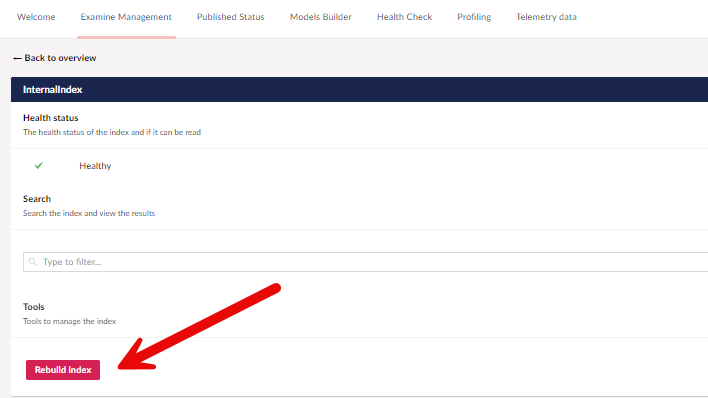
Rebuild the affected Examine index from the Umbraco back office. A full rebuild is required because existing indexed documents were created before nodeName was configured as a sortable field.
3. Verify the generated __Sort_nodeName field
After the rebuild completes, inspect a document in the Examine index. You should see the additional __Sort_nodeName field.
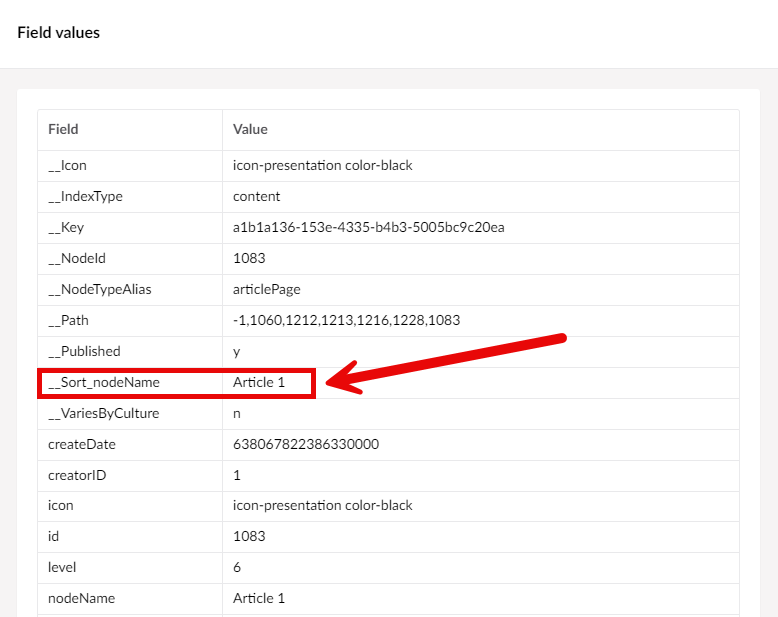
The Examine index view after rebuilding. The presence of __Sort_nodeName confirms that Examine generated the sortable representation of the standard nodeName field.
This is the practical verification step that is easy to miss. If __Sort_nodeName is absent, sorting by nodeName will not behave as expected even if the query itself is syntactically valid.
Important considerations
This example targets the Internal Index. If your search uses another Examine index, apply the field definition to that index instead.
Rebuilding is part of the change. Updating index options alone is not enough for content that has already been indexed.
Verify the actual index used by your query. Configuring the Internal Index will not affect a custom or external index.
Keep the field name consistent. The solution deliberately uses Umbraco's
UmbracoExamineFieldNames.NodeNameFieldNameconstant rather than repeating thenodeNamestring.
Summary
To sort Umbraco 13 Examine results by the built-in nodeName field, configure that field as FullTextSortable, register the component, rebuild the relevant Examine index, and verify that __Sort_nodeName exists. Once those pieces are in place, the index contains the sortable value that your Examine sorting query requires.


