
Umbraco registers several Examine indexes by default, but your application may not need every one of them.
In this tutorial, you will learn how to remove a specific Examine index by name from Umbraco's service registrations. This gives you a flexible way to exclude an index that is unnecessary for your application without changing the remaining Examine configuration.
Before removing an index, make sure that no Umbraco feature, custom search implementation, or third-party package depends on it.
Reviewing Active Umbraco Indexes in Umbraco Backoffice
When you go to the 'Settings' section and select the 'Examine Management' tab, you will see all active Examine indexes:
DeliveryApiContentIndex
ExternalIndex
InternalIndex
MembersIndex
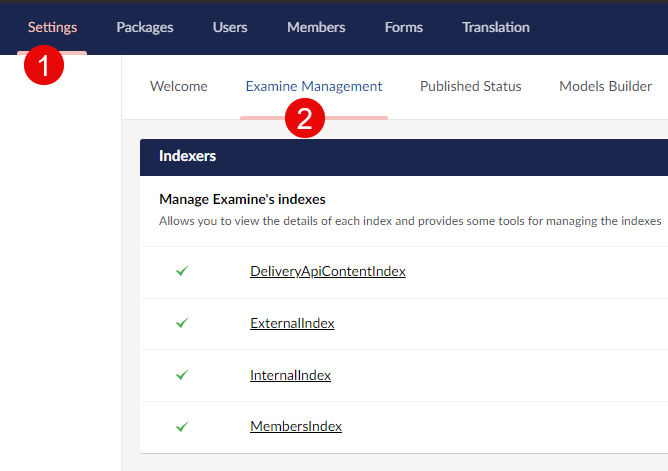
Active Examine indexes in Umbraco Settings view
This means that all four indexes are active.
Understanding Registering Examine Indexes in Runtime
In Umbraco, indexes are typically registered through the ServicesCollectionExtensions.cs file using the AddExamineLuceneIndex<TIndex, TDirectoryFactory>() method.
Here's a simplified look at how this registration process works:
/// <summary>
/// Registers an Examine index
/// </summary>
public static IServiceCollection AddExamineLuceneIndex<TIndex, TDirectoryFactory>(
	this IServiceCollection serviceCollection,
	string name,
	FieldDefinitionCollection fieldDefinitions = null,
	Analyzer analyzer = null,
	IValueSetValidator validator = null,
	IReadOnlyDictionary<string, IFieldValueTypeFactory> indexValueTypesFactory = null)
	where TIndex : LuceneIndex
	where TDirectoryFactory : class, IDirectoryFactory
{
	// This is the long way to add IOptions but gives us access to the
	// services collection which we need to get the dir factory
	serviceCollection.AddSingleton<IConfigureOptions<LuceneDirectoryIndexOptions>>(
		services => new ConfigureNamedOptions<LuceneDirectoryIndexOptions>(
			name,
			(options) =>
			{
				options.Analyzer = analyzer;
				options.Validator = validator;
				options.IndexValueTypesFactory = indexValueTypesFactory;
				options.FieldDefinitions = fieldDefinitions ?? options.FieldDefinitions;
				options.DirectoryFactory = services.GetRequiredService<TDirectoryFactory>();
			}));

	return serviceCollection.AddSingleton<IIndex>(services =>
	{
		IOptionsMonitor<LuceneDirectoryIndexOptions> options
				= services.GetRequiredService<IOptionsMonitor<LuceneDirectoryIndexOptions>>();

		TIndex index = ActivatorUtilities.CreateInstance<TIndex>(
			services,
			new object[] { name, options });

		return index;
	});
}
In the above code, the AddExamineLuceneIndex method registers a new Examine index in Umbraco using dependency injection.
It defines various configurations for the index, including the analyzer, validator, and directory factory, all of which are crucial components of the Lucene indexing system.
Removing Examine Index by Name
To remove an Examine index registration by name, you can use the following extension method:
public static class UmbracoBuilderExtensions
{
	public static void RemoveExamineIndex(this IUmbracoBuilder builder, string indexName)
	{
		var services = builder.Services;

		// Find all IIndex services registered
		var indexServiceDescriptors = builder.Services
			.Where(s => s.ServiceType == typeof(IIndex))
			.ToList();

		foreach (var service in indexServiceDescriptors)
		{
			if (service.ImplementationFactory != null)
			{
				// Inspect the factory target (closure)
				var factoryTarget = service.ImplementationFactory.Target;

				if (factoryTarget != null)
				{
					var targetType = factoryTarget.GetType();
					var fields = targetType.GetFields(BindingFlags.Public | BindingFlags.Instance);

					foreach (var field in fields)
					{
						// Check if the field is named "name" and is a string
						if (field.Name == "name" && field.FieldType == typeof(string))
						{
							var fieldValue = field.GetValue(factoryTarget);

							if (fieldValue != null && fieldValue.ToString() == indexName)
							{
								// If the field value matches the indexName, remove the service
								services.Remove(service);

								Console.WriteLine($"Examine {indexName} index found and removed.");

								return;
							}
						}
					}
				}
			}
		}
	}
}
As you can see - RemoveExamineIndex method takes advantage of C# reflection to find the correct index.
The method inspects all registered IIndex services, finds those that match the specified indexName, and removes them from the services collection.
Removing Umbraco ExternalIndex and DeliveryApiContentIndex
Let's say you want to remove two indexes: ExternalIndex and DeliveryApiContentIndex.
You just need to register a Composer and call the RemoveExamineIndex method twice with the appropriate index name as below:
public class SolutionComposer : IComposer
{
	public void Compose(IUmbracoBuilder builder)
	{
		builder.RemoveExamineIndex(Constants.UmbracoIndexes.ExternalIndexName);
		builder.RemoveExamineIndex(Constants.UmbracoIndexes.DeliveryApiContentIndexName);
	}
}
This removes the ExternalIndex and DeliveryApiContentIndex registrations during application startup. As a result, Umbraco will no longer create and maintain those indexes.
Notice that the index names are defined in Umbraco constants:
namespace Umbraco.Cms.Core;

public static partial class Constants
{
    public static class UmbracoIndexes
    {
        public const string InternalIndexName = "InternalIndex";
        public const string ExternalIndexName = "ExternalIndex";
        public const string MembersIndexName = "MembersIndex";
        public const string DeliveryApiContentIndexName = "DeliveryApiContentIndex";
    }
}
Validating Active Umbraco Indexes Again
After restarting Umbraco, return to Examine Management to verify the result. In this example, only two indexes remain active, as shown in the screenshot below:
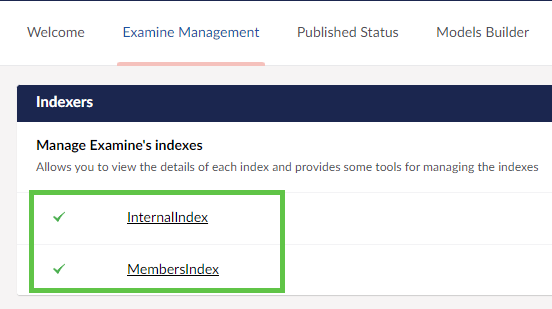
Active Examine indexes in Umbraco Settings view after index removal
Benefits of Removing Examine Indexes
Every active Examine index has a cost: it must be created, maintained, and updated when relevant content changes. Removing an index that your application does not use can therefore reduce unnecessary indexing work.
Less Indexing Work
An unused index does not need to be updated during content changes or rebuilt when indexes are regenerated. This can be particularly relevant for large content trees, imports, or applications with frequent publishing.
Lower Resource Usage
Each Lucene index consumes storage and requires processing to keep its data up to date. Removing an unnecessary index reduces that workload.
Simpler Examine Configuration
Keeping only the indexes required by your application makes the Examine setup easier to understand, maintain, and troubleshoot.
Pain Points and Considerations
Removing an Examine index is straightforward. Determining whether the index is safe to remove requires more care.
Custom Search
Check whether application code queries the index directly, for example through Examine APIs or a custom search service. Removing an index that powers search functionality will break those queries.
Packages and Integrations
Third-party packages or custom integrations may expect a particular index to exist. Review those dependencies before changing the registered indexes.
Umbraco Features
Some indexes are part of Umbraco's own infrastructure. Do not assume that an index is unused simply because your application does not query it directly.
Testing
After removing an index, test publishing, search, backoffice functionality, scheduled operations, imports, and any integrations that interact with Examine.
Important: Do not remove InternalIndex unless you fully understand which Umbraco features depend on it.
Conclusion
Umbraco's dependency injection configuration allows removing a specific Examine index registration by name without affecting the remaining indexes.
This can be useful when an index is genuinely unnecessary, and you want to reduce indexing work or simplify the Examine configuration. The implementation itself is small, but the important part is verifying that nothing in Umbraco, your application, or installed packages depends on the index.
Always validate the complete application after removing an index and before deploying the change to production.


