
Disabling vs Permanently Deleting a User
In Umbraco 8, the normal backoffice workflow is to disable a user. The account remains in the database, but the user can no longer sign in. For most operational scenarios, this is safer than deleting the record because Umbraco can retain historical relationships between the user and content.
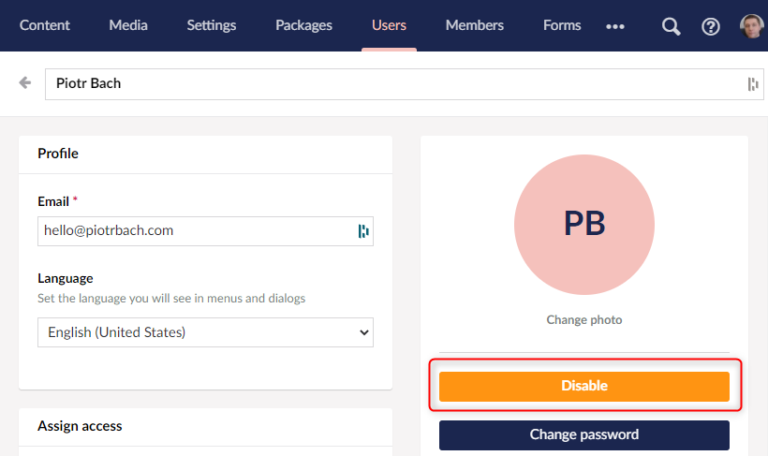
Disabling a user in the Umbraco backoffice.
If the goal is simply to revoke back-office access, disabling the account should normally be preferred. Permanent deletion is a database-level operation with wider consequences.
When a Hard Delete May Be Required
There are situations where keeping a disabled account is not the desired outcome. For example, an organization may have a documented data-retention or privacy process that requires specific personal data to be removed.
Tip
Do not treat hard deletion as an automatic GDPR requirement. Whether personal data must be erased depends on the legal basis, retention obligations, audit requirements, and the specific data involved. The technical procedure below should be part of an approved data-management process rather than used as legal guidance.
Before deleting anything, determine which user information actually needs to be removed and which historical records must remain intact.
Why You Cannot Delete Only from umbracoUser
The umbracoUser table is not isolated. A backoffice user's ID can be referenced by content versions, nodes, logs, group mappings, login records, notifications, and start-node configuration.
Deleting the user row without first handling those references can cause foreign key violations or leave inconsistent historical data.
Table | Role in the deletion |
|---|---|
| May reference the user responsible for a content version. |
| May reference the user associated with a node. |
| Contains historical log entries associated with users. |
| Maps users to backoffice user groups. |
| Stores user login-related records. |
| Stores node notification mappings. |
| Stores configured start nodes for the user. |
There are three broad strategies: delete related records, detach references where the schema permits it, or reassign historical references to another suitable user. The original implementation used a mixture of detaching historical references and deleting user-specific mappings.
Hard Delete an Umbraco 8 User with SQL
Example
This script targets Umbraco 8.6.0 and SQL Server. Database schemas can differ between Umbraco versions. Back up the database and verify the schema before running it. Do not reuse this script for modern Umbraco versions without reviewing their current schema.
Start with a transaction and ROLLBACK. This lets you inspect the result before making the deletion permanent.
BEGIN TRAN

DECLARE @userId INT = (
		SELECT id
		FROM [dbo].[umbracoUser]
		WHERE userLogin = 'user@example.com'
		);

UPDATE [dbo].[umbracoContentVersion]
SET userId = NULL
WHERE userId = @userId;

UPDATE [dbo].[umbracoNode]
SET nodeUser = NULL
WHERE nodeUser = @userId;

UPDATE [dbo].[umbracoLog]
SET userId = NULL
WHERE userId = @userId;

DELETE
FROM [dbo].[umbracoUser2UserGroup]
WHERE userId = @userId;

DELETE
FROM [dbo].[umbracoUserLogin]
WHERE userId = @userId;

DELETE
FROM [dbo].[umbracoUser2NodeNotify]
WHERE userId = @userId;

DELETE
FROM [dbo].[umbracoUserStartNode]
WHERE userId = @userId;

DELETE
FROM [dbo].[umbracoUser]
WHERE id = @userId;

ROLLBACK TRAN
-- Replace ROLLBACK TRAN with COMMIT TRAN only after validating the result.
Replace user@example.com with the login of the user you intend to remove. Run the script against a safe copy or a non-production environment first, inspect the affected data, and replace ROLLBACK TRAN with COMMIT TRAN only after you have verified the outcome.
Tip
Keep the transaction defensive. Permanent user deletion should be deliberate, reviewable, and tested against the exact Umbraco database version you use.
What Happens to Existing Content
The script sets selected historical user references to NULL rather than deleting the content itself. Existing content therefore remains available, but places that previously displayed the deleted user's identity may no longer be able to resolve that user.
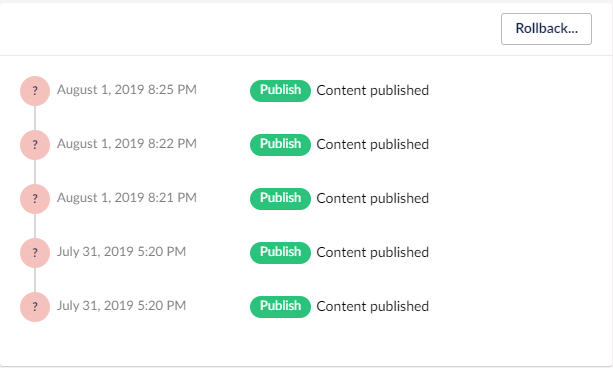
Existing content after the associated backoffice user has been removed
Content versions are not removed by this script, so the content history itself is retained. However, always test version restoration and audit views in your own installation because custom packages and schema changes can introduce additional user references.
Alternative: Hide Disabled Users in the Umbraco 8 Backoffice
If permanent deletion is unnecessary and the real problem is a cluttered Users section, Umbraco 8 provides a less destructive option: keep the account disabled and hide disabled users from the back office.
In ~/config/umbracoSettings.config, set:
<hideDisabledUsersInBackoffice>true</hideDisabledUsersInBackoffice>This preserves the user record and its historical relationships while removing disabled accounts from the normal back-office view. It also makes later reactivation possible.
Note
Prefer this approach when the requirement is operational rather than data-erasure related. Disabling and hiding a user is significantly less invasive than modifying Umbraco's database directly.
Conclusion
Permanently deleting an Umbraco 8 backoffice user is not equivalent to deleting one row from umbracoUser. User IDs participate in several relationships, so a safe hard-delete procedure must account for those references and preserve the content data that should remain.
For ordinary access management, disable the account and, if useful, hide disabled users in the backoffice. Reserve direct SQL deletion for cases where permanent removal is genuinely required, and always validate the operation against the exact database version before committing it.


