
Prerequisites
A working Umbraco CMS v8 setup.
Basic understanding of Umbraco's back office.
Familiarity with C# and Umbraco's APIs.
Role-Based Customization of Umbraco CMS Back-Office Interface
Role-based visibility can simplify the back office by showing editors only the properties and tabs relevant to their responsibilities.
The implementation below uses Umbraco's backoffice model events to adjust the editing model before it is sent to the client.
Include these essential namespaces
using Umbraco.Web.Editors;
using Umbraco.Web.Models.ContentEditing;
using Umbraco.Web.PublishedModels;
using Umbraco.Core.Composing;
Create the Composer and Component
The custom composer registers the component with Umbraco during application startup.
[RuntimeLevel(MinLevel = RuntimeLevel.Run)]
public class HideContentPartsComposer : IUserComposer
{
    public void Compose(Composition composition)
    {
        composition.Components().Append<HideContentPartsComponent>();
    }
}
Now, create the component that handles the logic for showing or hiding content based on the user's role.
public class HideContentPartsComponent: IComponent
{
    public void Initialize()
    {
        throw new NotImplementedException();
    }

    public void Terminate()
    {
        throw new NotImplementedException();
    }
}
Register SendingContentModel event
Secondly, go to HideContentPartsComponent and set the SendingContentModel event for EditorModelEventManager as follows:
public void Initialize()
{
    EditorModelEventManager.SendingContentModel += EditorModelEventManager_SendingContentModel;
}

private void EditorModelEventManager_SendingContentModel(HttpActionExecutedContext sender, EditorModelEventArgs<ContentItemDisplay> e)
{
   //Restrict visibility here
}
Finding user groups for logged-in Umbraco user
To determine which user groups the logged-in backoffice user belongs to, read the groups from the current user in UmbracoContext:
IList<string> _currentUserGroupsAliasses =
    e.UmbracoContext.Security.CurrentUser?.Groups?.Select(userGroup => userGroup.Alias).ToList();
Showing content fields only for the role
private void ShowFieldOnlyForRole(ContentItemDisplay contentItemDisplay, string contentTypeAlias, string propertyAlias, string userGroup)
{
    if (contentItemDisplay.ContentTypeAlias.Equals(contentTypeAlias))
    {
        if (!_currentUserGroupsAliasses.IsNullOfEmpty() && !_currentUserGroupsAliasses.Contains(userGroup))
        {
            foreach (var tab in contentItemDisplay?.Variants?.FirstOrDefault()?.Tabs?.ToList())
            {
                if (!tab.Properties.IsNullOfEmpty())
                {
                    tab.Properties = tab.Properties.Where(x => x.Alias != propertyAlias);
                }
            }
        }
    }
}
For example, to display the 'google manager' field exclusively for administrators, use the following method:
/* Show google manager field only for admin */
ShowFieldOnlyForRole(contentItemDisplay: e.Model, contentTypeAlias: "globalSettings",
    propertyAlias: "googleTagManagerId", userGroup: "admin");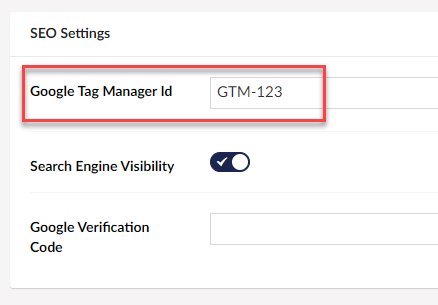
Showing googleTagManagerId field for admin role
Showing content tabs only for the role
private void ShowTabOnlyForRole(ContentItemDisplay contentItemDisplay, string contentTypeAlias, string tabAlias, string userGroup)
{
    if (contentItemDisplay.ContentTypeAlias.Equals(contentTypeAlias))
    {
        if (!_currentUserGroupsAliasses.IsNullOfEmpty() && !_currentUserGroupsAliasses.Contains(userGroup))
        {
            if ((contentItemDisplay?.Variants?.FirstOrDefault()?.Tabs?.Any()).GetValueOrDefault(false))
            {
                contentItemDisplay.Variants.FirstOrDefault().Tabs =
                    contentItemDisplay.Variants.FirstOrDefault().Tabs.Where(x=> x.Alias != tabAlias);
            }
        }
    }
}
To show the ‘SEO Settings’ tab only for the admin role, execute the method as follows:
/* Show 'SEO Settings' tab only for admin role */
ShowTabOnlyForRole(contentItemDisplay: e.Model, contentTypeAlias: "globalSettings",
    tabAlias: "SEO Settings", userGroup: "admin");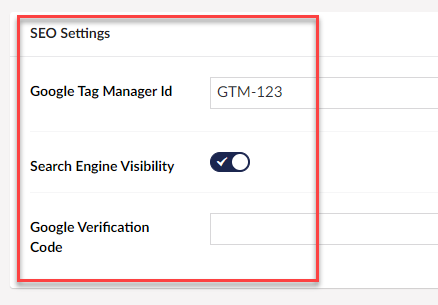
Showing SEO Settings tab only for admin role
Show content tab only for specific roles
To make ‘SEO Settings’ tab visible only for both admin and editor roles, execute the method as follows:
ShowTabsOnlyForRoles(contentItemDisplay: e.Model, contentTypeAlias: "globalSettings",
    tabAliases: new []{ "Content", "SEO Settings"} , userGroups: new []{ "admin", "editor"  } );
private void ShowTabsOnlyForRoles(ContentItemDisplay contentItemDisplay, string contentTypeAlias, string[] tabAliases, string[] userGroups)
{
if (contentItemDisplay.ContentTypeAlias.Equals(contentTypeAlias))
{
if (!_currentUserGroupsAliasses.IsNullOfEmpty() && !userGroups.IsNullOfEmpty() && !_currentUserGroupsAliasses.Any(cug=> userGroups.Any(ug=>ug == cug)))
{
if ((contentItemDisplay?.Variants?.FirstOrDefault()?.Tabs?.Any()).GetValueOrDefault(false))
{
contentItemDisplay.Variants.FirstOrDefault().Tabs =
contentItemDisplay.Variants.FirstOrDefault().Tabs.Where(x=> !tabAliases.Contains(x.Alias));
}
}
}
}Show list of tabs only for specific roles
To make ‘SEO Settings’ and “Content” tab visible only for both admin and editor user groups, execute the method as follows:
ShowTabsOnlyForRoles(contentItemDisplay: e.Model, contentTypeAlias: "globalSettings",
tabAliases: new []{ "Content", "SEO Settings"} , userGroups: new []{ "admin", "editor" } );private void ShowTabsOnlyForRoles(ContentItemDisplay contentItemDisplay, string contentTypeAlias, string[] tabAliases, string[] userGroups)
{
if (contentItemDisplay.ContentTypeAlias.Equals(contentTypeAlias))
{
if (!_currentUserGroupsAliasses.IsNullOfEmpty() && !userGroups.IsNullOfEmpty() && !_currentUserGroupsAliasses.Any(cug=> userGroups.Any(ug=>ug == cug)))
{
if ((contentItemDisplay?.Variants?.FirstOrDefault()?.Tabs?.Any()).GetValueOrDefault(false))
{
contentItemDisplay.Variants.FirstOrDefault().Tabs =
contentItemDisplay.Variants.FirstOrDefault().Tabs.Where(x=> !tabAliases.Contains(x.Alias));
}
}
}
}Helper Extensions
We'll include an extension method to streamline the code.
using System.Collections.Generic;
public static class CollectionsExtensions
{
public static bool IsNullOrEmpty<T>(this ICollection<T> collection)
{
return collection == null || !collection.Any();
}
}Working HideContentPartsComponent implementation
public class HideContentPartsComponent: IComponent
{
IList<string> _currentUserGroupsAliasses;
public void Initialize()
{
EditorModelEventManager.SendingContentModel += EditorModelEventManager_SendingContentModel;
}
private void EditorModelEventManager_SendingContentModel(HttpActionExecutedContext sender, EditorModelEventArgs<ContentItemDisplay> e)
{
_currentUserGroupsAliasses = e.UmbracoContext.Security.CurrentUser?.Groups?.Select(userGroup => userGroup.Alias).ToList();
/* Show google manager field only for admin */
ShowFieldOnlyForRole(contentItemDisplay: e.Model, contentTypeAlias: "globalSettings",
propertyAlias: "googleTagManagerId", userGroup: "admin");
/* Show 'SEO Settings' tab only for admin role */
ShowTabOnlyForRole(contentItemDisplay: e.Model, contentTypeAlias: "globalSettings",
tabAlias: "SEO Settings", userGroup: "admin");
}
private void ShowFieldOnlyForRole(ContentItemDisplay contentItemDisplay, string contentTypeAlias, string propertyAlias, string userGroup)
{
if (contentItemDisplay.ContentTypeAlias.Equals(contentTypeAlias))
{
if (!_currentUserGroupsAliasses.IsNullOfEmpty() && !_currentUserGroupsAliasses.Contains(userGroup))
{
foreach (var tab in contentItemDisplay?.Variants?.FirstOrDefault()?.Tabs?.ToList())
{
if (!tab.Properties.IsNullOfEmpty())
{
tab.Properties = tab.Properties.Where(x => x.Alias != propertyAlias);
}
}
}
}
}
private void ShowTabOnlyForRole(ContentItemDisplay contentItemDisplay, string contentTypeAlias, string tabAlias, string userGroup)
{
if (contentItemDisplay.ContentTypeAlias.Equals(contentTypeAlias))
{
if (!_currentUserGroupsAliasses.IsNullOfEmpty() && !_currentUserGroupsAliasses.Contains(userGroup))
{
if ((contentItemDisplay?.Variants?.FirstOrDefault()?.Tabs?.Any()).GetValueOrDefault(false))
{
contentItemDisplay.Variants.FirstOrDefault().Tabs =
contentItemDisplay.Variants.FirstOrDefault().Tabs.Where(x=> x.Alias != tabAlias);
}
}
}
}
private void ShowTabOnlyForRoles(ContentItemDisplay contentItemDisplay, string contentTypeAlias, string tabAlias, string[] userGroups)
{
if (contentItemDisplay.ContentTypeAlias.Equals(contentTypeAlias))
{
if (!_currentUserGroupsAliasses.IsNullOfEmpty() && !userGroups.IsNullOfEmpty() && !_currentUserGroupsAliasses.Any(cug=> userGroups.Any(ug=>ug == cug)))
{
if ((contentItemDisplay?.Variants?.FirstOrDefault()?.Tabs?.Any()).GetValueOrDefault(false))
{
contentItemDisplay.Variants.FirstOrDefault().Tabs =
contentItemDisplay.Variants.FirstOrDefault().Tabs.Where(x=> !x.Alias.Equals(tabAlias));
}
}
}
}
private void ShowTabsOnlyForRoles(ContentItemDisplay contentItemDisplay, string contentTypeAlias, string[] tabAliases, string[] userGroups)
{
    if (contentItemDisplay.ContentTypeAlias.Equals(contentTypeAlias))
    {
        if (!_currentUserGroupsAliasses.IsNullOfEmpty() && !userGroups.IsNullOfEmpty() && !_currentUserGroupsAliasses.Any(cug=> userGroups.Any(ug=>ug == cug)))
        {
            if ((contentItemDisplay?.Variants?.FirstOrDefault()?.Tabs?.Any()).GetValueOrDefault(false))
            {
                contentItemDisplay.Variants.FirstOrDefault().Tabs =
                    contentItemDisplay.Variants.FirstOrDefault().Tabs.Where(x=> !tabAliases.Contains(x.Alias));
            }
        }
    }
}
public void Terminate()
{
EditorModelEventManager.SendingContentModel -= EditorModelEventManager_SendingContentModel;
}
}Common pitfall and workaround when hiding properties/tabs in Umbraco
However, not everything works beautifully, as the Umbraco documentation says.
Wojciech Tengler noticed a bug.
There is an important side effect to consider: removing properties from the editing model can cause them to be submitted without their existing values.
If the existing value must be preserved, an alternative is to keep the property in the model and replace its editor view with a read-only or no-access view.
The following pseudo-code demonstrates this approach:
var tabAlias = "tabAliasToHide";

foreach(var variant in model.Variants) {
    var tabsToHide = variant.Tabs.Where(t => t.Alias.Equals(tabAlias));

    foreach(var tab in tabsToHide) {
        foreach(var propety in tab.Properties) {
            propety.View = "/App_Plugins/CustomPropertyEditorViews/PropertyWithoutAccess.html";
        }
    }
}
Conclusion
Umbraco 8's backoffice model events provide a practical way to tailor the editing experience to different user groups.
This approach can reduce editor clutter and prevent users from interacting with fields irrelevant to their role. Treat it as a back-office UX restriction rather than an authorization boundary: sensitive operations and data should still be protected by server-side permissions.
You can modify or extend the code above as needed, and I recommend exploring Umbraco events if you need more advanced back-office workflows.


