
Introduction
Version note
This technique targets the AngularJS-based Umbraco back office used in Umbraco 13 and earlier. Umbraco 14 introduced the new back office, so the AngularJS APIs shown here are not applicable to Umbraco 14+.
Carefully configuring the Multinode Treepicker start node can make a noticeable difference to the editorial experience. By opening the picker in the correct branch, editors do not need to navigate an unrelated content tree every time they select an item.
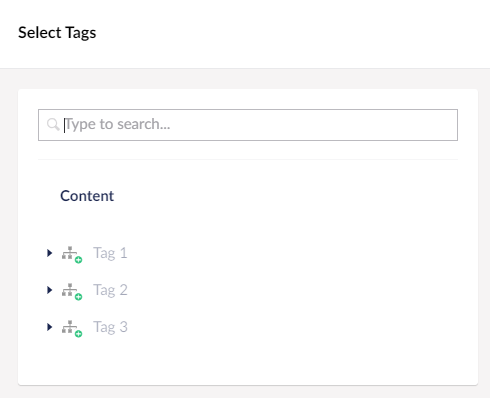
Umbraco Multinode Treepicker: selecting tags from a focused part of the content tree.
Why the Start Node Matters for Editors
Suppose you manage a large content tree and need to simplify the content-selection process for editors. By setting a specific start node for the Multinode Treepicker, you can direct editors to the relevant section immediately.
For example, if your site has a blog with a dedicated tags section, setting the picker start node to that section lets editors focus on tag-related content rather than navigating unrelated branches.
Resolve the Start Node with entityResource and XPath
In a custom AngularJS backoffice controller, first resolve the required node, then pass its ID to the tree picker. This example uses entityResource.getByQuery with the current content item as the query context:
function PlaygroundController($scope, $http, umbRequestHelper, editorService, entityResource, $routeParams) {

	$scope.openTagsPicker = function($event) {
		$event.preventDefault();

		let xPathQuery = "$site/tagsParentSection";

		entityResource.getByQuery(xPathQuery, $routeParams.id, 'Document').then(function (entity) {

			let sectionId = entity != null ? entity.id: -1;

			let contentPicker = {
				title: 'Select Tags',
				section: "content",
				treeAlias: "content",
				filterCssClass: "not-allowed not-published",
				filterAdvanced: true,
				filter: function (node) {
					return ['tag'].indexOf(node.metaData.contentType) < 0;
				},
				multiPicker: true,
				ignoreUserStartNodes: false,
				startNodeId: sectionId,
				hideHeader: false,
				idType: "udi",
				submit: function (model) {

					 // Handle selected items here.

					editorService.close();

					$event.preventDefault();
				},
				close: function () {
					editorService.close();
				}
			};

			editorService.treePicker(contentPicker);
		});
	};
}
The important sequence is: resolve $site/tagsParentSection, obtain the entity ID, and assign that ID to startNodeId before opening the picker.
Breaking Down the Code
Controller definition. PlaygroundController injects the services used by the example. The relevant dependencies here are editorService, entityResource, and $routeParams.
openTagsPicker. The function runs when the picker is opened, prevents the default event action and defines the XPath query used to find the desired start node.
Entity lookup. entityResource.getByQuery resolves the query relative to the current route node. If an entity is found, its ID becomes the picker start node.
Picker configuration. multiPicker: true enables multiple selection. The filter rejects nodes whose content type is not tag, while startNodeId determines where the tree opens.
Submit and close. Put your selection-handling logic in submit, then close the infinite editor with editorService.close().
Why Not Pass XPath Directly to the Picker?
It would be convenient to put the XPath expression directly into the JavaScript picker configuration. In this AngularJS implementation, the practical approach is to resolve the query first and pass the resulting node ID as startNodeId.
This also makes the execution flow explicit: by the time the picker opens, it already has a concrete node ID rather than an unresolved query.
Production Considerations
Handle a missing entity deliberately instead of silently opening an unexpected branch.
Keep
ignoreUserStartNodesintentional because editor start-node permissions are part of the access model.Use stable document type aliases in the XPath query and node filter.
Test with editors whose content permissions differ from administrator permissions.
Treat this AngularJS implementation as legacy backoffice code when planning an upgrade to Umbraco 14 or later.
Conclusion
For AngularJS-based Umbraco back offices, resolving the desired branch with entityResource and passing its ID to the picker is a practical way to create a focused editor experience. The key is to resolve the correct node before the picker opens.
If you are working on Umbraco 14 or later, treat this article as legacy-version guidance rather than copying the AngularJS implementation into the new backoffice.


