
Introduction
Version scope
Several packages in this guide were created for Umbraco 7, 8 or 9. Before installing any package, verify its supported Umbraco version, maintenance status, dependencies, and upgrade path.
Finding Umbraco Packages
The Umbraco ecosystem has long offered packages for development workflow, editor experience, redirects, media storage and security. Start with the Umbraco Marketplace and narrow the available packages by the problem you actually need to solve.
Do not install a package simply because it is popular. Start with the requirement, then check compatibility, maintenance status, documentation, security, and dependencies.

Navigating the Umbraco Marketplace with a Quick Search
Quick Comparison
Package | Area | What it solves | License / model | 2026 note |
|---|---|---|---|---|
uSync | Development & deployment | Synchronizes Umbraco configuration between environments and stores changes on disk so they can travel with source control. | Free core / commercial extensions | Verify compatibility before installing. |
The StarterKit | Starter site | Provides a ready-made sample site and content structure for learning Umbraco or quickly exploring a fresh installation. | Free | Useful primarily as a learning or demo starting point. |
Doc Type Grid Editor (DTGE) | Content editing | Adds document-type-driven editors to the legacy Umbraco Grid, making structured Grid components easier to build. | Free | Relevant to legacy Grid-based Umbraco projects. |
Umbraco Azure File System Provider | Media & Azure | Moves media storage to Azure Blob Storage for cloud-hosted legacy Umbraco solutions. | Free | Verify the package stack for your Umbraco version. |
SimpleRedirects | SEO & redirects | Adds a backoffice UI for managing HTTP redirects, including search and CRUD operations. | Free | Check the package page for exact version compatibility. |
Media Protect | Security | Restricts access to selected media files or folders for authenticated members or member groups. | Commercial | Evaluate current support and security requirements. |
The Dashboard | Editor experience | Surfaces recent activity, unpublished content and basic backoffice metrics for editors. | Free | Check the package page for exact version compatibility. |
Recommended Umbraco Packages
uSync
uSync synchronizes Umbraco configuration between environments. It can serialize items such as content types, data types, languages, media types, member types and templates to files, making configuration changes easier to move through source control and deployment pipelines.
Why it stood out: it addressed one of the most common problems in multi-environment Umbraco development: keeping schema and configuration changes synchronized.
The StarterKit
The StarterKit provided a ready-made site structure with example pages and content. It was useful for developers learning Umbraco, demonstrations, and quickly understanding how common document types and templates could fit together.
For production work, treat a starter kit as a learning reference rather than architecture you must preserve.
Doc Type Grid Editor (DTGE)
DTGE made it possible to create structured editors inside the legacy Umbraco Grid based on element/document type definitions. For Grid-heavy Umbraco installations, this significantly improved component development and editor consistency.
Umbraco Azure File System Provider
This package provided an Azure Blob Storage option for Umbraco media. The package supports cloud media storage, caching, and keeping media outside the web application's local file system.
It was particularly relevant to Azure-hosted sites with larger media libraries. Package support differs between Umbraco generations, so verify compatibility with your exact Umbraco version before using this integration.
SimpleRedirects
SimpleRedirects added a backoffice dashboard for managing HTTP redirects with search, paging and CRUD operations. It also includes caching configuration and supports the Umbraco versions documented by the package.
Redirect management remains important, but first check what your Umbraco version already provides before introducing another dependency.
Media Protect
Media Protect was designed to restrict access to media files and folders in a way similar to protected content. Access could be limited to authenticated members or selected member groups.
This solves a materially different problem from merely hiding a media URL: authorization must be enforced when the file is requested.
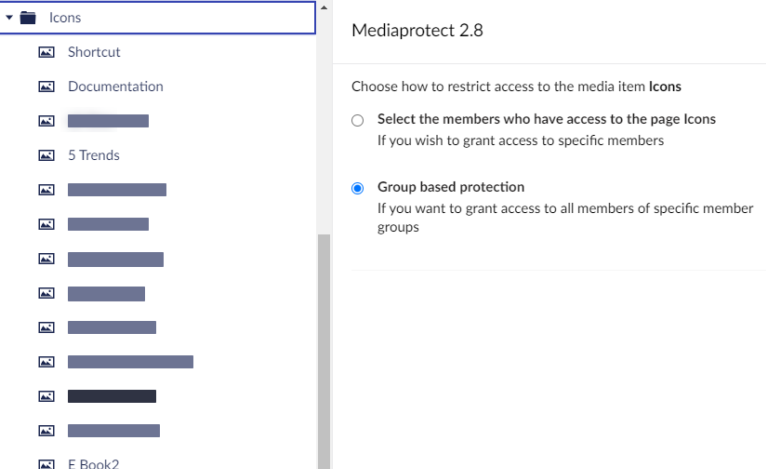
Media Protect restrict options
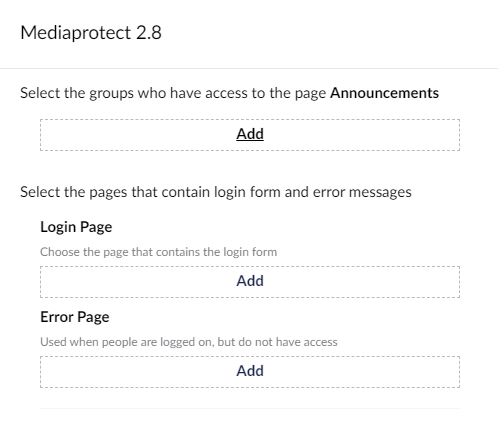
Media Protect redirect pages options
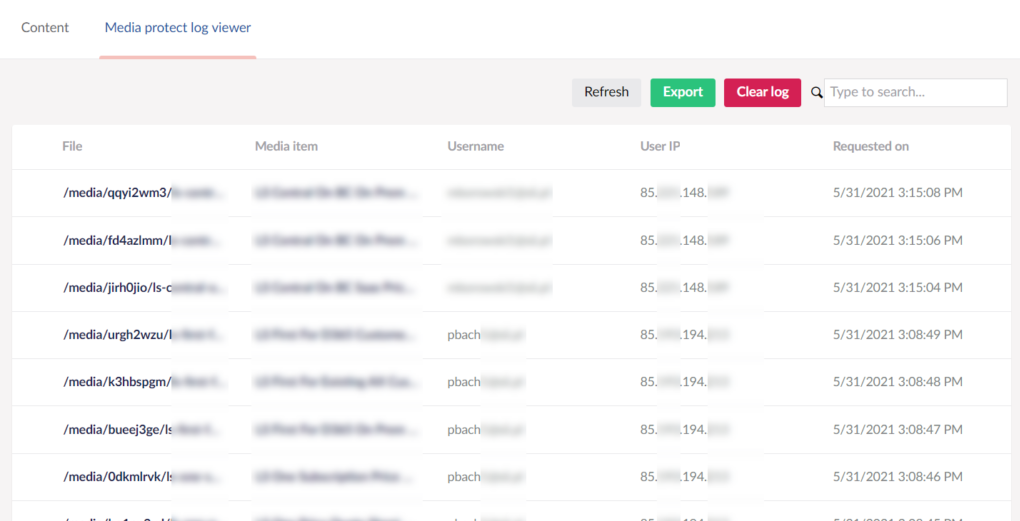
Media Protect Log Viewer
The Dashboard
The Dashboard surfaced recent backoffice activity, unpublished content and basic content/member metrics. It was intended to give editors a quick overview of what was happening in the site.
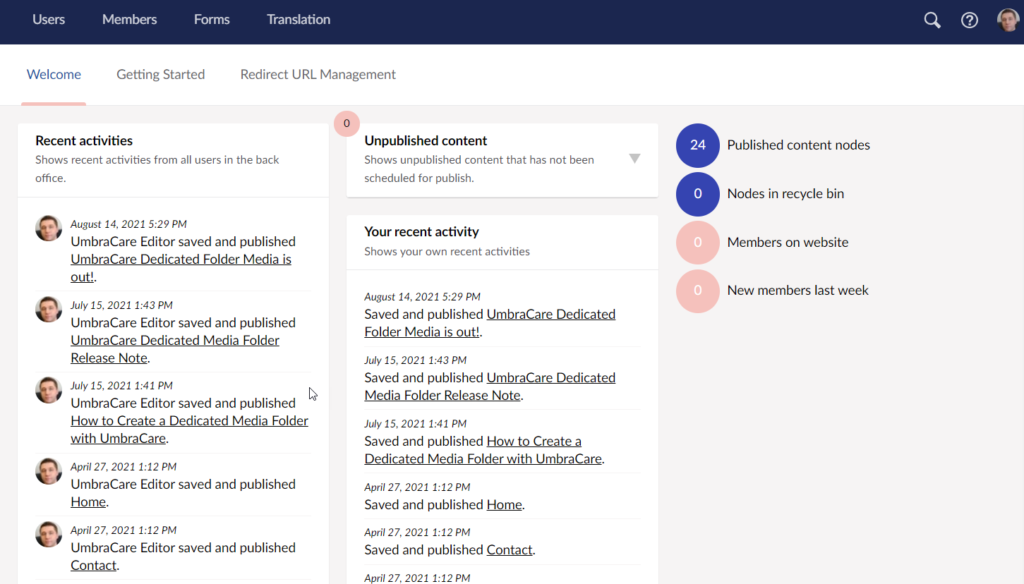
The Dashboard package for Umbraco interface overview
What to Check Before Installing an Umbraco Package
Choosing the right package matters as much as choosing the right implementation. A package becomes part of your application's architecture, dependency graph, maintenance burden, and upgrade path.
Compatibility: confirm the exact Umbraco and .NET versions supported.
Maintenance: check recent releases, issue activity and whether the project is still actively supported.
Documentation: installation, configuration, upgrade and troubleshooting guidance should be clear.
Security: review known vulnerabilities and the permissions or application areas the package touches.
Dependencies: understand what additional libraries and transitive dependencies enter your solution.
Migration cost: consider what happens when you upgrade Umbraco or remove the package later.
Testing: install and validate it in a non-production environment first, with a tested backup and rollback path.
Download counts and community popularity can provide useful context, but they should never outweigh compatibility, maintainability, security and the actual requirement
Official References
Use the current Umbraco Marketplace to check package compatibility, versions, installation details, documentation, and project links before adding a package to your solution.
Final Words
Packages can save substantial development time, but every package also increases the surface area you need to maintain. For legacy Umbraco projects, a well-supported package can still be the right choice; an abandoned dependency can just as easily become the reason an upgrade is difficult.
For older Umbraco projects, these packages can still solve real problems when their compatibility and support status match your installation. For every Umbraco version, apply the same evaluation criteria before introducing a new dependency.


