
Introduction
Version scope
This guide targets Umbraco 7, ASP.NET MVC 5, ASP.NET Web API 2, and the classic .NET Framework application model. Modern Umbraco versions use the built-in ASP.NET Core dependency injection container and should not use this setup.
Why Use Dependency Injection in Umbraco 7?
Dependency injection keeps controller code focused on HTTP and presentation concerns while application logic lives in dedicated services. In an Umbraco 7 solution, that is especially useful when the same service needs to be consumed by both MVC rendering controllers and Web API endpoints.
The main benefits are straightforward:
controllers depend on abstractions rather than concrete implementations;
services can be replaced or mocked during testing;
object lifetimes are configured centrally;
the same application service can be reused across MVC and Web API;
construction logic no longer leaks into controllers.
Umbraco 7 does not provide the ASP.NET Core DI model used by current Umbraco releases, so a third-party IoC container such as Autofac is a common option for legacy projects.
Install Autofac Integration Packages
For an Umbraco 7 project that uses both ASP.NET MVC 5 and ASP.NET Web API 2, install the Autofac integrations for both frameworks:
Install-Package Autofac.Mvc5
Install-Package Autofac.WebApi2
These packages provide the MVC and Web API controller registration helpers and their corresponding dependency resolvers.
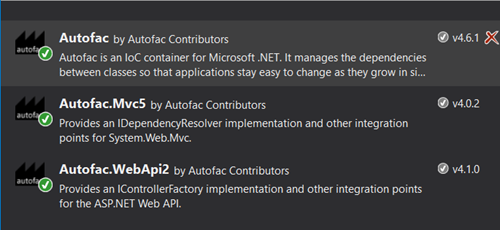
Autofac integration packages for ASP.NET MVC 5 and Web API 2.
Register Autofac During Umbraco Startup
In Umbraco 7, application startup extensions commonly inherit from ApplicationEventHandler. Build the container after Umbraco has started, and assign Autofac to both dependency-resolver pipelines.
using System.Reflection;
using System.Web.Http;
using System.Web.Mvc;
using Autofac;
using Autofac.Integration.Mvc;
using Autofac.Integration.WebApi;
using Umbraco.Core;
using Umbraco.Web;

public class AutofacApplicationEventHandler : ApplicationEventHandler
{
    protected override void ApplicationStarted(UmbracoApplicationBase umbracoApplication, ApplicationContext applicationContext)
    {
        RegisterContainer();
    }

    private static void RegisterContainer()
    {
        var builder = new ContainerBuilder();
        var applicationAssembly = Assembly.GetExecutingAssembly();

        // MVC controllers in this application.
        builder.RegisterControllers(applicationAssembly);

        // Web API controllers in Umbraco and in this application.
        builder.RegisterApiControllers(typeof(UmbracoApplication).Assembly);
        builder.RegisterApiControllers(applicationAssembly);

        // Application services.
        builder.RegisterModule<WebModule>();

        // UmbracoContext belongs to the current HTTP request.
        builder.Register(_ => UmbracoContext.Current)
            .AsSelf()
            .InstancePerRequest();

        var container = builder.Build();

        DependencyResolver.SetResolver(new AutofacDependencyResolver(container));

        GlobalConfiguration.Configuration.DependencyResolver = new AutofacWebApiDependencyResolver(container);
    }
}
Note
Two resolvers are required. ASP.NET MVC and ASP.NET Web API use separate dependency resolver abstractions. Configuring only System.Web.Mvc.DependencyResolver does not make constructor injection work in Web API controllers, and configuring only GlobalConfiguration.Configuration.DependencyResolver does not configure MVC.
Registering the Web API controllers from the Umbraco assembly is also important when Autofac becomes the Web API dependency resolver for the application.
Register Application Services
Keep application registrations in an Autofac module rather than putting every dependency into the startup method.
using Autofac;

public class WebModule : Module
{
    protected override void Load(ContainerBuilder builder)
    {
        builder.RegisterType<SampleService>()
            .As<ISampleService>()
            .InstancePerRequest();
    }
}
The sample service is deliberately small so the dependency-injection flow remains easy to see:
using System.Collections.Generic;

public interface ISampleService
{
    IReadOnlyCollection<string> GetItems();
}

public sealed class SampleService : ISampleService
{
    public IReadOnlyCollection<string> GetItems()
    {
        return new[]
        {
            "Autofac",
            "Ninject",
            "Unity",
            "Castle Windsor",
            "Spring.NET",
            "StructureMap"
        };
    }
}
Note
Choose lifetimes deliberately. InstancePerRequest() is a sensible default for services that participate in the current web request or depend on request-scoped state. Stateless services may use another lifetime when appropriate.
Inject Services into UmbracoApiController
An Umbraco Web API controller can receive the registered service through its constructor:
using System.Web.Http;
using Umbraco.Web.WebApi;

public class SampleWebApiController : UmbracoApiController
{
    private readonly ISampleService _sampleService;

    public SampleWebApiController(ISampleService sampleService)
    {
        _sampleService = sampleService;
    }

    [HttpGet]
    public IHttpActionResult Get()
    {
        return Ok(new
        {
            items = _sampleService.GetItems()
        });
    }
}
The controller now depends only on ISampleService. Autofac creates the implementation and supplies it when Web API constructs the controller.
Tip
Keep MVC and Web API types separate. UmbracoApiController belongs to the ASP.NET Web API pipeline, so return Web API results such as IHttpActionResult. Do not return System.Web.Mvc.JsonResult from a Web API controller.
Inject Services into RenderMvcController
The same service can be injected into an Umbraco MVC rendering controller:
using System.Web.Mvc;
using Umbraco.Core.Models;
using Umbraco.Web.Models;
using Umbraco.Web.Mvc;

public class SampleRenderMvcController : RenderMvcController
{
    private readonly ISampleService _sampleService;

    public SampleRenderMvcController(ISampleService sampleService)
    {
        _sampleService = sampleService;
    }

    public override ActionResult Index(RenderModel model)
    {
        var viewModel = new ExtendedModel(model.Content)
        {
            Items = _sampleService.GetItems()
        };

        return CurrentTemplate(viewModel);
    }
}

public class ExtendedModel : RenderModel
{
    public ExtendedModel(IPublishedContent content)
        : base(content)
    {
    }

    public IReadOnlyCollection<string> Items { get; set; }
}
The corresponding Razor view can consume the extended model:
@inherits Umbraco.Web.Mvc.UmbracoViewPage<ExtendedModel>

<p>Popular IoC containers:</p>

<ul>
    @foreach (var item in Model.Items)
    {
        <li>@item</li>
    }
</ul>
This demonstrates the useful part of a mixed MVC/Web API setup: both controller types use the same application abstraction and the container owns the concrete implementation.
Test MVC and Web API Resolution
Test the Web API endpoint
Call the API endpoint with a browser, Postman, or another HTTP client. A successful response confirms that Autofac can construct the UmbracoApiController and resolve ISampleService.
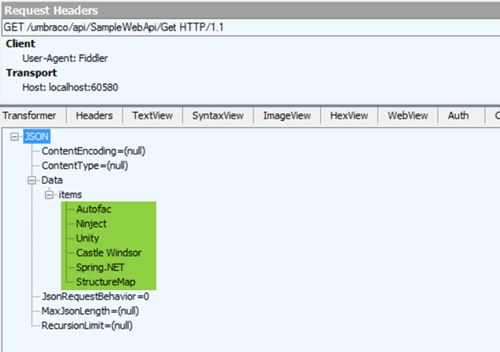
Testing the Umbraco 7 Web API endpoint in Postman.
Test the MVC rendering controller
Render the page that uses SampleRenderMvcController. If the list is displayed, Autofac is also resolving the MVC controller correctly.
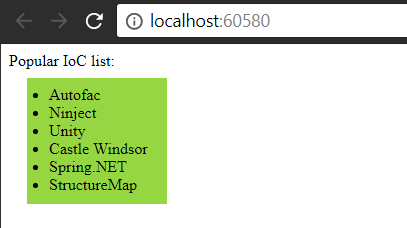
Umbraco 7 rendering values supplied through the injected service.
Common Pitfalls
Registering only application Web API controllers
Once Autofac owns Web API controller creation, Umbraco's own API controllers may also need to be registered. Include typeof(UmbracoApplication).Assembly in RegisterApiControllers().
Using the wrong dependency resolver
MVC and Web API have different resolvers. Configure both when the application uses both controller stacks.
Treating UmbracoContext.Current as a singleton
UmbracoContext is tied to the active request. Register it per request rather than capturing one instance when the container is built.
Resolving request-dependent services during container construction
Register factories and lifetimes so request-bound objects are created when a request exists. Avoid eagerly constructing objects that expect HttpContext or UmbracoContext during application startup.
Using this architecture in current Umbraco
This is a legacy Umbraco 7 integration. Modern Umbraco runs on ASP.NET Core and has built-in dependency injection; introducing Autofac this way would solve a problem that no longer exists in the same form.
References
Conclusion
Autofac can provide clean constructor injection across both MVC and Web API in an Umbraco 7 application, but the integration has to respect the two separate ASP.NET controller pipelines.
Register your MVC controllers, register both application and Umbraco Web API controllers, keep application services in modules, use request-aware lifetimes for request-bound dependencies, and assign both Autofac dependency resolvers.
For a legacy Umbraco 7 codebase, this keeps controller construction predictable and makes application services easier to test and maintain until the system is upgraded or retired.


