
This case started with a real production failure in Umbraco 13.5.2. One JSON log file contained an event deep enough to exceed the default reader depth introduced by Newtonsoft.Json 13.0.1. The result was not just one missing log entry. In practice, the backoffice LogViewer could become unusable.
The first response was a custom ILogViewer with explicit JSON serializer settings. That restored the diagnostic workflow. Later, however, a different class of corruption appeared: an incomplete JSON event caused JsonSerializationException: Unexpected end when deserializing object. The custom viewer could now parse deeper JSON, but it was still repeatedly touching a file that could not be deserialized correctly.
The final design principle was simple: a diagnostic tool should not repeatedly fail due to a bad input file. Detect the known parser failure, quarantine the file, keep the original evidence, and continue reading healthy logs.
Incident 1: one log file made LogViewer practically unusable
The original failure was visible in the Umbraco back office as an inability to parse a line from the JSON log file. Instead of isolating the bad input and continuing, the failure affected the LogViewer experience itself.
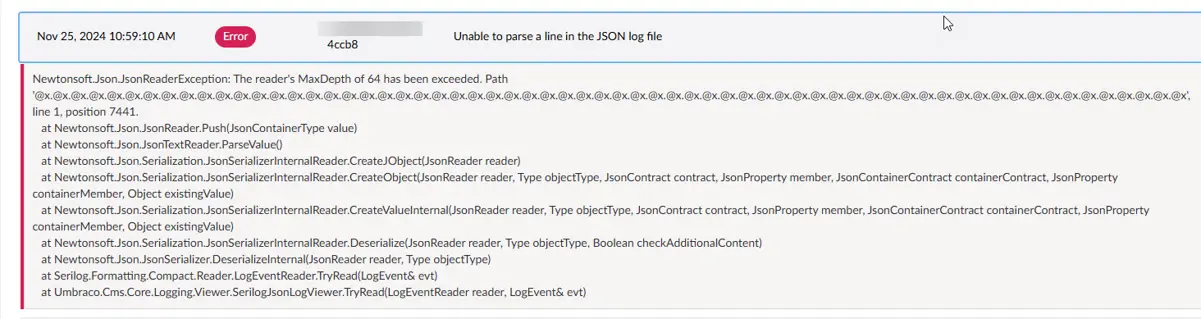
The original Umbraco 13 LogViewer parsing failure
The exception behind that incident was:
Newtonsoft.Json.JsonReaderException: The reader's MaxDepth of 64 has been exceeded.That detail matters because the failure was not caused by invalid JSON. The event could be structurally valid but nested deeper than the reader allowed.
Why Newtonsoft.Json MaxDepth 64 mattered
Newtonsoft.Json 13.0.1 introduced a default maximum JSON depth of 64. Umbraco 13.5.2 could therefore encounter a log event that older behavior had accepted, but the updated JSON reader rejected.
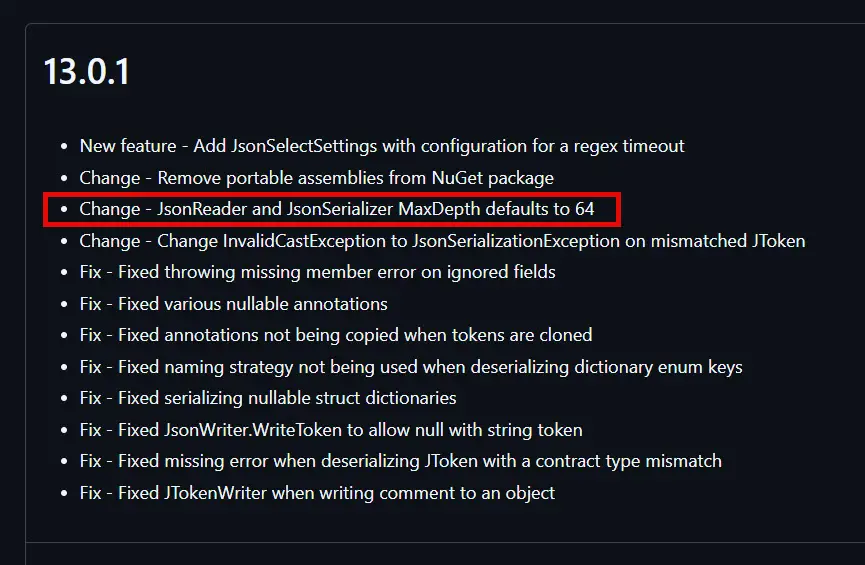
The Newtonsoft.Json default depth
The issue was reported to Umbraco as #17629, with a related pull request #17630. During the discussion, the more appropriate application-level option was to replace the default LogViewer rather than globally change Core behavior for every installation.
For this production application, we used MaxDepth = 128. That value solved the actual incident, but it should not be treated as a universal Umbraco recommendation. It is an application-specific tolerance setting. If your log data can legitimately exceed that depth, moving the number again only moves the boundary.
Replacing the default ILogViewer
The custom implementation gave us control over deserialization and later became the natural place to add fault isolation. Registration remained intentionally small:
public static IUmbracoBuilder SetCustomLogViewer(this IUmbracoBuilder builder)
{
    builder.Services.AddSingleton<ILogViewer, UmbracoCustomLogViewer>();

    return builder;
}
The back-office workflow itself did not change. Editors and developers continued using the standard LogViewer UI while the service behind it was replaced.
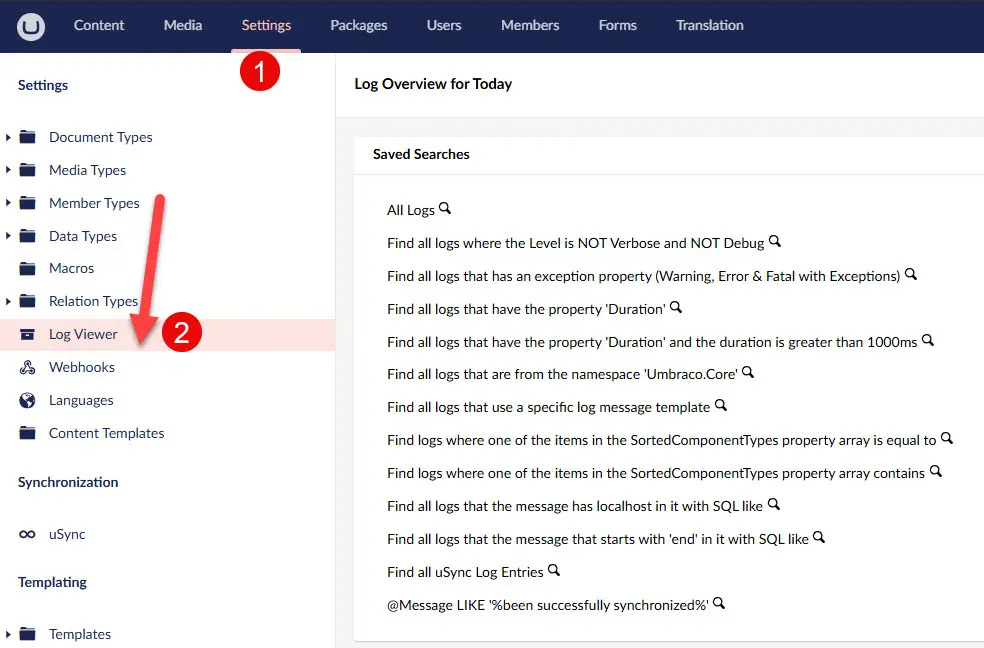
The standard Umbraco 13 backoffice LogViewer
Incident 2: a different JSON failure appeared later
Increasing the permitted JSON depth solved the first incident, but it could not make malformed or incomplete JSON valid. Later, the LogViewer encountered a different exception:
Newtonsoft.Json.JsonSerializationException: Unexpected end when deserializing object.
Path '@x', line 1, position 931.
The stack trace reached Serilog.Formatting.Compact.Reader.LogEventReader.TryRead(). The important operational symptom was recurrence. Each attempt to browse the affected logs touched the same broken file again, generated another warning or error, and made the diagnostic output noisier.
We did not establish a proven root cause for how the file became incomplete. A deployment-time or disposal-related explanation was considered during troubleshooting, but it remained a hypothesis. The solution therefore should not depend on guessing why the file was corrupted. It should handle the corrupted input safely whenever it appears.
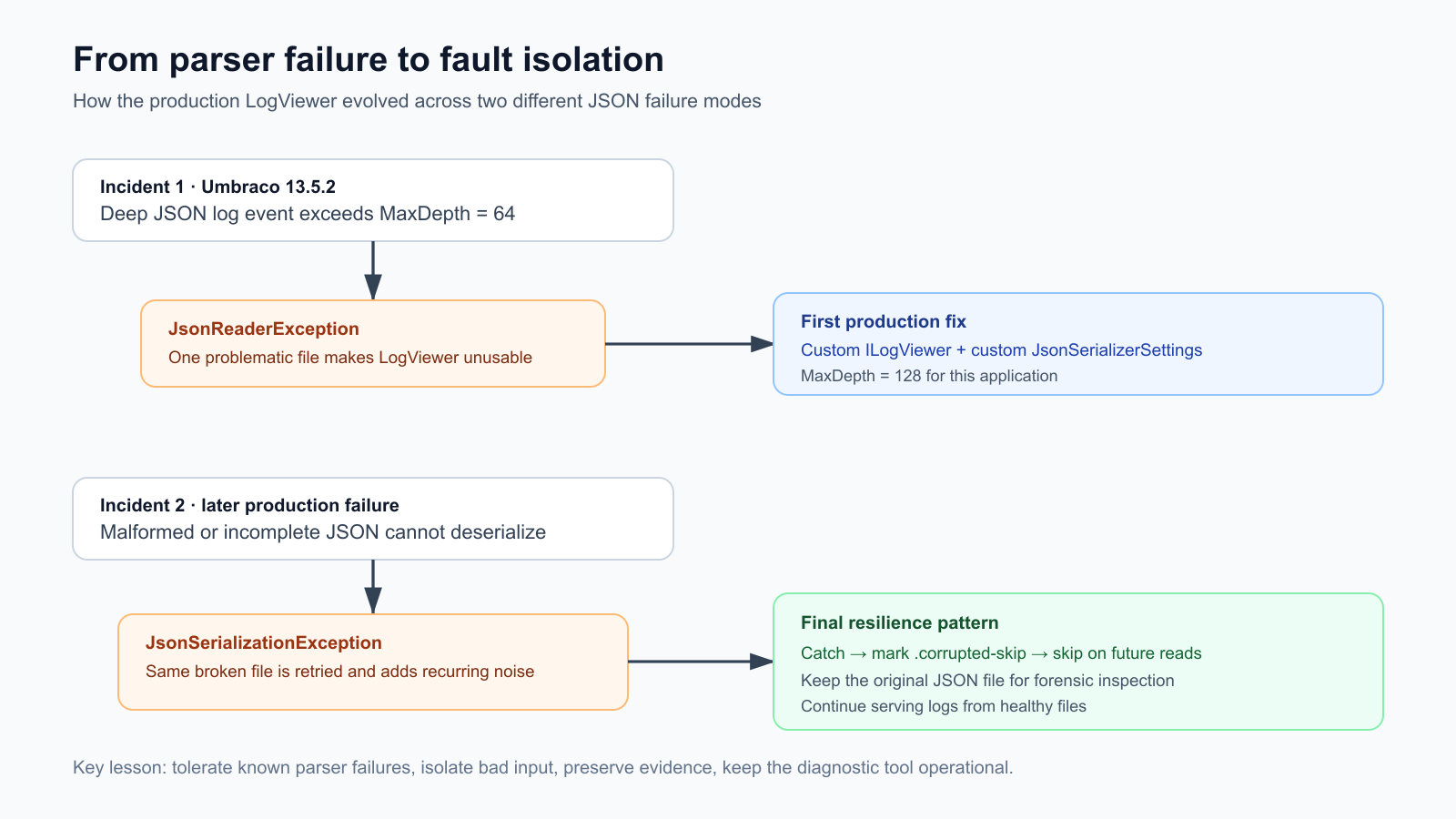
Two different parser failures led to a more resilient design: tolerate expected failures, isolate bad input, preserve evidence, and continue.
Quarantine instead of deletion
The key improvement was a sidecar marker named after the broken log file with the extension .corrupted-skip. When deserialization throws a known JSON reader or serialization exception, the file is recorded as corrupted. After processing, an empty marker file is created next to it.
On later LogViewer requests, the presence of that marker is checked before opening the JSON file:
if (File.Exists(filePath + CorruptedMarkerExtension))
    continue;
This is deliberately different from deleting the log. The original file remains available on disk. If the event contains information needed for incident analysis, you can still download the corrupted JSON file and inspect it manually with tooling that does not depend on Umbraco LogViewer.
Why this worked well in production: the failure became bounded. One unreadable file no longer forced every future LogViewer request to rediscover the same problem.
Full UmbracoCustomLogViewer implementation
The following is the final implementation. It combines the serializer configuration from the first incident with the file quarantine behavior introduced for the second.
internal class UmbracoCustomLogViewer : SerilogLogViewerSourceBase
{
    private const int FileSizeCap = 100;
    private const string CorruptedMarkerExtension = ".corrupted-skip";

    private readonly ILogger<UmbracoCustomLogViewer> _logger;
    private readonly string _logsPath;

    public UmbracoCustomLogViewer(
        ILogger<UmbracoCustomLogViewer> logger,
        ILogViewerConfig logViewerConfig,
        ILoggingConfiguration loggingConfiguration,
        ILogLevelLoader logLevelLoader,
        ILogger serilogLog)
        : base(logViewerConfig, logLevelLoader, serilogLog)
    {
        _logger = logger;
        _logsPath = loggingConfiguration.LogDirectory;
    }

    public override bool CanHandleLargeLogs => false;

    public override bool CheckCanOpenLogs(LogTimePeriod logTimePeriod)
    {
        // Log Directory
        var logDirectory = _logsPath;

        // Number of entries
        long fileSizeCount = 0;

        // foreach full day in the range - see if we can find one or more filenames that end with
        // yyyyMMdd.json - Ends with due to MachineName in filenames - could be 1 or more due to load balancing
        for (DateTime day = logTimePeriod.StartTime.Date; day.Date <= logTimePeriod.EndTime.Date; day = day.AddDays(1))
        {
            // Filename ending to search for (As could be multiple)
            var filesToFind = GetSearchPattern(day);

            var filesForCurrentDay = Directory.GetFiles(logDirectory, filesToFind);

            fileSizeCount += filesForCurrentDay.Sum(x => new FileInfo(x).Length);
        }

        // The GetLogSize call on JsonLogViewer returns the total file size in bytes
        // Check if the log size is not greater than 100Mb (FileSizeCap)
        var logSizeAsMegabytes = fileSizeCount / 1024 / 1024;

        return logSizeAsMegabytes <= FileSizeCap;
    }

    protected override IReadOnlyList<LogEvent> GetLogs(LogTimePeriod logTimePeriod, ILogFilter filter, int skip,
        int take)
    {
        var logs = new List<LogEvent>();

        var count = 0;
        var corruptedFiles = new HashSet<string>();

        var serializerSettings = GetJsonSerializerSettings();
        var jsonSerializer =  JsonSerializer.Create(serializerSettings);

        // foreach full day in the range - see if we can find one or more filenames that end with
        // yyyyMMdd.json - Ends with due to MachineName in filenames - could be 1 or more due to load balancing
        for (DateTime day = logTimePeriod.StartTime.Date; day.Date <= logTimePeriod.EndTime.Date; day = day.AddDays(1))
        {
            // Filename ending to search for (As could be multiple)
            var filesToFind = GetSearchPattern(day);

            var filesForCurrentDay = Directory.GetFiles(_logsPath, filesToFind);

            // Foreach file we find - open it
            foreach (var filePath in filesForCurrentDay)
            {
                if (File.Exists(filePath + CorruptedMarkerExtension))
                    continue;

                var fileIsCorrupted = false;

                // Open log file & add contents to the log collection
                // Which we then use LINQ to page over
                using (var fs = new FileStream(filePath, FileMode.Open, FileAccess.Read, FileShare.ReadWrite))
                {
                    using (var stream = new StreamReader(fs))
                    {
                        var reader = new LogEventReader(stream, jsonSerializer);

                        while (TryRead(reader, filePath, out LogEvent? evt, ref fileIsCorrupted))
                        {
                            // We may get a null if log line is malformed
                            if (evt == null)
                            {
                                continue;
                            }

                            if (count > skip + take)
                            {
                                break;
                            }

                            if (count < skip)
                            {
                                count++;
                                continue;
                            }

                            if (filter.TakeLogEvent(evt))
                            {
                                logs.Add(evt);
                            }

                            count++;
                        }
                    }
                }

                if (fileIsCorrupted)
                {
                    corruptedFiles.Add(filePath);
                }
            }
        }

        MarkCorruptedFiles(corruptedFiles);

        return logs;
    }

    private string GetSearchPattern(DateTime day) => $"*{day:yyyyMMdd}*.json";

    private bool TryRead(LogEventReader reader, string filePath, out LogEvent? evt, ref bool fileIsCorrupted)
    {
        evt = null;

        try
        {
            return reader.TryRead(out evt);
        }
        catch (JsonReaderException ex)
        {
            fileIsCorrupted = true;

            _logger.LogWarning(ex, "JSON Reader error detected in file '{FilePath}'. Corruption marker will be created.", filePath);

            return false;
        }
        catch (JsonSerializationException ex)
        {
            fileIsCorrupted = true;

            _logger.LogWarning(ex, "JSON Serialization error detected in file '{FilePath}'. Corruption marker will be created.", filePath);

            return false;
        }
        catch (Exception ex)
        {
            _logger.LogError(ex, "An unexpected error occurred while reading a log event from file '{FilePath}'.", filePath);

            throw;
        }
    }

    private void MarkCorruptedFiles(HashSet<string> corruptedFiles)
    {
        foreach (var filePath in corruptedFiles)
        {
            try
            {
                var markerPath = filePath + CorruptedMarkerExtension;

                // Create empty marker file if it doesn't exist
                if (!File.Exists(markerPath))
                {
                    File.WriteAllText(markerPath, string.Empty);

                    _logger.LogWarning("Marked corrupted log file '{FilePath}' with marker '{MarkerPath}'.", filePath, markerPath);
                }
            }
            catch (Exception ex)
            {
                _logger.LogWarning(ex, "Failed to create corruption marker for file '{FilePath}'.", filePath);
            }
        }
    }

    private JsonSerializerSettings GetJsonSerializerSettings()
    {
        return new JsonSerializerSettings
        {
            DateParseHandling = DateParseHandling.None,
            Culture = System.Globalization.CultureInfo.InvariantCulture,
            MaxDepth = 128
        };
    }
}
What each defensive layer does
GetSearchPattern() accepts machine-name variants for a given date, so the implementation can discover more than one matching JSON log file. Files are opened with FileShare.ReadWrite, which is appropriate for reading logs that may still be active.
TryRead() distinguishes expected parser failures from unexpected application failures. JsonReaderException and JsonSerializationException mark the current file as corrupted and stop reading it. Any other exception is logged and rethrown instead of being silently hidden.
MarkCorruptedFiles() runs after the read loop and creates the marker only if needed. If marker creation itself fails, the operation is logged as a warning rather than replacing the original failure with another fatal path.
Finally, CheckCanOpenLogs() retains a 100 MB guardrail for the selected period. Like MaxDepth = 128, this is an application-level choice from this production implementation, not a universal recommended value for every Umbraco project.
Operational trade-offs you should understand
The quarantine strategy intentionally operates at the file level. Once a file is marked, the custom LogViewer skips the whole file. That means valid entries in the same JSON file are also unavailable through LogViewer until someone deliberately removes the marker and deals with the underlying file.
The marker is persistent by design. If a corrupted file is repaired or replaced manually, remove its matching .corrupted-skip marker before expecting the custom viewer to read it again.
The trade-off was appropriate for this system: keep the back-office diagnostics usable and preserve the corrupted evidence, rather than repeatedly destabilizing the viewer in an attempt to recover every event automatically.
Do not copy the constants blindly. The 100 MB file-size cap and MaxDepth = 128 are part of this tested implementation. They should be evaluated against your own log volume, data shape, hosting model, and operational requirements.
What this means for Umbraco 17
This code is an Umbraco 13 production solution and should not be presented as a drop-in fix required by every Umbraco 17 site. Core behavior evolved after the original v13 incident.
There is, however, an important modern connection. In May 2026, an Umbraco 17.2.2 issue was reported in which a corrupted JSON log file could rapidly fill the current log with parsing errors and freeze the LogViewer. The report described 178 log files where a single malformed JSON file triggered the behavior. The Core fix was tracked as #22820 and released under the change “Log Viewer: Defensively handle corrupt log files,” targeted to Umbraco 17.6.0 and 18.1.0.
That does not make this v13 class a current v17 workaround. It does validate the architectural lesson: diagnostic readers need defensive boundaries around corrupted input. If you are on a current Umbraco 17 build, upgrade to a version containing the Core fix before considering an application-level replacement. If you still need custom behavior, use the current extension points and current source as your baseline rather than porting this v13 implementation unchanged.
Lessons from the two incidents
The first incident taught us that parser defaults can lead to application failures when a diagnostic component assumes that every log event can be deserialized. The second incident showed why simply raising a parser limit is not resilience: invalid or truncated input needs isolation, not a larger number.
The final solution worked because it separated recoverable diagnostic failure from system failure. Known JSON errors stop at the affected file. The file is marked once. Future reads avoid it. The evidence stays available for manual analysis. Healthy log files remain useful.
That is the reusable pattern worth taking from this case study, even when the exact Umbraco implementation changes.
References
Umbraco issue #17629: Umbraco 13.5.2 LogViewer and Newtonsoft.Json MaxDepth.
Umbraco pull request #17630: discussion around the v13 MaxDepth behavior and custom LogViewer approach.
Umbraco issue #22820: corrupted log file freezing LogViewer in Umbraco 17.2.2.
Umbraco releases: release note for defensively handling corrupt log files.


