
Why Configure UmbracoApplicationUrl with an Environment Variable?
An Umbraco application commonly runs in several environments: local development, development, staging, and production. Each deployment can have a different public URL, while the application code and base configuration remain the same.
Azure App Service application settings are exposed to ASP.NET Core as environment variables. That makes them a natural place for deployment-specific configuration such as UmbracoApplicationUrl.
Note
The main benefit is configuration separation. The URL belongs to the environment, not to the application build. The same artifact can therefore move through environments without changing appsettings.json.
The UmbracoApplicationUrl Configuration Key
In JSON configuration, the setting belongs under Umbraco:CMS:WebRouting:
{
  "Umbraco": {
    "CMS": {
      "WebRouting": {
        "UmbracoApplicationUrl": "https://dev.example.com/"
      }
    }
  }
}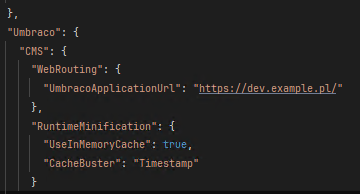
UmbracoApplicationUrl in appsettings.json
You can keep a local/default value in JSON when useful and override it in Azure for deployed environments.
Configure UmbracoApplicationUrl in Azure App Service
1. Open the Web App environment variables
In the Azure portal, open your App Service and navigate to its environment variables/application settings.
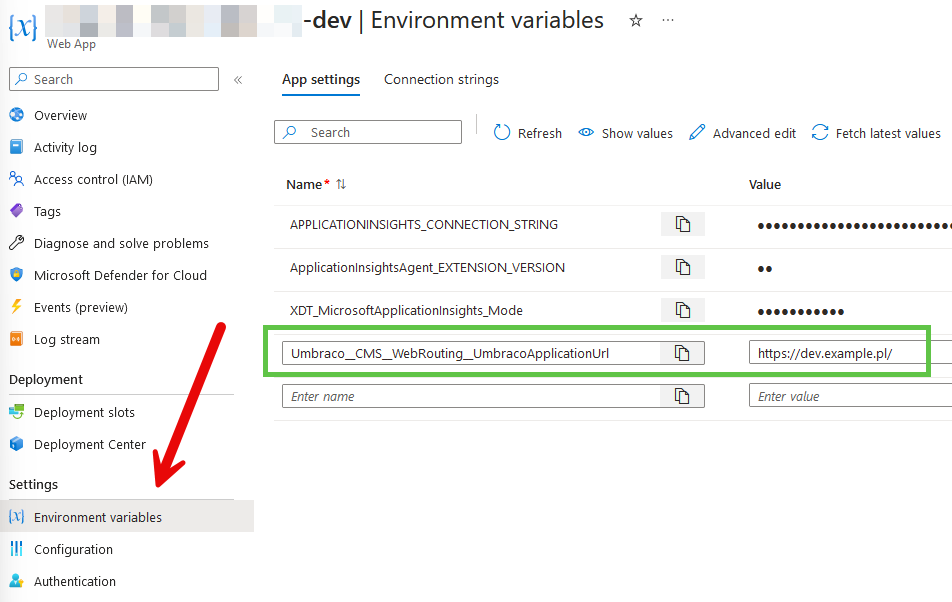
Azure App Service environment variables
2. Add the application setting
Create an application setting with this exact name:
Umbraco__CMS__WebRouting__UmbracoApplicationUrlSet the value to the absolute URL for that deployment, for example:
https://dev.example.com/Save the configuration. An App Service configuration change normally causes the application to restart so the new environment configuration is loaded.
Verify the Value in Umbraco
A simple way to verify the effective value is to read Umbraco's web-routing settings and log UmbracoApplicationUrl during startup or from diagnostic code.
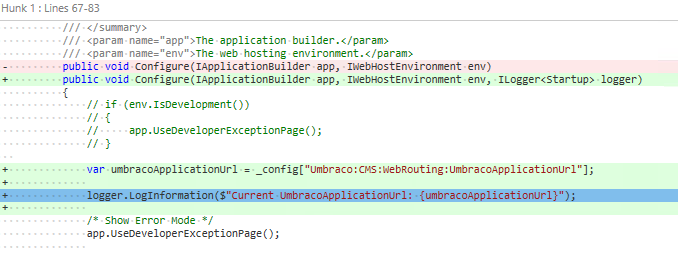
Logging the effective UmbracoApplicationUrl
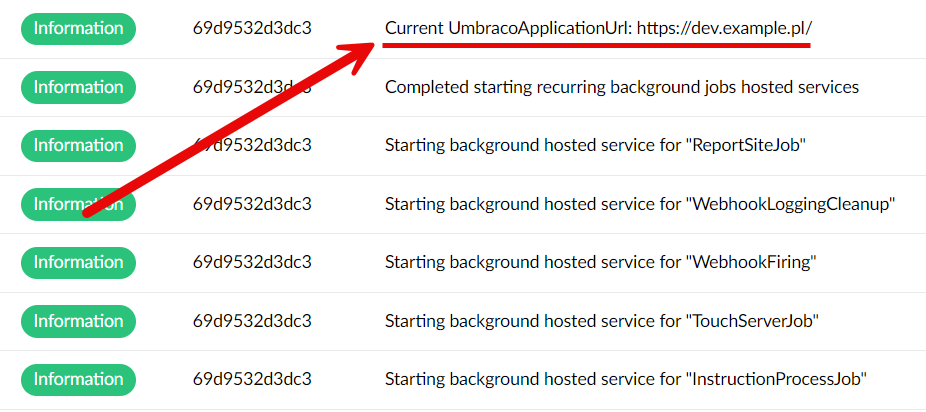
The configured UmbracoApplicationUrl visible in the application logs
Note
Check the effective configuration, not only the Azure setting. Seeing the expected value inside the running application confirms that the environment variable name, hierarchy, and deployment value are correct.
How Double Underscores Map to ASP.NET Core Configuration
ASP.NET Core uses double underscores in environment-variable names as a portable replacement for the configuration hierarchy delimiter. Therefore:
Umbraco__CMS__WebRouting__UmbracoApplicationUrlmaps to:
Umbraco:CMS:WebRouting:UmbracoApplicationUrland overrides the corresponding nested value from appsettings.json when the environment-variable configuration provider has higher precedence.
Use a Different URL for Each Environment
The same application-setting name can be used in every App Service while the value changes with the deployment:
Development: https://dev.example.com/
Staging:     https://staging.example.com/
Production:  https://www.example.com/
This keeps environment-specific URLs outside the source-controlled application configuration and makes deployment promotion easier to reason about.
Reading WebRoutingSettings in Code
If application code needs the effective Umbraco web-routing configuration, consume Umbraco's strongly typed WebRoutingSettings options instead of manually reading a configuration string.
public sealed class PlatformHelper
{
    private readonly IOptionsMonitor<WebRoutingSettings> _webRoutingSettings;

    public PlatformHelper(IOptionsMonitor<WebRoutingSettings> webRoutingSettings)
    {
        _webRoutingSettings = webRoutingSettings;
    }

    public string? GetUmbracoApplicationUrl()
    {
        return _webRoutingSettings.CurrentValue.UmbracoApplicationUrl;
    }
}
IOptionsMonitor<WebRoutingSettings> gives code access to the current options value. For an Azure App Service environment-variable change, however, design around normal application configuration/restart behavior rather than assuming every external configuration change will be observed live without a restart.
Conclusion
For Azure-hosted Umbraco sites, Umbraco__CMS__WebRouting__UmbracoApplicationUrl is a clean way to make UmbracoApplicationUrl environment-specific. Keep the configuration hierarchy consistent, assign the correct URL in each App Service, and verify the effective value after deployment.
The result is a simpler deployment model: one application build, with the environment supplying the URL that belongs to it.


