
Version scope
Note
This article documents a legacy implementation built and tested with Umbraco 8.6.0 and .NET Framework 4.7.2. It is intentionally kept focused on Umbraco 8 rather than newer Umbraco media-storage architecture.
Why Choose Private Blob Storage Over Public Access?
Azure provides the flexibility to set your container as either public or private. While public access might seem convenient, it comes with potential security risks.
Microsoft's guidance is clear: if anonymous access is not required, keep blob data private.
When a container allows anonymous access, clients can read its data without authorization. For scenarios that do not require anonymous access, Microsoft recommends disabling it for the storage account.
For additional context on the challenge of using Umbraco 8 and ImageProcessor with private Azure Blob containers, the original ImageProcessor discussion remains useful: ImageProcessor issue #699.
As discussed there, the Umbraco 8 solution requires two essential steps:
implement a custom
IImageService;update the ImageProcessor
security.configfile.
Prerequisites: Environment and Libraries
Before diving into the integration, it is important to understand the exact environment in which this implementation was built. Keeping the original package versions documented helps avoid ambiguity when reproducing a legacy Umbraco 8 setup.
The working setup used in this implementation was:
ImageProcessor: 2.7.0.100
ImageProcessor.Web: 4.10.0.100
ImageProcessor.Web.Plugins.AzureBlobCache: 1.5.0.100
WindowsAzure.Storage: 8.7.0
UmbracoFileSystemProviders.Azure: 2.0.0-alpha1
UmbracoCms: 8.6.0
.NET Framework: 4.7.2
Legacy package note
These versions are preserved because they describe the original working Umbraco 8 solution. They should not be interpreted as recommendations for a new project in 2026.
Implementing Custom Azure Image Service
To retrieve images from private Azure Blob Storage, implement a custom IImageService. The key method is GetImage(object id).
Make sure the blob name does not include the container name as a prefix. The expected value has a format such as:
3gikqq22/example-image.pngHere is the original AzureImageService implementation:
/// <summary>
/// An image service for retrieving images from Azure.
/// </summary>
public class AzureImageService : IImageService
{
   private CloudBlobContainer _blobContainer;
   private CloudStorageAccount _storageAccount;
   private Dictionary<string, string> _settings = new Dictionary<string, string>();

   /// <summary>
   /// Gets or sets the prefix for the given implementation.
   /// <remarks>
   /// This value is used as a prefix for any image requests that should use this service.
   /// </remarks>
   /// </summary>
   public string Prefix { get; set; } = string.Empty;

   /// <summary>
   /// Gets a value indicating whether the image service requests files from
   /// the locally based file system.
   /// </summary>
   public bool IsFileLocalService => false;

   /// <summary>
   /// Gets or sets any additional settings required by the service.
   /// </summary>
   public Dictionary<string, string> Settings
   {
      get => this._settings;
      set
      {
         this._settings = value;
         this.InitService();
      }
   }

   /// <summary>
   /// Gets or sets the white list of <see cref="Uri" />.
   /// </summary>
   public Uri[] WhiteList { get; set; }

   /// <summary>
   /// Gets the image using the given identifier.
   /// </summary>
   /// <param name="id"></param>
   /// <returns></returns>
   public async Task<byte[]> GetImage(object id)
   {
      if (await _blobContainer.ExistsAsync())
      {
         //expecting id as "3gikqq22/example-image.png"
         string sId = PrepareBlobName(id);

         CloudBlockBlob blob = _blobContainer.GetBlockBlobReference(sId);

         if (await blob.ExistsAsync())
         {
            using (MemoryStream memoryStream = MemoryStreamPool.Shared.GetStream())
            {
               await blob.DownloadToStreamAsync(memoryStream).ConfigureAwait(false);
               return memoryStream.ToArray();
            }
         }
      }

      return null;
   }

   /// <summary>
   /// Removes container prefix from blob path
   /// </summary>
   /// <param name="id"></param>
   /// <returns></returns>
   private string PrepareBlobName(object id)
   {
      string sId = id.ToString();

      if (sId.StartsWith($"/{this.Settings["Container"]}/"))
      {
         return sId.Substring(this.Settings["Container"].Length + 2);
      }

      return sId;
   }


   /// <summary>
   /// Gets a value indicating whether the current request passes sanitizing rules.
   /// </summary>
   /// <param name="path">The image path.</param>
   /// <returns>
   /// <c>True</c> if the request is valid; otherwise, <c>False</c>.
   /// </returns>
   public bool IsValidRequest(string path) => ImageHelpers.IsValidImageExtension(path);

   /// <summary>
   /// Initialise the service.
   /// </summary>
   private void InitService()
   {
      // Retrieve storage accounts from connection string.
      _storageAccount = CloudStorageAccount.Parse(this.Settings["StorageAccount"]);

      // Create the blob client.
      CloudBlobClient blobClient = _storageAccount.CreateCloudBlobClient();

      string container = this.Settings.ContainsKey("Container")
         ? this.Settings["Container"]
         : string.Empty;

      BlobContainerPublicAccessType accessType = this.Settings.ContainsKey("AccessType")
         ? (BlobContainerPublicAccessType)Enum.Parse(typeof(BlobContainerPublicAccessType), this.Settings["AccessType"])
         : BlobContainerPublicAccessType.Blob;

      this._blobContainer = CreateContainer(blobClient, container, accessType);
   }

   /// <summary>
   /// Returns the cache container, creating a new one if none exists.
   /// </summary>
   /// <param name="cloudBlobClient"><see cref="CloudBlobClient"/> where the container is stored.</param>
   /// <param name="containerName">The name of the container.</param>
   /// <param name="accessType"><see cref="BlobContainerPublicAccessType"/> indicating the access permissions.</param>
   /// <returns>The <see cref="CloudBlobContainer"/></returns>
   private static CloudBlobContainer CreateContainer(CloudBlobClient cloudBlobClient, string containerName, BlobContainerPublicAccessType accessType)
   {
      CloudBlobContainer container = cloudBlobClient.GetContainerReference(containerName);

      if (!container.Exists())
      {
         container.Create();
         container.SetPermissions(new BlobContainerPermissions { PublicAccess = accessType });
      }

      return container;
   }
}
The complete source is also available in the original GitHub Gist.
Configuring Security for ImageProcessor
After implementing the Azure image service, configure ImageProcessor to use it.
Locate:
~/config/imageprocessor/security.config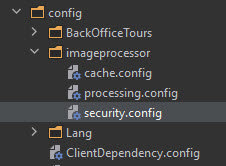
Imageprocessor security config file in Umbraco project location
Define the custom service in security.config:
<?xml version="1.0" encoding="utf-8"?>
<security>
	<services>
		<service name="AzureImageService" type="[Namespace].AzureImageService, [Namespace]">
			<settings>
				<setting key="StorageAccount" value="[StorageAccountConnectionString]" />
				<setting key="Container" value="media" />
				<setting key="AccessType" value="Off" />
			</settings>
		</service>
	</services>
</security>
In this configuration:
StorageAccountcontains the Azure Storage connection string;Containeridentifies the Blob Storage container, heremedia;AccessType="Off"keeps anonymous container access disabled.
Note
With this configuration in place, ImageProcessor can use the custom service to retrieve media files directly from private Azure Blob Storage.
Conclusion on Azure Private Blob Storage and Umbraco 8
Setting up Umbraco 8 to work with private Azure Blob Storage requires more work than using a publicly readable media container, but it avoids exposing media anonymously when public access is not required.
In this legacy setup, the integration comes down to two changes: a custom ImageProcessor IImageService that reads blobs using authenticated storage access, and a matching security.config service registration.
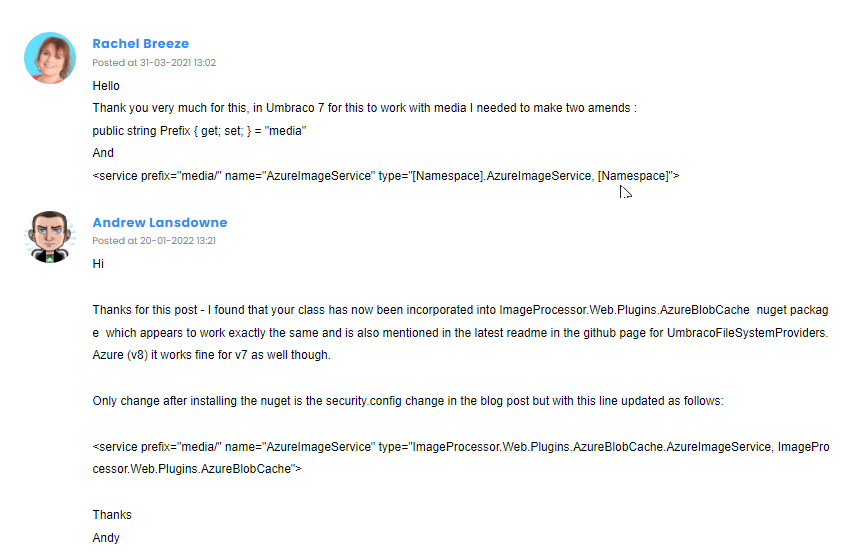
Rachel and Andrew - big thanks for the comments (restored from the old blog)
Official References
The Umbraco 8 implementation above is intentionally preserved as a legacy solution. For the Azure Storage security model itself, use the current Microsoft documentation:
For the historical ImageProcessor implementation itself, see ImageProcessor issue #699 and the linked source-code example above.


