
What warm-up means in this implementation
After an application starts, the first requests to important pages can be more expensive than later requests because they exercise parts of the request pipeline that have not yet been used in the current process. A URL warm-up mechanism deliberately requests selected pages before ordinary visitors are expected to reach them.
The implementation below does not try to solve every aspect of application performance. Its responsibility is narrower: determine which Umbraco URLs should be requested, execute those requests through a reusable strategy, and record whether each attempt succeeded.
A notification such as UmbracoApplicationStartedNotification can also be used as a trigger for startup-related work. Here, the implementation uses a recurring hosted service so that scheduling and URL warm-up remain explicit and isolated.
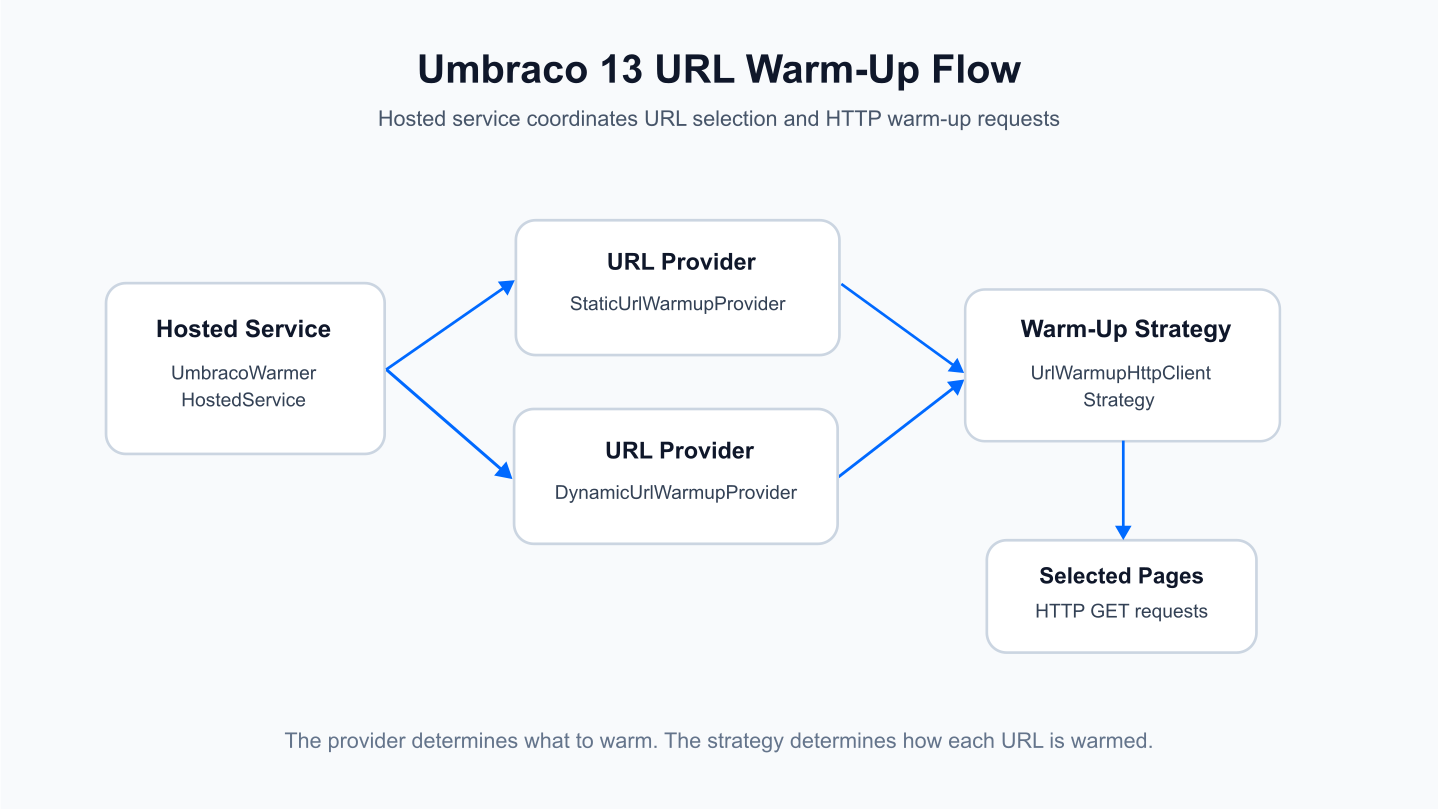
The hosted service coordinates the process. The provider decides which URLs to warm, while the strategy defines how each URL is requested.
The recurring hosted service
UmbracoWarmerHostedService derives from RecurringHostedServiceBase. In this example, the initial delay is 60 seconds and the recurring period is one day. Those values are configuration choices in this implementation, not universal warm-up defaults.
When execution begins, the service creates a dependency injection scope, resolves the configured URL provider and warm-up strategy, obtains the URL list, then processes each URL sequentially. The result of every request is logged.
public class UmbracoWarmerHostedService : RecurringHostedServiceBase
{
    private readonly ILogger<UmbracoWarmerHostedService> _logger;
    private readonly IServiceProvider _serviceProvider;
    private static TimeSpan _period = TimeSpan.FromDays(1); //Let's assume one warm up daily
    private static TimeSpan _delay = TimeSpan.FromSeconds(60);
    private IUrlWarmupStrategy _urlWarmupStrategy;
    private IUrlWarmupProvider _urlWarmupProvider;

    public UmbracoWarmerHostedService(
        ILogger<UmbracoWarmerHostedService> logger,
        IServiceProvider serviceProvider) : base(logger, _period, _delay)
    {
        _serviceProvider = serviceProvider;
        _logger = logger;
    }

    public override async Task PerformExecuteAsync(object? state)
    {
        using (var scope = _serviceProvider.CreateScope())
        {
            _urlWarmupProvider = scope.ServiceProvider.GetRequiredService<IUrlWarmupProvider>();
            _urlWarmupStrategy = scope.ServiceProvider.GetRequiredService<IUrlWarmupStrategy>();

            var urls = await _urlWarmupProvider.GetWarmupUrlsAsync();

            foreach (var url in urls)
            {
                bool isSuccess = await _urlWarmupStrategy.WarmupUrlAsync(url);

                if (isSuccess)
                {
                    _logger.LogInformation($"{url} was warmed up successfully");
                }
                else
                {
                    _logger.LogError($"{url} warm up failed");

                    // Handle the failure case, e.g., log, retry, or take other actions
                }
            }
        }
    }
}
The resulting log entries make the outcome visible without coupling the service to a separate reporting mechanism:
[10:02:35 INF] http://example.com/page1/ was warmed up successfully
[10:02:36 ERR] http://example.com/page2/ warm up failed
[10:02:36 INF] http://example.com/page3/ was warmed up successfully
[10:02:36 ERR] http://example.com/page4/ warm up failed
Separating URL selection from warm-up execution
The design has two small interfaces. IUrlWarmupProvider answers the question which URLs should be warmed? IUrlWarmupStrategy answers how should one URL be warmed?
This separation keeps URL discovery independent from the transport used to execute the warm-up. It also makes the hosted service unaware of whether the URL list is fixed or generated from published Umbraco content.
public interface IUrlWarmupStrategy
{
    Task<bool> WarmupUrlAsync(string url);
}
public interface IUrlWarmupProvider
{
Task<IList<string>> GetWarmupUrlsAsync();
}Static and dynamic URL providers
Static URL provider
The simplest option is a predefined set of pages. This is useful when the warm-up target is deliberately small and stable, such as a homepage and a few critical landing pages.
public class StaticUrlWarmupProvider : IUrlWarmupProvider
{
    public async Task<IList<string>> GetWarmupUrlsAsync()
    {
        // This example returns a static list of URLs, but you could
        // fetch them from a database, configuration file, or external service.
        return new List<string>
        {
            "http://example.com/page1",
            "http://example.com/page2"
        };
    }
}
Dynamic URL provider
The dynamic provider builds the list from selected Umbraco content type aliases. In the example, those aliases are represented by generated model constants such as Home.ModelTypeAlias and LandingPage.ModelTypeAlias.
public class DynamicUrlWarmupProvider : IUrlWarmupProvider
{
    private readonly PublishedContentHelper _publishedContentHelper;
    private readonly IList<string> _contentTypesAliasesToWarmup;

    public DynamicUrlWarmupProvider(PublishedContentHelper publishedContentHelper)
    {
        _publishedContentHelper = publishedContentHelper;

        // Initialize with a predefined list of content type aliases to warm up
        _contentTypesAliasesToWarmup = new List<string>
        {
            Home.ModelTypeAlias,
            LandingPage.ModelTypeAlias,
            // Add more content type aliases as needed
        };
    }

    public Task<IList<string>> GetWarmupUrlsAsync()
    {
        List<string> urls = new List<string>();

        foreach (var contentType in _contentTypesAliasesToWarmup)
        {
            var contentUrls = _publishedContentHelper.GetAllUrlsByContentType(contentType);

            urls.AddRange(contentUrls);
        }

        return Task.FromResult((IList<string>)urls);
    }
}
PublishedContentHelper obtains an Umbraco context, resolves the published content type by alias, then returns the URLs of matching published items.
public class PublishedContentHelper
{
    private IUmbracoContextFactory _umbracoContextFactory;

    public PublishedContentHelper(IUmbracoContextFactory umbracoContextFactory)
    {
        _umbracoContextFactory = umbracoContextFactory;
    }

    public IList<string> GetAllUrlsByContentType(string alias)
    {
        using (var cref = _umbracoContextFactory.EnsureUmbracoContext())
        {
            var contentCache = cref.UmbracoContext.Content;

            var contentType = contentCache.GetContentType(alias);

            if (contentType == null) throw new ArgumentNullException($"Published content type not found for {alias}");

            return contentCache.GetByContentType(contentType).Select(x=>x.Url()).ToList();
        }
    }
}
This makes the provider responsive to content changes: pages that match the configured content types can enter the warm-up set without requiring a separate hard-coded URL list.
HTTP warm-up strategy
UrlWarmupHttpClientStrategy receives an HttpClient, sets a request timeout, and sends an HTTP GET request to each selected URL. The implementation appends ?warmup=1 to the URL, which can also be useful if application code or diagnostics need to distinguish warm-up traffic.
A successful HTTP status produces true. Non-success status codes and exceptions produce false, while exceptions are also logged.
public class UrlWarmupHttpClientStrategy : IUrlWarmupStrategy
{
    private readonly HttpClient _httpClient;
    private TimeSpan _requestTimeout = TimeSpan.FromSeconds(90);
    private readonly ILogger<UrlWarmupHttpClientStrategy> _logger;

    public UrlWarmupHttpClientStrategy(HttpClient httpClient, ILogger<UrlWarmupHttpClientStrategy> logger)
    {
        _httpClient = httpClient;
        _logger = logger;

        _httpClient.Timeout = _requestTimeout;
    }

    public async Task<bool> WarmupUrlAsync(string url)
    {
        try
        {
            // Attempt to make the HTTP call
            var response = await _httpClient.GetAsync($"{url}?warmup=1");

            // Check if the response indicates success (e.g., HTTP 200 OK)
            if (response.IsSuccessStatusCode)
            {
                // Log success or store success state as needed
                return true; // Indicates the refresh was successful
            }
            else
            {
                // Log failure or store failure state as needed
                return false; // Indicates the refresh was not successful
            }
        }
        catch (Exception ex)
        {
            _logger.LogError(ex, $"Warm up failed for {url}.");

            // Log exception details here
            return false; // Indicates the refresh was not successful due to an exception
        }
    }
}
Registering the warm-up services
The hosted service and its dependencies are registered in the Umbraco composer. This example selects DynamicUrlWarmupProvider. The commented registration shows the alternative static provider.
public void Compose(IUmbracoBuilder builder)
{
	builder.Services.AddHostedService<UmbracoWarmerHostedService>();
	builder.Services.AddScoped<IUrlWarmupProvider, DynamicUrlWarmupProvider>();
	builder.Services.AddScoped<IUrlWarmupStrategy, UrlWarmupHttpClientStrategy>();
	//builder.Services.AddScoped<IUrlWarmupProvider, StaticUrlWarmupProvider>();
}
The hosted service itself does not change when the provider changes. That is the main benefit of keeping scheduling, URL discovery, and request execution as separate responsibilities.
Practical considerations
Warm only pages that justify the additional requests. Large dynamic sites can produce a substantial URL set, so content type selection should be deliberate. The 60-second initial delay and daily recurrence shown in the code are example scheduling values and should be evaluated against the application's hosting and deployment behavior.
Also treat a successful warm-up request as evidence that the page responded successfully, not as proof of a specific performance improvement. If warm-up is introduced for a measurable performance objective, compare first-request latency and application behavior before and after the change.
Conclusion
This Umbraco 13 pattern keeps URL warm-up straightforward: a recurring hosted service coordinates execution, an IUrlWarmupProvider supplies the target pages, and an IUrlWarmupStrategy performs the request. Static and dynamic providers can be swapped without changing the orchestration code.
The result is a small, extensible mechanism for deliberately hitting selected Umbraco pages after application startup and on the configured schedule, without presenting warm-up as a substitute for broader performance analysis.


