
The SQL Truncation Error
The failure typically appears as a System.AggregateException containing a Microsoft.Data.SqlClient.SqlException. SQL Server reports that string or binary data would be truncated in the umbracoRedirectUrl table, specifically in its url column.
System.AggregateException: One or more errors occurred.
(String or binary data would be truncated in table 'BachSample.dbo.umbracoRedirectUrl', column 'url'.
Truncated value: '/academic-fields/quantum-physics/particle-dynamics/wave-functions/measurement/probability-wave-detection'.
The statement has been terminated.)

---> Microsoft.Data.SqlClient.SqlException (0x80131904): String or binary data would be truncated in table
'BachSample.dbo.umbracoRedirectUrl', column 'url'. Truncated value:
'/academic-fields/quantum-physics/particle-dynamics/wave-functions/measurement/probability-wave-detection'.

The statement has been terminated.
at Microsoft.Data.SqlClient.SqlConnection.OnError(SqlException exception, Boolean breakConnection, Action`1
wrapCloseInAction)
at Microsoft.Data.SqlClient.SqlInternalConnection.OnError(SqlException exception, Boolean breakConnection,
Action`1 wrapCloseInAction)
at Microsoft.Data.SqlClient.TdsParser.ThrowExceptionAndWarning(TdsParserStateObject stateObj, Boolean
callerHasConnectionLock, Boolean asyncClose)
The important detail is that the failing value is a generated path. A single document name can be valid, while the complete path becomes much longer after Umbraco combines multiple levels of the content tree.
Node Name Length vs. Generated URL Length
The original issue is easy to misread as a document-name problem. It is not necessarily the name of one node that exceeds the limit. Umbraco builds a URL from the hierarchy, so several individually reasonable segments can produce a path longer than the database column that stores redirect history.
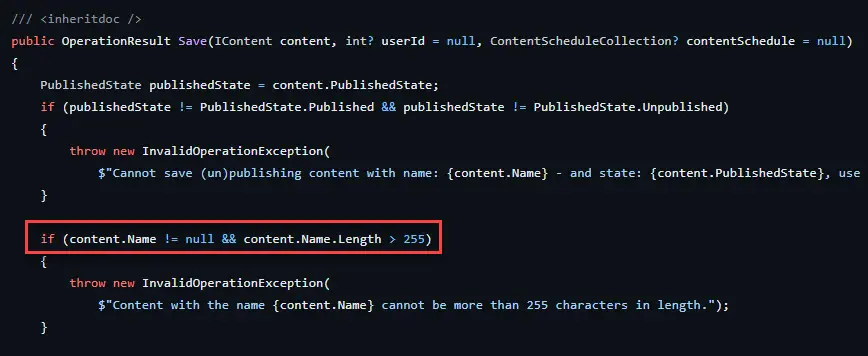
Umbraco source on GitHub: Umbraco node name limit is 255 characters https://github.com/umbraco/Umbraco-CMS/blob/release-13.0.0/src/Umbraco.Core/Services/ContentService.cs#L994
Deep nesting and descriptive page names therefore increase the chance of hitting the redirect-table limit even when each content item looks perfectly normal in isolation.
What umbracoRedirectUrl Does
Umbraco Redirect URL Management keeps a history of previous routes when URLs change. That allows an old route to redirect to the current document instead of returning a 404. This can matter for inbound links, bookmarks, search engines, and editors who rename or move content.
Redirect URL Management solves the historical-URL problem. It is not the same mechanism as umbracoRedirect, umbracoUrlAlias, umbracoUrlName, or umbracoInternalRedirectId. The Umbraco routing properties guide compares those request-routing behaviors and when each one is appropriate.
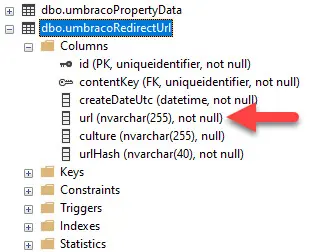
dbo.umbracoRedirectUrl table in Umbraco database
Do not treat redirect history as disposable by default
Redirect history can have real SEO and UX value. Disable or clear it only when your architecture uses a different redirect strategy, or when losing historical redirects is an intentional decision.
Option 1: Disable Redirect URL Tracking
If the application does not need Umbraco's built-in redirect tracking, the cleanest response may be to stop creating these records rather than modifying the database schema. This can make sense in systems where redirects are handled elsewhere.
Configure DisableRedirectUrlTracking
"Umbraco": {
  "CMS": {
    "WebRouting": {
      "DisableRedirectUrlTracking": true
    }
  }
}
This changes application behavior going forward. It does not remove rows already stored in the table.
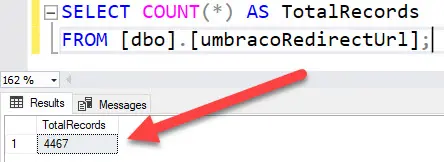
Total number of records for the Umbraco dbo.umbracoRedirectUrl table. Example showing how Umbraco redirect history can accumulate many records.
Option 2: Clear Existing Redirect History
If the redirect table contains history you intentionally no longer need, clearing it removes those records. This is a maintenance action, not a universal performance fix. The tradeoff is that the stored redirects disappear.
Back up the database first
TRUNCATE TABLE removes all rows from the table. Verify that losing the redirect history is acceptable and take a tested backup before running destructive SQL in production.
USE [YourDatabaseName]; -- Replace with your actual database name
GO

-- Truncate the umbracoRedirectUrl table
TRUNCATE TABLE [dbo].[umbracoRedirectUrl];
GO
Option 3: Increase the URL Column Length
The third approach keeps redirect tracking enabled and changes the database column so longer paths can be stored.
Schema customization has an upgrade cost
Changing an Umbraco-owned table is a database customization. Document the change, include it in deployment procedures, and retest future Umbraco upgrades or migrations against the modified schema.
Increase the column to NVARCHAR(2000)
USE [YourDatabaseName]; -- Replace with your actual database name
GO

ALTER TABLE [dbo].[umbracoRedirectUrl]
ALTER COLUMN [url] NVARCHAR(2000) NOT NULL;
GO
Alternative: NVARCHAR(MAX)
USE [YourDatabaseName]; -- Replace with your actual database name
GO

ALTER TABLE [dbo].[umbracoRedirectUrl]
ALTER COLUMN [url] NVARCHAR(MAX) NOT NULL;
GO
Rollback to NVARCHAR(255)
A rollback can fail if rows already contain values that exceed 255 characters, so inspect the data before reducing the column size.
USE [YourDatabaseName]; -- Replace with your actual database name
GO

ALTER TABLE [dbo].[umbracoRedirectUrl]
ALTER COLUMN [url] NVARCHAR(255) NOT NULL;
GO
Which Option Should You Choose?
The best fix depends on whether Redirect URL Management is part of the site's routing and SEO strategy. Avoid changing the schema simply to make the exception disappear. First decide whether the application needs this redirect history at all.
Situation | Preferred direction | Main tradeoff |
|---|---|---|
Redirects are handled elsewhere | Consider disabling redirect tracking | Umbraco stops maintaining its own redirect history |
Old redirect history is no longer needed | Consider clearing the table after backup | Existing redirects are permanently removed |
Built-in redirect tracking must remain | Consider increasing the column length | You own a customization to an Umbraco-managed schema |
Also review why the generated URL became exceptionally long. Reducing unnecessary nesting or overly verbose route segments can improve usability and reduce the chance of similar integration limits elsewhere, but URL length alone should not be treated as an SEO scoring rule.
Production Checklist
Confirm the exact Umbraco version and database schema before running SQL.
Back up the database before destructive operations or schema changes.
Decide whether built-in Redirect URL Management is actually required.
Preserve important redirects before clearing historical records.
Document any direct modification to an Umbraco-owned database table.
Retest upgrades and migrations after a schema customization.
Verify old URLs return the intended redirect or
404after the change.


