
Recognize the AADSTS7000222 error
A deployment can run for months and then fail without any application code changes. A typical Azure Pipelines log contains invalid_client along with AADSTS7000222 and indicates that the application's client secret keys have expired.
Error: Could not fetch access token for Azure.
Status code: invalid_client
AADSTS7000222: The provided client secret keys for app '***' are expired.
Microsoft Entra defines AADSTS7000222 as an expired client-secret credential. In an Azure DevOps deployment, the credential is commonly associated with the Azure Resource Manager service connection used by the pipeline.
Note
Do not start by changing your App Service or deployment package. If the log clearly reports AADSTS7000222, investigate the service connection and its identity first.
Why it happens
A classic Azure Resource Manager service connection can authenticate through a Microsoft Entra app registration and a client secret. Client secrets expire. Once the credential used by the service connection is no longer valid, Azure DevOps cannot obtain an Azure Resource Manager access token, and tasks that depend on that connection fail.
This is why the failure can appear immediately after an otherwise normal commit. The commit did not necessarily break the deployment. It may simply be the first pipeline run after the credential expired.
Fast recovery: rotate the expired secret
If production delivery is blocked and the existing Azure Resource Manager service connection was automatically created by Azure DevOps, the quickest supported recovery can be to open Project settings > Service connections, select the affected connection, and use Rotate secret. Current Microsoft documentation states that this renews the automatically created service principal secret for an additional 3 months.
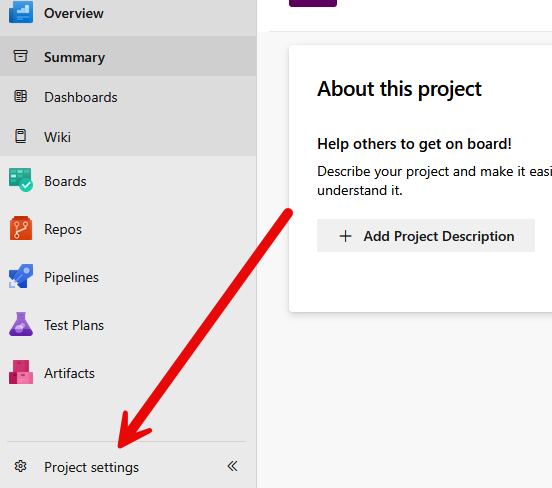
Open Project settings in the Azure DevOps project that owns the failing pipeline.
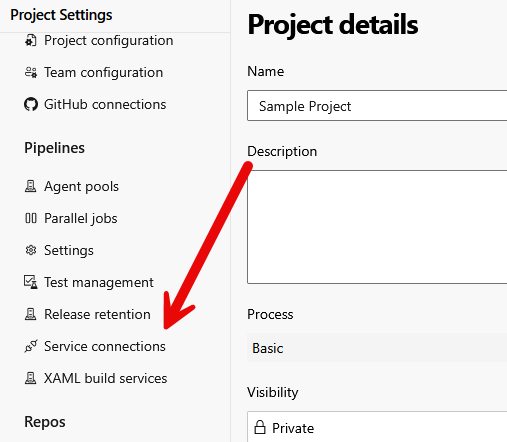
Open Service connections and inspect the Azure Resource Manager connection used by the deployment.
Run the pipeline again after rotation. This is a recovery action, not the best long-term authentication design, because the replacement secret expires too.
Warning
Rotation is not always available. It applies to service principals or secrets that Azure DevOps can manage automatically. Manually created identities, restricted tenants, cross-project connections, or connections owned by another team can require a different recovery path.
Preferred fix: convert the existing service connection to workload identity federation
For an existing Azure Resource Manager service connection, first check whether Azure DevOps offers Convert. Microsoft recommends workload identity federation and supports converting eligible existing connections from secret-based authentication.
Converting the existing connection is preferable to creating a replacement when possible because the service connection identity in Azure DevOps remains the same from the pipeline's perspective. That usually means you do not have to rename azureSubscription throughout your YAML.
Go to Project settings > Service connections.
Open the affected Azure Resource Manager service connection.
If Convert is available, select it and confirm the conversion to workload identity federation.
Wait for Azure DevOps to complete the identity configuration.
Verify the connection and run the pipeline again.
The built-in conversion has eligibility requirements. Microsoft documents that the connection must have been created by Azure DevOps for the conversion tool to modify its credentials, and cross-project service connections are not supported by that conversion path.
Note
Best default: if the existing service connection can be converted, convert it instead of creating another connection and editing every pipeline that references the old name.
Create a new WIF service connection when conversion is not suitable
If conversion is unavailable, you deliberately want a new connection, or you are rebuilding the authentication setup, create an Azure Resource Manager service connection that uses workload identity federation.
Open Azure DevOps > Project Settings > Service connections > New service connection.
Select Azure Resource Manager.
For Identity type, choose App registration (automatic) when it fits your tenant and permissions.
For Credential, choose the recommended Workload identity federation.
Select the narrowest appropriate scope. A resource group is often preferable to subscription-wide access when the pipeline only deploys resources in that group.
Give the connection a stable descriptive name and save it.
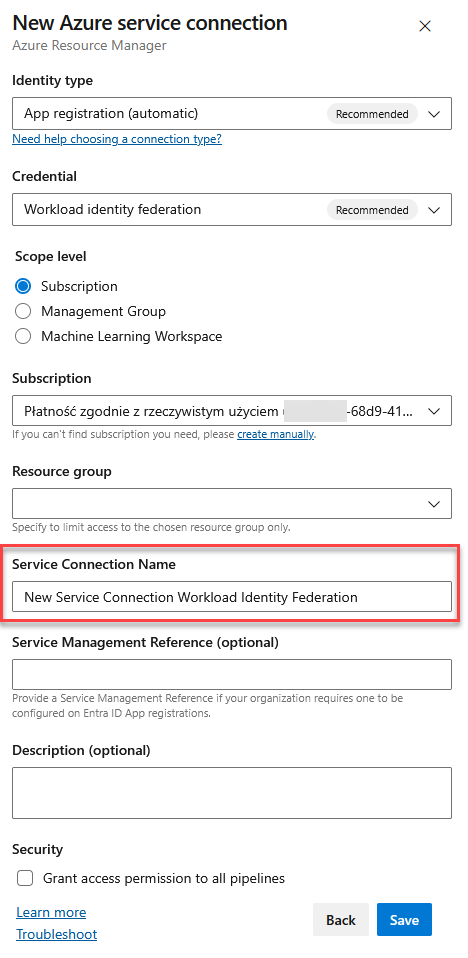
Creating an Azure Resource Manager service connection with workload identity federation.
Avoid enabling Grant access permission to all pipelines automatically. Current Microsoft guidance recommends authorizing individual pipelines instead unless broad access is genuinely required.
Update pipeline YAML only when the service connection name changes
Azure deployment tasks reference the service connection by name. If you created a new connection, update the task input, such as azureSubscription, to match it exactly.
task: AzureRmWebAppDeployment@4
  inputs:
    ConnectionType: 'AzureRM'
    azureSubscription: 'New Service Connection Workload Identity Federation'
    appType: 'webAppLinux'
    WebAppName: 'sample-website-dev'
    packageForLinux: '$(Build.ArtifactStagingDirectory)/**/*.zip'
    RuntimeStack: 'DOTNETCORE|8.0'
If you converted the existing service connection and kept its name, this YAML change is usually unnecessary.
The same principle applies to other Azure tasks. The exact input name depends on the task, but it must reference the service connection that now uses workload identity federation.
Why workload identity federation is better
Workload identity federation removes the long-lived client secret from this authentication path. Azure Pipelines uses an OIDC assertion that Microsoft Entra validates against a federated identity credential and exchanges for an Azure access token.
Client-secret connection | Workload identity federation |
|---|---|
Stores a secret credential | No long-lived client secret is stored for pipeline authentication |
Secret expires and must be rotated | Removes scheduled client-secret rotation from this path |
Leaked secret can be reused until revoked or expired | Uses federated assertions and short-lived access tokens |
Credential lifecycle creates operational work | Reduces credential maintenance |
WIF does not remove the need for authorization. The app registration or managed identity still needs the correct Azure role assignments, and the service connection should be scoped according to least privilege.
Important in 2026: check which WIF issuer your connection uses
There is a newer migration detail that matters for long-lived Azure DevOps environments. Microsoft is retiring the older Azure DevOps issuer used by some workload identity federation service connections on July 1, 2027. New WIF service connections use the Microsoft Entra issuer by default.
If you have already migrated to WIF, check existing service connections for an Azure DevOps warning. Eligible connections using the older issuer should be converted to the Microsoft Entra issuer before the retirement date.
Note
This is separate from AADSTS7000222. Moving from an expired client secret to a WIF fixes the secret lifecycle problem. The issuer migration concerns older WIF connections and should be handled as its own maintenance task.
Troubleshooting checklist
Confirm that the failing log really contains
AADSTS7000222, not a different Entra authentication code.Identify the exact Azure Resource Manager service connection used by the failing task.
If you rotated a secret, verify the service connection and rerun the pipeline.
If you created a new connection, make sure
azureSubscriptionexactly matches its name.Check that the identity still has the required Azure RBAC role at the intended subscription, resource group, or resource scope.
For WIF, verify that the issuer, subject identifier, and audience match the federated credential when the connection was configured manually.
Authorize the pipeline to use the service connection instead of granting blanket access unless broad access is intentional.
If an older WIF connection shows an issuer-deprecation warning, migrate it to the Microsoft Entra issuer.
Frequently Asked Questions
What does AADSTS7000222 mean?
Microsoft Entra returns this error when the client secret keys presented for an application have expired.
Can I just create a new client secret?
Yes, rotating the secret can restore a compatible service connection quickly. It does not remove the underlying lifecycle problem because the replacement secret will expire later.
Do I need to create a new Azure DevOps service connection?
Not necessarily. For an eligible existing Azure Resource Manager connection, converting it to workload identity federation is usually cleaner because pipelines can continue referencing the same service connection.
Do I need to edit azure-pipelines.yml after conversion?
Usually not if you convert the existing connection in place and keep its name. Update the YAML when you create a replacement connection with a different name.
Should I grant the new connection to all pipelines?
Only when that broad access is intentional. Authorizing individual pipelines provides tighter control and aligns better with least privilege.
Will workload identity federation prevent AADSTS7000222?
It removes the client secret from this Azure DevOps authentication path, so that particular failure mode caused by the service connection's expiring client secret is eliminated. WIF can still fail for other reasons such as incorrect federated credential values or missing Azure permissions.
References
Conclusion
AADSTS7000222 is straightforward once you trace the pipeline back to its Azure Resource Manager service connection: a client secret used for authentication has expired. Rotate the secret when you need immediate recovery, but use that moment to remove the recurring failure mode.
For eligible existing connections, convert them to workload identity federation. Create a new WIF connection only when conversion is unavailable or a new identity boundary is intentional. That gives you a deployment setup with less credential maintenance and no scheduled client-secret expiry waiting to break a future release.


