
Introduction
Learning Umbraco is relatively easy. Learning it well enough to build maintainable, production-ready websites is a different problem.
There are documentation pages, tutorials, videos, training courses, community discussions, GitHub issues, packages, and years of older material online. The problem is not finding information. The problem is knowing what to trust, what to learn first, and whether a resource still applies to the version and architecture you are using.
My recommendation is to treat Umbraco as two things at the same time: a CMS with its own content model and conventions, and a modern .NET application that should still follow solid engineering practices.
Rule of thumb
start with official documentation, turn knowledge into a hands-on project, use GitHub and the official community to go deeper, use AI to accelerate understanding, and treat production experience as the final test.
TL;DR: where should you start?
Resource | Best for | Priority |
|---|---|---|
Official Umbraco Documentation | Concepts, APIs, and platform behavior | Essential |
Official Umbraco Product Roadmap | Understanding what is changing next and which skills will become more important | Essential for working developers |
Hands-on project | Turning theory into a real skill | Essential |
Official Umbraco Training | Structured learning | High |
Umbraco Community | Real-world context and support | High |
Umbraco GitHub repository | Issues, releases, and implementation details | High for experienced developers |
Umbraco Marketplace | Understanding extensions and package trade-offs | Useful |
AI assistants | Explanations, exploration, and debugging hypotheses | Useful when verified |
My recommended Umbraco learning stack
I do not treat learning resources as a flat list. I use them as a hierarchy. The closer you are to the top, the more authoritative the source usually is. The further you move down, the more important context, experimentation and engineering judgement become.
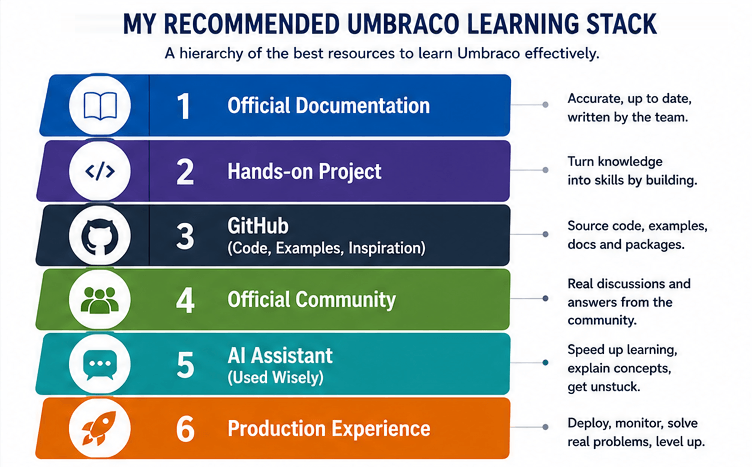
My recommended Umbraco learning stack: start with authoritative sources, learn by building, deepen your understanding with GitHub and the community, use AI as an accelerator, and validate everything through production experience.
The point is not to avoid community knowledge or AI. Both are valuable. The point is to know what role each source should play. Documentation defines the platform. A project converts information into skill. GitHub reveals implementation detail and product history. Community discussion adds real-world experience. AI helps you move faster. Production tells you whether your assumptions were actually good.
The Umbraco learning roadmap
A useful roadmap should tell you not only what to read, but what you should be able to build before moving on. I would divide the journey into three stages.
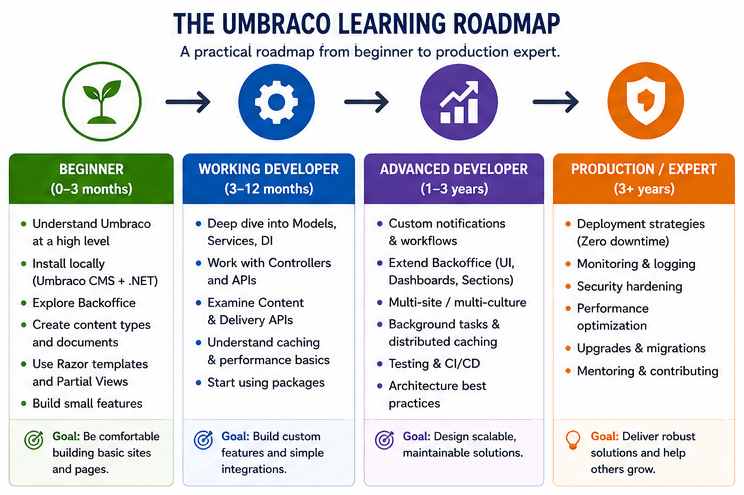
A practical Umbraco learning roadmap. Each stage should end with a project and a clear readiness criterion, not just a completed reading list.
Stage 1: Beginner
Learn how the CMS thinks. Focus on content, Document Types, properties, Data Types, Property Editors, media, templates, and basic content rendering.
Project: build a small site with Home, About, Blog and Contact pages.
You are ready to move on when: you can create a small content model, render it in templates, add reusable content, and explain how editor input becomes published website output.
Stage 2: Working Umbraco Developer
Move from pages to application development. Learn dependency injection, services, notifications, controllers, configuration, integrations, search, caching, packages, editor workflows and content modelling for real projects.
Project: build a realistic CMS-driven site with reusable components, forms, search, an external integration and a proper deployment workflow.
You are ready to move on when: you can solve requirements without relying on a tutorial, diagnose errors using logs and source information, and make reasonable architectural trade-offs.
Stage 3: Production / Advanced
Learn the parts tutorials often skip: deployment, monitoring, performance, security, troubleshooting, upgrades, migrations, CI/CD, architecture, scaling where relevant and operational risk.
Project: run and maintain an Umbraco application as if it were production: deploy it, monitor it, break it, diagnose it, upgrade it and document the decisions.
You are ready when: you can own the lifecycle of an Umbraco platform, not only write features inside it.
Official Umbraco Documentation
The official Umbraco Documentation should be your primary source of truth. It is the first place I would check when learning a concept, validating an API, understanding platform behaviour or checking whether an older implementation still makes sense.
Start with the fundamentals: Document Types, Data Types, Property Editors, content, media, templates, routing, querying content and the extension points that connect Umbraco to the rest of your application.
The most important habit is simple: always verify the version and current API before copying code from another source.
Official Umbraco Product Roadmap
The official Umbraco Product Roadmap is one of the most useful resources for developers who already know the basics and want to understand where the platform is going next.
Documentation answers how does this work now? The roadmap answers a different question: what is Umbraco HQ working on now, planning next, or considering later? That distinction matters when you choose what to learn, which abstractions to depend on, how aggressively to customize the platform, and how you prepare for future upgrades.
As of August 2026, the roadmap highlights major directions including the gradual move from NPoco to Entity Framework Core, broader async patterns in the CMS data layer, deeper MCP and AI integration, a search abstraction designed to make external search providers easier to adopt, and continued work across Umbraco Cloud, Deploy, Engage, Commerce, Forms and Compose.
Do not read the roadmap as a contract or as documentation for features that already exist. Treat Now, Next, and Later as planning signals. Verify delivered functionality against release notes, documentation, and the Roadmap History.
How I would use the roadmap when learning Umbraco
Beginner: do not chase unreleased features. Learn current CMS fundamentals first.
Working developer: scan the roadmap regularly to identify APIs, patterns, and product areas that are likely to become more important.
Architect or senior developer: use it as an architectural early-warning system for upgrades, dependencies, custom infrastructure, and long-lived platform decisions.
AI-assisted developer: pay particular attention to Umbraco MCP, hosted remote MCPs, agent skills, and AI-assisted editorial workflows because these can change how developers and content teams interact with the CMS.
For me, this moves the roadmap from “interesting product news” to a genuine learning resource. It helps you decide not only what to learn today, but which knowledge is likely to compound over the next several Umbraco releases.
Learn by building, not by collecting tutorials
Reading documentation is necessary, but it does not create production skill by itself. After you understand the core model, build something without following a tutorial line by line.
A good first learning project can stay small. Add navigation, reusable content, images, a blog listing, basic SEO fields, a contact form and error handling. Then rebuild part of it differently and compare the trade-offs.
The goal is to move from I have seen this before to I can explain why I chose this implementation.
Learn the .NET underneath Umbraco
One of the biggest mistakes when learning Umbraco is learning only “Umbraco code”. Modern Umbraco development is also .NET development.
You should be comfortable with:
C# and ASP.NET Core fundamentals
dependency injection and configuration
Razor and MVC concepts
HTTP, logging and error handling
asynchronous programming
caching and application lifecycle
basic database and deployment concepts
Useful question
is this actually an Umbraco problem, or is it an ASP.NET Core problem happening inside an Umbraco application?
Official Umbraco Training
If you prefer structured learning, official training can help you cover areas you might otherwise skip. I see it as an accelerator rather than a requirement.
Free official resources should still be the foundation. Training and certification make more sense when you work professionally with Umbraco, want a structured path, or need a broader view of the platform than one project naturally gives you.
The Umbraco Community
Documentation explains APIs. Community knowledge often explains the context around them: why one approach worked, what failed in production, what became difficult to maintain, and which trade-offs matter in real projects.
Use official community channels for questions, discussions, meetups, Codegarden, community events and practical experience. At this stage, I would not treat community content as a replacement for documentation, but as the layer that makes the documentation more useful in real life.
Umbraco on GitHub
GitHub becomes increasingly valuable from the Working Developer stage onward. You do not need to read the entire Umbraco source code. Start with issues, releases, pull requests and the implementation around a feature you already understand.
GitHub is especially useful when documentation does not explain an edge case, you suspect a regression, you are upgrading, or you need to understand why a platform behaviour changed.
For advanced developers, source code becomes one of the best ways to understand how Umbraco actually works beneath the public API.
Umbraco Marketplace and packages
The Umbraco Marketplace is useful not only for finding extensions, but also for learning how the ecosystem solves recurring problems.
The important lesson is not to install a package simply because it exists. Every dependency becomes part of your future upgrade and maintenance surface.
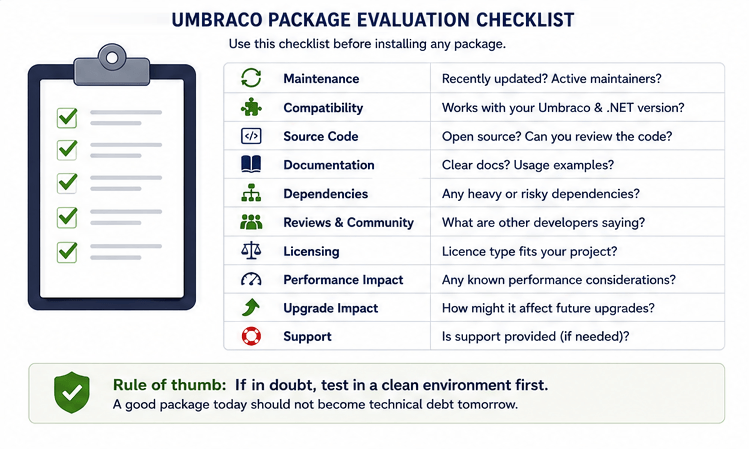
A package should be evaluated like any other dependency: maintenance, compatibility, documentation, source availability, licensing, dependency risk, and future upgrade impact all matter.
Is the package actively maintained?
Does it support your current Umbraco and .NET versions?
Is the source available and understandable?
Is the documentation good enough for long-term ownership?
What dependencies does it add?
Does the license fit your project?
What happens during the next major upgrade?
Would building a small internal feature be safer than adding the package?
Learn editor experience and content modelling
A strong Umbraco developer does more than write C#. You are building a content system for people who will use the Backoffice every day.
Learn to design Document Types, compositions, reusable content structures and components that make sense both technically and editorially. A content model can be perfectly valid in code and still be frustrating for editors.
When reviewing a model, ask two questions: does this structure make the code maintainable, and does it make the editor’s job obvious?
The roadmap makes this skill even more important: Umbraco HQ is explicitly investing in AI agent skills for content modeling and implementation, which means well-structured models and clear implementation conventions are becoming inputs not only for humans, but also for AI-assisted development workflows.
Using AI to learn Umbraco
AI assistants such as ChatGPT, Claude and GitHub Copilot can make learning much faster. They are particularly good at explaining unfamiliar code, summarising documentation, generating debugging hypotheses, comparing approaches and helping you explore a large codebase.
They should not become your source of truth for version-specific framework behaviour. Umbraco has changed significantly over time, and an AI answer can combine valid information from different generations of the platform.
Recommended workflow
AI explanation → verify in official documentation → check version and API → check the product roadmap when future direction matters → inspect GitHub if necessary → test in a minimal project.
Used this way, AI becomes an interface to knowledge rather than a substitute for engineering judgement.
Umbraco learning resources I would use carefully
Learning faster also means learning what to reject. Some resources are useful only when you understand their context.
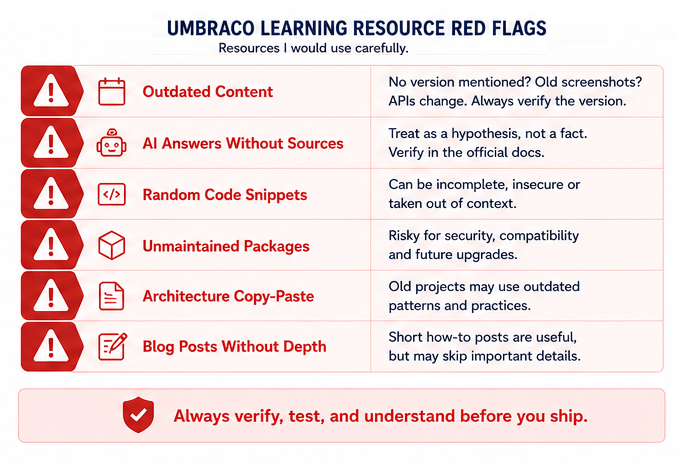
Red flags that should trigger verification before you use a learning resource in a real Umbraco project.
Red flag
Old tutorials with no version context. The advice may be correct for a different Umbraco generation.
AI answers with no verification. Treat them as hypotheses, not facts.
Random code snippets. They may omit dependencies, error handling, lifecycle concerns or security context.
Unmaintained packages. A quick fix today can become an upgrade blocker later.
Copying architecture from an old project. Working code is not proof that the design is still appropriate.
Short “how-to” posts without trade-offs. Useful for syntax, weaker for architectural decisions.
Roadmap items treated as released APIs. Roadmaps describe direction and planning. Verify shipped behavior in documentation, release notes, and Roadmap History.
Final recommendations
The best way to learn Umbraco is not to memorise the CMS. Learn its mental model first, connect it to your .NET knowledge, build real features, verify behaviour against official sources, and gradually move toward production concerns.
Use the official documentation as your baseline. Use hands-on projects to turn reading into skill. Use the official product roadmap to understand direction and prepare for upcoming platform shifts. Use GitHub when you need implementation detail. Use the official community when experience matters more than syntax. Use AI to accelerate understanding, but keep verification in the loop.
Most importantly, keep one small Umbraco project that you control. Use it as your laboratory: build features, break them, test packages, investigate logs, deploy it, and upgrade it. That project will eventually teach you more than another folder full of bookmarked tutorials.
Frequently Asked Questions
What is the best place to start learning Umbraco?
Start with the official Umbraco Documentation and a small hands-on website. Learn the core content model before moving into advanced APIs and architecture.
Do I need to know C# before learning Umbraco?
You can explore the CMS without deep C# knowledge, but professional Umbraco development requires solid C# and ASP.NET Core fundamentals.
Is official Umbraco training worth it?
It can be valuable when you want structured learning or use Umbraco professionally, but free official resources and hands-on practice should remain the foundation.
Should I use AI to learn Umbraco?
Yes, as an accelerator. Use AI for explanations, exploration and debugging hypotheses, then verify important version-specific information against official documentation, GitHub or a minimal test project.
How do I know whether an Umbraco tutorial is outdated?
Check the publication date, target Umbraco version, .NET context and APIs used. If those details are missing, verify the implementation against the current official documentation.
Why should developers follow the Umbraco Product Roadmap?
Because it shows the platform direction before every change reaches stable documentation. It can help you identify upcoming areas such as EF Core migration, MCP and AI integration, search abstraction, Cloud deployment changes, and other product investments. Use it for planning and learning priorities, not as proof that an unreleased feature is already available.
Keep learning Umbraco
Continue with practical guides on Umbraco, .NET, and Azure. Explore architecture, upgrades, performance, deployment and troubleshooting — with solutions built for real-world projects.


