
In short: implement IAsyncActionFilter when controller actions need reusable asynchronous logic immediately before, after, or instead of the action method. Put application-wide HTTP concerns in middleware and use endpoint filters for route-handler endpoints. Inside an async action filter, call await next() exactly when the pipeline should continue. Set context.Result and return when it should not.
What is an async action filter?
An async action filter is a component in the ASP.NET Core MVC action pipeline. It can inspect or change action arguments before a controller action runs, stop the action from running, and inspect the resulting ActionExecutedContext after it completes.
The interface contains one method:
public interface IAsyncActionFilter : IFilterMetadata
{
    Task OnActionExecutionAsync(ActionExecutingContext context, ActionExecutionDelegate next);
}
The two parameters define the filter's job:
ActionExecutingContextexposes the HTTP context, selected action, model state, action arguments, and a writableResultproperty.ActionExecutionDelegateinvokes the remaining action filters and, unless one short-circuits execution, the controller action.
The most important decision is whether to invoke next. Calling it continues the action pipeline. Setting context.Result and returning without calling it short-circuits the pipeline.
How the execution flow works
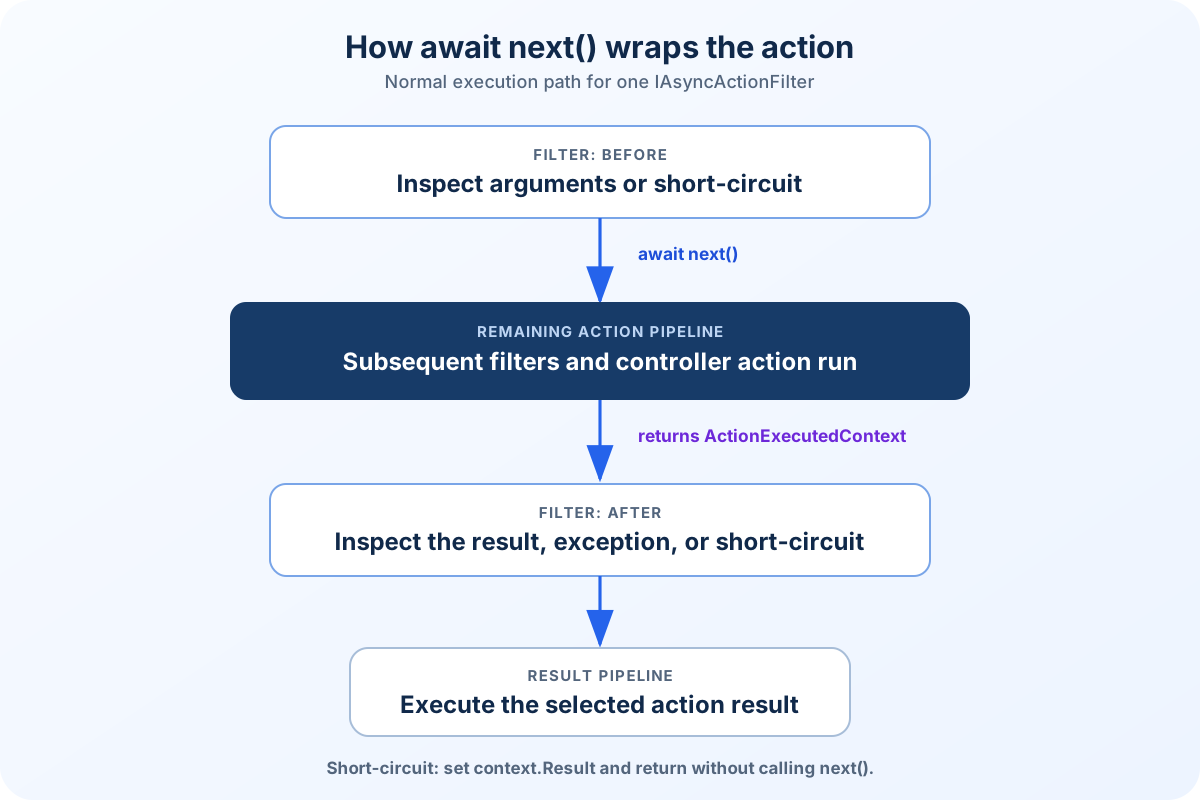
await next() hands control to the remaining action pipeline. When it completes, the same filter method resumes.
The before and after phases belong to the same filter method. On the normal path, execution pauses at await next() while the remaining action filters and controller action run. When that delegate completes, the method resumes with an ActionExecutedContext.
public async Task OnActionExecutionAsync(ActionExecutingContext context, ActionExecutionDelegate next)
{
    // Runs before the controller action.

    var executedContext = await next();

    // Runs after the controller action.
    // Inspect executedContext.Result, Exception, and ExceptionHandled.
    // Canceled means a later action filter short-circuited execution.
}
Default order: global, controller, action
You can ignore filter ordering when only one action filter applies. When several filters apply to the same action, their scope provides the default order. The following registration creates a global filter:
builder.Services.AddScoped<ControllerAuditFilter>();
builder.Services.AddScoped<ActionAuditFilter>();

builder.Services.AddControllers(options =>
{
    options.Filters.Add<GlobalAuditFilter>();
});
MVC type-activates GlobalAuditFilter, so the filter type itself does not need a separate service registration. Any services required by its constructor must still be registered.
The other two filters can be applied at controller and action scope:
[ServiceFilter<ControllerAuditFilter>]
public sealed class OrdersController : ControllerBase
{
    [HttpGet]
    [ServiceFilter<ActionAuditFilter>]
    public IActionResult Get() => Ok();
}
Assuming each type implements IAsyncActionFilter, the request follows this sequence:
Global filter: before
Controller filter: before
Action filter: before
Controller action
Action filter: after
Controller filter: after
Global filter: after
The filter that starts first finishes last.
Override the default with Order
Use Order only when scope does not express the required sequence. ServiceFilterAttribute<TFilter> implements IOrderedFilter, so the value can be set directly on the attribute:
builder.Services.AddScoped<OuterTraceFilter>();
builder.Services.AddScoped<InnerTraceFilter>();
[HttpGet("/api/filter-order")]
[ServiceFilter<OuterTraceFilter>(Order = 0)]
[ServiceFilter<InnerTraceFilter>(Order = 10)]
public ActionResult<IReadOnlyList<string>> GetFilterOrder()
{
var trace = HttpContext.GetFilterTrace();
trace.Add("Action");
return Ok(trace);
}A lower value starts earlier and finishes later. The endpoint included with this article returns the observed sequence:
[
  "Outer: before",
  "Inner: before",
  "Action",
  "Inner: after",
  "Outer: after"
]
The accompanying project contains both filter implementations, the trace endpoint, and an integration test that verifies this exact response.
Order takes precedence over scope. When two filters have the same Order, their scope determines which one runs first.
Important boundary: action filters surround controller action execution. They do not surround static files, unmatched routes, middleware failures, or Minimal API handlers. They are also not supported directly by Razor Page handler methods.
IAsyncActionFilter example: resolving an account
Consider several account endpoints that require the same preparation:
Read a bound
accountIdaction argument.Resolve the account asynchronously.
Return a consistent
400or404response when execution cannot continue.Make the resolved account available to the controller action.
This concern is action-specific, depends on model-bound arguments, and performs asynchronous I/O. That makes an async action filter a reasonable fit.
Define the dependency
public interface IAccountLookup
{
    ValueTask<Account?> FindByIdAsync(
        Guid accountId,
        CancellationToken cancellationToken);
}
Implement the filter
public sealed class RequireAccountFilter(IAccountLookup accounts)
    : IAsyncActionFilter
{
    public async Task OnActionExecutionAsync(
        ActionExecutingContext context,
        ActionExecutionDelegate next)
    {
        if (!context.ActionArguments.TryGetValue("accountId", out var value) ||
            value is not Guid accountId ||
            accountId == Guid.Empty)
        {
            context.Result = new BadRequestObjectResult(new ProblemDetails
            {
                Title = "Invalid account identifier",
                Detail = "The action requires a non-empty accountId value.",
                Status = StatusCodes.Status400BadRequest
            });

            return;
        }

        var account = await accounts.FindByIdAsync(
            accountId,
            context.HttpContext.RequestAborted);

        if (account is null)
        {
            context.Result = new NotFoundObjectResult(new ProblemDetails
            {
                Title = "Account not found",
                Detail = $"Account '{accountId}' does not exist.",
                Status = StatusCodes.Status404NotFound
            });

            return;
        }

        context.HttpContext.SetResolvedAccount(account);

        await next();
    }
}A few details matter here:
The filter uses constructor injection. It does not resolve services manually from
HttpContext.RequestServices.The request cancellation token is passed to the asynchronous dependency.
Invalid requests are short-circuited without calling
next.ProblemDetailskeeps error responses predictable.The resolved object is stored under a controlled key. A small typed extension method is preferable to repeating the string lookup in controllers.
public static class AccountHttpContextExtensions
{
    private static readonly object AccountItemKey = new();

    public static void SetResolvedAccount(
        this HttpContext context,
        Account account)
    {
        ArgumentNullException.ThrowIfNull(context);
        ArgumentNullException.ThrowIfNull(account);

        context.Items[AccountItemKey] = account;
    }

    public static Account GetRequiredAccount(this HttpContext context)
    {
        ArgumentNullException.ThrowIfNull(context);

        return context.Items.TryGetValue(AccountItemKey, out var value) &&
               value is Account account
            ? account
            : throw new InvalidOperationException(
                "The account filter did not resolve an account.");
    }
}
Do not turn filters into hidden application services. If only one action needs the lookup, keep it visible in that action or its application handler. A filter earns its place when the behavior is genuinely cross-cutting across a meaningful group of controller actions.
How to register and apply the filter
Register the filter and its dependency with the DI container:
var builder = WebApplication.CreateBuilder(args);

builder.Services.AddControllers();
builder.Services.AddSingleton<IAccountLookup, InMemoryAccountLookup>();
builder.Services.AddScoped<RequireAccountFilter>();

var app = builder.Build();

app.MapControllers();
app.Run();
Then apply it to a controller or action:
[ApiController]
[Route("api/accounts")]
public sealed class AccountsController : ControllerBase
{
    [HttpGet("{accountId:guid}/summary")]
    [ServiceFilter<RequireAccountFilter>]
    public ActionResult<AccountSummary> GetSummary(Guid accountId)
    {
        var account = HttpContext.GetRequiredAccount();

        return Ok(new AccountSummary(account.Id, account.Name));
    }
}
Registration options
Approach | Best use | DI behavior |
|---|---|---|
| Recommended here. Use it when the filter is an application service registered in DI. | The filter type and its dependencies must be registered. |
| Use it when the attribute must supply additional constructor arguments. | The filter type does not need registration. Its service dependencies do. |
| Use it only when the behavior genuinely applies to every controller action. | MVC creates the filter through type activation and resolves its constructor dependencies from DI. |
Custom attribute implementing | Advanced. Use it for a reusable custom attribute that creates another filter. | The factory controls how the filter instance is created, usually with services from DI. |
A plain filter attribute applied directly to a controller cannot receive arbitrary services through constructor injection because attribute arguments must be known where the attribute is declared. Use one of the DI-aware approaches instead.
Working after the action executes
The value returned by await next() is an ActionExecutedContext. It tells the filter whether a subsequent action filter short-circuited execution, whether an exception occurred, whether that exception was handled, and what action result was produced. Its Canceled property describes a filter short-circuit, not cancellation through HttpContext.RequestAborted.
public async Task OnActionExecutionAsync(
    ActionExecutingContext context,
    ActionExecutionDelegate next)
{
    var executedContext = await next();

    if (executedContext.Exception is not null &&
        !executedContext.ExceptionHandled)
    {
        // Observe or enrich diagnostics, but do not silently swallow failures.
    }
}
This is useful for domain-specific auditing or diagnostics tied to selected actions. It is not a reason to duplicate the framework's request logging. Microsoft explicitly recommends avoiding action filters used only to log framework events because ASP.NET Core already logs action execution.
Choose the correct filter stage. If the requirement is specifically about formatting or changing an action result, a result filter is usually more precise. If it must cover the whole HTTP request, use middleware.
Action filter, middleware, or endpoint filter?
Mechanism | Best fit | Avoid it when |
|---|---|---|
Async action filter | Controller-specific cross-cutting behavior that needs model state, action arguments, controller metadata, or the action result. | The behavior must cover non-MVC endpoints or run before routing and model binding. |
Middleware | Request-wide concerns such as exception handling, correlation, security headers, request logging, or response compression. | The logic depends on bound action parameters or a selected controller action. |
Endpoint filter | Before-and-after behavior around Minimal API handlers. In ASP.NET Core 10, endpoint filters can also be attached to controller action endpoints through endpoint conventions. | You specifically need MVC filter types, scopes, or |
Authorization policy | Access-control decisions based on identities, claims, resources, or requirements. | You are tempted to create an action filter solely for authorization. |
A practical rule is to select the narrowest pipeline that naturally owns the concern. Middleware has the broadest reach. Action filters provide the richest MVC-specific context. Endpoint filters are the native fit for route-handler endpoints and can also cover controller action endpoints when their simpler contract is sufficient. Authorization belongs in the authorization system.
Async action filter best practices and common mistakes
1. Forgetting to call await next()
If the filter neither assigns context.Result nor calls next, the action never executes and the pipeline has no intentional result. Make the branching explicit: short-circuit and return, or await the delegate.
2. Calling next after setting a result
Short-circuiting means setting context.Result and not calling next. Doing both produces contradictory control flow and can trigger an invalid operation.
3. Blocking asynchronous work
Do not use .Wait(), .Result, or artificial Task.Run calls around naturally asynchronous I/O. Await the dependency and pass HttpContext.RequestAborted when its API accepts cancellation.
4. Resolving dependencies through RequestServices
Manual resolution hides dependencies and makes tests harder to read. Prefer constructor injection through ServiceFilter<T>, TypeFilter<T>, a global type-activated filter, or a custom IFilterFactory.
5. Implementing synchronous and asynchronous versions together
Implement one version for each filter stage. When a filter implements both sync and async interfaces, ASP.NET Core checks the async interface first and calls only that implementation.
6. Using filters for validation already handled by [ApiController]
Controllers marked with [ApiController] automatically return 400 for invalid model state. Add a filter only when the rule is different, such as an asynchronous lookup or a shared domain prerequisite.
7. Registering the wrong lifetime
A filter that depends on scoped services should not be promoted to a singleton or marked reusable. Register it with a lifetime compatible with its dependencies. Scoped is a safe default for filters that use request-scoped application services.
8. Hiding substantial business workflows in filters
Filters are infrastructure around actions, not an alternative application layer. Keep complex orchestration in explicit services or handlers. Otherwise, behavior becomes difficult to discover from the controller and difficult to reuse outside MVC.
Testing the filter
At minimum, test the main control-flow paths:
invalid input assigns the expected result and does not invoke
next;a missing resource short-circuits with
404;a valid resource is attached to the request context and invokes
nextexactly once;the request cancellation token reaches the asynchronous dependency.
The implementation used in this article was compiled with .NET SDK 10.0.401 and tested against ASP.NET Core 10.0.12.
Frequently asked questions
What is the difference between IActionFilter and IAsyncActionFilter?
IActionFilter provides separate synchronous methods before and after an action. IAsyncActionFilter provides one asynchronous method that wraps the action through await next(). Use the async interface when the filter awaits I/O.
Can an async action filter stop a controller action?
Yes. Assign an IActionResult to context.Result, then return without invoking next. This is called short-circuiting.
Should logging be implemented with an action filter?
Usually not for general request or framework logging. Use built-in ASP.NET Core logging or middleware. An action filter can still be appropriate for domain-specific audit events tied to selected controller actions.
Do action filters work with Minimal APIs?
IAsyncActionFilter belongs to the MVC action pipeline. Minimal APIs have endpoint filters, which provide a similar before-and-after model around route handlers.
Should a filter use ServiceFilter or TypeFilter?
Use ServiceFilter<T> when the filter itself is registered in DI. Use TypeFilter<T> when the runtime should construct the filter while resolving its dependencies from DI. For a widely reused public API, consider a custom attribute implementing IFilterFactory.
Final recommendations
Async action filters are valuable when reusable controller behavior genuinely depends on the MVC action context. Keep their responsibility narrow, inject dependencies explicitly, propagate cancellation, and make the short-circuit path unmistakable.
The decisive question is not whether a filter can implement the behavior. It is whether the MVC action pipeline is the correct owner of that behavior. Choosing that boundary well prevents filters from becoming invisible middleware or a hidden business layer.
Architecture signal: if a controller is difficult to understand without knowing several global filters, too much behavior has probably moved out of sight. Filters should remove repetition without removing clarity.
References
Filters in ASP.NET Core, Microsoft Learn.
ServiceFilterAttribute.Order property, Microsoft Learn.
ASP.NET Core middleware, Microsoft Learn.
Filters in Minimal API apps, Microsoft Learn.
Automatic HTTP 400 responses with ApiController, Microsoft Learn.


