
Introduction
Content migrations often change URLs.
The content itself may migrate correctly, but old URLs can still exist in Google, backlinks, documentation, emails, bookmarks, or other websites. Returning a 404 Not Found for those addresses throws away traffic and link equity that could instead be redirected to the migrated content.
Umbraco already has a mechanism for this. When a content URL changes, historical addresses can be stored in the umbracoRedirectUrl table and resolved to the current URL of the destination content.
Normally, Umbraco manages these records for you. During a migration, however, you may already know the old URLs and need to import them yourself.
I recently needed exactly that:
/disabling-resharper-in-visual-studio/had moved to:
/blog/disabling-resharper-in-visual-studio/I wanted the original address to return a real HTTP 301 Moved Permanently.
Here is how I implemented and tested it on Umbraco 17.
Important
Directly modifying Umbraco database tables bypasses Umbraco's service layer. Test this against a restored local copy of your database first, take a backup before production changes, and revalidate the implementation when changing Umbraco versions.
The game plan in 13 seconds
Understanding umbracoRedirectUrl
In the Umbraco 17 database, redirect records are stored in:
dbo.umbracoRedirectUrlThe relevant columns are:
Column | Purpose |
|---|---|
| Unique identifier of the redirect record |
| GUID of the destination content item |
| Creation timestamp |
| Historical URL that should redirect |
| Content culture for a variant |
| SHA-1 hash used to identify the historical URL |
The important concept is that the table does not need the new URL.
Instead, it contains:
old URL -> contentKeyUmbraco can resolve that content item to its current published URL.
That is useful because another future URL change does not require you to rewrite every historical redirect to contain the latest destination URL.
How urlHash is generated
A real record from the database gave me this pair:
/configuring-umbraco-media-on-azure-private-blob-storage

3cb3b3ffbb58bf125cca803211ac35b2fd7b3d78
Calculating SHA-1 for that URL produces exactly the same value:
SHA1("/configuring-umbraco-media-on-azure-private-blob-storage")
=
3cb3b3ffbb58bf125cca803211ac35b2fd7b3d78
Another existing record confirmed the result:
/blog/how-to-enhance-umbraco-media-folder-management

1632b49cf8704367be208aeba4a6efdf5603808a
This means SQL Server can calculate the value when inserting the redirect:
LOWER(CONVERT(VARCHAR(40),
    HASHBYTES('SHA1', CONVERT(VARCHAR(MAX), @Url)),
    2
))
There is no reason to manually calculate and paste hashes into migration scripts.
Culture matters
On a multilingual Umbraco installation, culture can contain values such as:
en
pl-pl
while non-variant records may contain:
NULLDo not assume that every installation uses values such as en-US.
Instead, check the actual Umbraco configuration:
SELECT
    id,
    languageISOCode,
    languageCultureName,
    isDefaultVariantLang,
    mandatory,
    fallbackLanguageId
FROM dbo.umbracoLanguage;
The stored procedure can then validate the supplied culture against languageISOCode.
Finding the destination content key
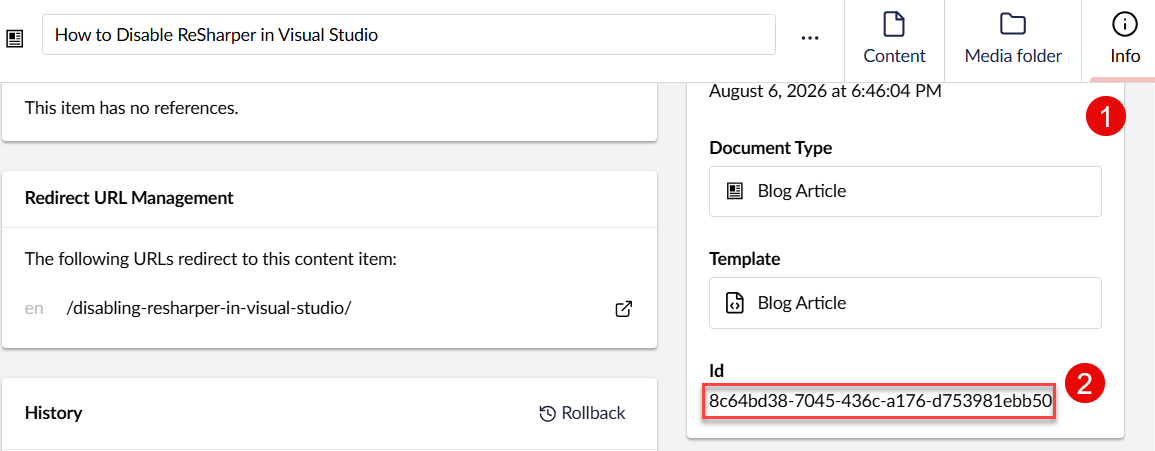
Umbraco 17 Info tab showing Redirect URL Management and the content item GUID
You need the GUID of the destination content item, not the numeric node ID.
There is an easy way to find it without querying SQL Server.
Open the destination document in the Umbraco backoffice and select:
Content → your document → Info
Look for:
Id
For example:
8c64bd38-7045-436c-a176-d753981ebb50That GUID is the value to use as contentKey.
This is particularly important after a content migration. Do not assume that a GUID from an old installation or old redirect record is still the identifier of the newly migrated document.
Creating a reusable stored procedure
For my migration scripts I used a small stored procedure instead of writing raw INSERT statements repeatedly.
CREATE OR ALTER PROCEDURE dbo.pbRedirectUrlAdd
    @ContentKey UNIQUEIDENTIFIER,
    @Url NVARCHAR(2048),
    @Culture NVARCHAR(20) = NULL
AS
BEGIN
    SET NOCOUNT ON;
    SET XACT_ABORT ON;

    SET @Url = LTRIM(RTRIM(@Url));

    IF @Url = ''
        THROW 50001, 'Url cannot be empty.', 1;

    IF NOT EXISTS (
        SELECT 1
        FROM dbo.umbracoNode
        WHERE uniqueId = @ContentKey
    )
        THROW 50002, 'ContentKey does not exist.', 1;

    IF @Culture IS NOT NULL AND NOT EXISTS (
        SELECT 1
        FROM dbo.umbracoLanguage
        WHERE languageISOCode = @Culture
    )
        THROW 50003, 'Culture does not exist.', 1;

    DECLARE @UrlHash VARCHAR(40);

    SET @UrlHash = LOWER(CONVERT(VARCHAR(40),
        HASHBYTES('SHA1', CONVERT(VARCHAR(MAX), @Url)),
        2
    ));

    IF EXISTS (
        SELECT 1
        FROM dbo.umbracoRedirectUrl
        WHERE urlHash = @UrlHash
          AND (culture = @Culture OR (culture IS NULL AND @Culture IS NULL))
    )
        THROW 50004, 'Redirect already exists.', 1;

    INSERT INTO dbo.umbracoRedirectUrl (
        id,
        contentKey,
        createDateUtc,
        url,
        culture,
        urlHash
    )
    VALUES (
        NEWID(),
        @ContentKey,
        GETUTCDATE(),
        @Url,
        @Culture,
        @UrlHash
    );
END;
GO
There are a few deliberate checks here.
First, the destination contentKey must exist in umbracoNode. In Umbraco 17 the relevant column is uniqueId.
Second, when a culture is supplied, it must exist in umbracoLanguage.
Finally, the procedure prevents another redirect with the same URL hash and culture from being inserted.
Adding a redirect
Suppose this URL:
/disabling-resharper-in-visual-studio/should redirect to the current article:
/blog/disabling-resharper-in-visual-studio/After finding the GUID of the destination article in the Info tab, execute:
EXEC dbo.pbRedirectUrlAdd
    @ContentKey = '8c64bd38-7045-436c-a176-d753981ebb50',
    @Url = '/disabling-resharper-in-visual-studio',
    @Culture = 'en';
Notice that I do not pass:
/blog/disabling-resharper-in-visual-studio/to the procedure.
The destination is represented by @ContentKey. The URL parameter is the old URL being registered.
The same approach can be used for another migrated article:
EXEC dbo.pbRedirectUrlAdd
    @ContentKey = 'YOUR-DESTINATION-CONTENT-GUID',
    @Url = '/best-umbraco-cms-packages',
    @Culture = 'en';
where the destination document currently lives at:
/blog/best-packages-for-umbraco-free-and-paid/Verify the database records
After running the migration, check what was inserted:
SELECT
    id,
    contentKey,
    createDateUtc,
    url,
    culture,
    urlHash
FROM dbo.umbracoRedirectUrl
WHERE url IN (
    '/disabling-resharper-in-visual-studio',
    '/best-umbraco-cms-packages'
);
This verifies the database operation, but it does not prove that the website returns the expected redirect.
There are two more useful checks.
Check Redirect URL Management in Umbraco
Open the destination document and go back to the Info tab.
Under Redirect URL Management, Umbraco should list the historical URL that redirects to the document.
For example:
en /disabling-resharper-in-visual-studio/This is a convenient way to verify that Umbraco recognizes the database record and associates it with the expected content item.
Verify the actual HTTP 301
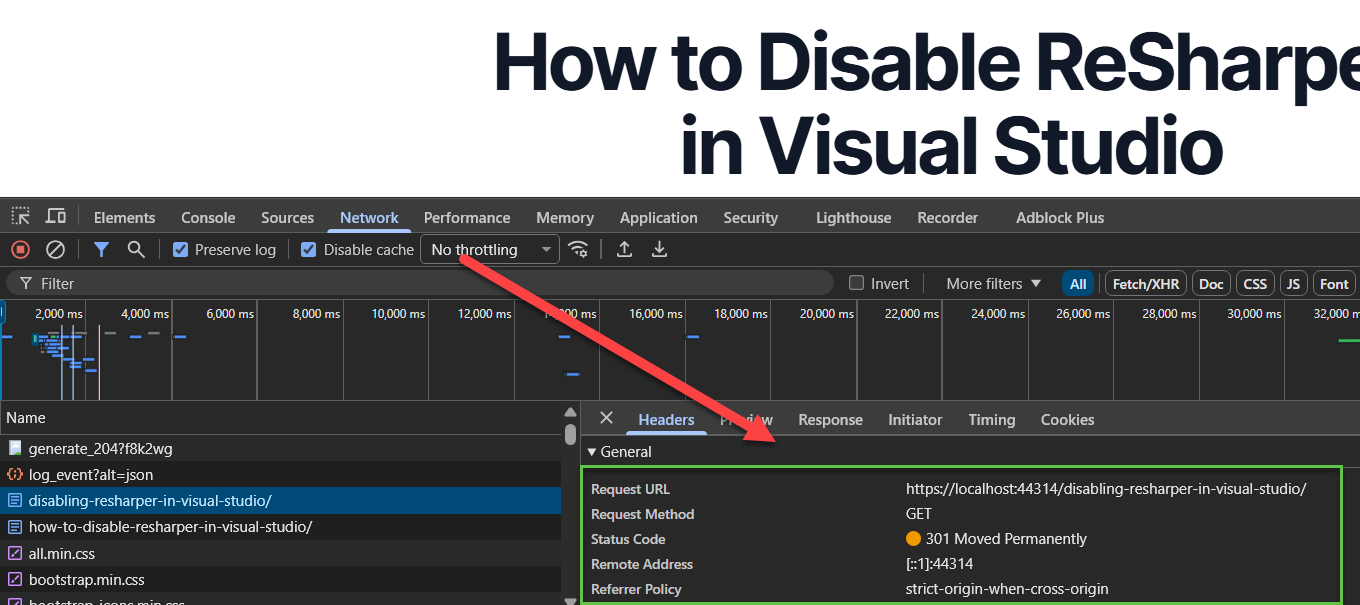
Chrome DevTools Network panel showing a 301 Moved Permanently response for an old Umbraco URL
This is the final test, and I would not skip it.
The browser ending up on the correct page does not by itself prove that the server returned the status code you wanted.
Open Chrome DevTools and:
Select Network.
Enable Preserve log if necessary.
Enable Disable cache while DevTools is open.
Navigate directly to the old URL.
Select the request for the old document.
Open Headers.
Check Status Code.
You want to see:
301 Moved PermanentlyGET /disabling-resharper-in-visual-studio/
|
301 Moved Permanently
|
/blog/disabling-resharper-in-visual-studio/
|
200 OKThat verifies the whole mechanism rather than just the database state.
Why not just insert records manually?
You can.
A plain INSERT works if you construct every required value correctly. The stored procedure is useful because migrations tend to involve more than one URL.
It centralizes:
content validation,
culture validation,
hash generation,
duplicate detection,
record creation.
It also makes a migration script considerably easier to review:
EXEC dbo.pbRedirectUrlAdd
    @ContentKey = '...',
    @Url = '/old-url',
    @Culture = 'en';
rather than repeating knowledge about Umbraco's table structure for every redirect.
Should you use this in application code?
I would distinguish a controlled migration from normal application development.
For a one-off migration where I have a database backup, a known Umbraco version, a reviewed list of URLs, and the ability to test everything before production, a SQL migration can be pragmatic.
For normal application functionality, I would prefer Umbraco's APIs rather than making application code depend directly on internal database tables.
Database schemas and internal implementation details can change between Umbraco versions.
Treat this procedure as a version-specific migration tool, not as a new public API for your application.
Migration checklist
Before production:
back up the database,
test against a restored local database,
confirm the destination content GUID,
verify
languageISOCode,insert the redirect,
check Info → Redirect URL Management,
request the historical URL,
verify 301 Moved Permanently in DevTools,
verify the final destination,
test representative URLs containing non-ASCII characters separately if your migration contains them.
A successful SQL statement is only the first half of the test.
The HTTP response is the final proof.
FAQ
Where does Umbraco 13 store historical redirect URLs?
They are stored in the umbracoRedirectUrl table. Each record associates a historical URL with the GUID of the destination content item.
What is contentKey?
For this table, it identifies the destination Umbraco content item. In the Umbraco 13 database it can be matched against umbracoNode.uniqueId.
How can I find the content GUID without SQL?
Open the document in the backoffice and select Info → Id.
What is urlHash?
In the records examined here, it is a lowercase hexadecimal SHA-1 hash of the historical URL. The examples were independently reproduced with SHA-1 during preparation of this article.
Should the new URL be stored in umbracoRedirectUrl?
No. The redirect associates the historical URL with a content key. Umbraco then resolves the current URL of that content.
How do I know the redirect is really permanent?
Use the browser's Network tools and inspect the response for the historical URL. It should return:
301 Moved PermanentlyCan I execute this directly in production?
Technically yes, but that should not be the first test. Restore a backup locally, execute the migration there, verify Umbraco's backoffice and HTTP behavior, back up production, and only then consider the production migration.


